
Bus Parking Out
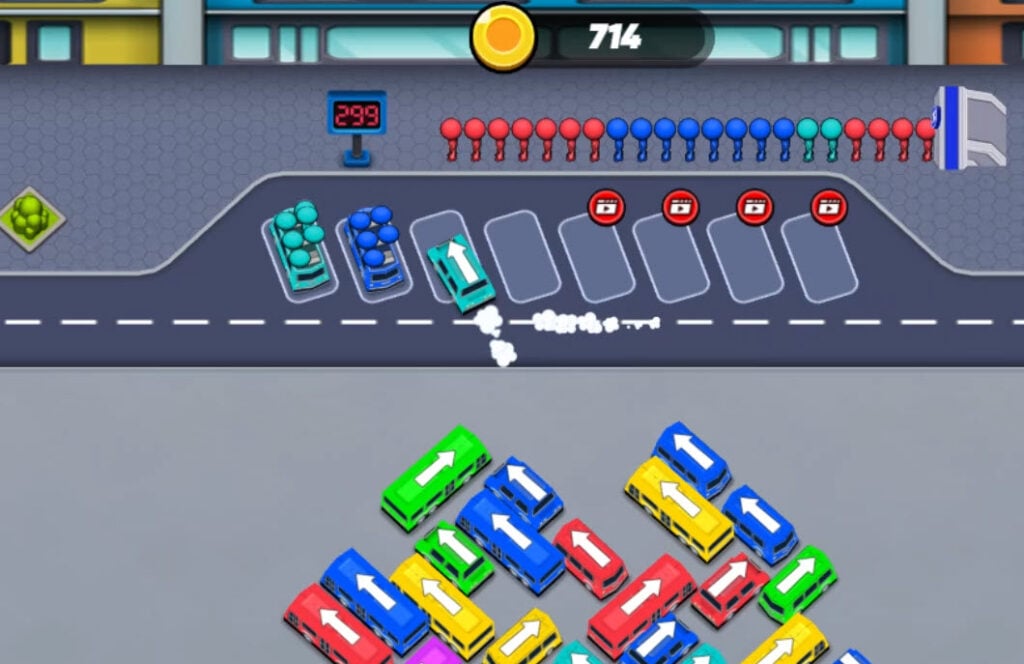
Table of Contents
Summary
This isn’t your typical browser parking game where you’re reversing into tight spaces or avoiding cones. Instead, you’re managing a chaotic bus station during rush hour, where strategy and logic matter way more than showing off your driving skills.

As the color-coded passengers wait in line, they’ll need to board a vehicle matching their color. You’ve got limited parking bays, a growing line of impatient customers, and vehicles that won’t budge until they’re completely full.
The challenge is shuffling the buses, minivans, and cars in and out without boxing in the wrong vehicles or clogging up the precious parking spaces.

There’s no timer pressuring you, but there’s a huge queue waiting, and you can only see a small sample of who’s coming next. As you progress, more colors are added to the mix, turning what starts as a simple clicking game into one that soon leaves you stumped, using up all your brainpower as you constantly think several moves ahead.
One wrong move, and the vehicles will be unable to move out of the bay, meaning no one can reach their destination, and you’ll immediately be fired on the spot. (Well, until you press restart and start over with a sneaky new job application!)
Bus Parking Out features
- Release date – March 15, 2025
- Difficulty – Beginner/Intermediate
- Levels/environments – Endless levels
- Number of vehicles – 3
- Vehicle customization/upgrades – No
- Multiplayer – No
- Mobile – Yes (iOS and Android)
- Developer – Inlogic Software
Physics
There’s not much to them, but this means the game runs smoothly, even on low-spec devices. As you direct them around, the vehicles (yes, even the buses) zoom in and out of the bays with a satisfying drift, leaving a smoke trail behind them.
You don’t actually get to throw them sideways yourself, unfortunately, but don’t panic – we’ve got heaps of browser games that offer some epic sideways action in our drifting games collection, if that’s what you’re after.
Graphics

The simple, clean 3D graphics keep you focused on the puzzle aspect rather than trying to impress you with flashy visuals. Look no further than UNBOUNDED if stunning graphics are what you’re after, where you’ll get to skid some of the finest modern-day drift cars around nighttime city streets, or cruise with your friends in online lobbies.
Controls
PC/laptop/Chromebook
- Left mouse click – Select a vehicle to send to the parking bays
Mobile/tablet (iOS/Android)
- Tap a vehicle to send it to the parking bays
As with all the games in our mobile games catalog, Bus Parking Out is fully optimized for portable devices, making it perfect for quick sessions on the go.
How to play Bus Parking Out
Initial setup
When you open the game, you’ll see a splash screen prompting you to click anywhere to continue before a tutorial walks you through the basics.

The main screen shows the current parking lot in the middle. At the top, you’ll see the queue of waiting passengers, along with a screen next to them indicating how many people are left.
In the top-right corner, the Settings cog wheel lets you toggle music and sound effects or change the language.
At the bottom center of the screen, two important icons are ready to bail you out when things get messy:

- SHUFFLE (vehicle icon) rearranges the colors of vehicles in the parking lot for 500 coins or a free ad

- SORT (queue icon) reorganizes the passenger queue to match your current vehicles for the same price
Getting started
Each passenger’s color corresponds to the vehicle they’ll need to jump on. Blue passengers want blue vehicles, red passengers want red ones, and so on.

Click any vehicle to send it to a parking bay, where it’ll be ready for matching-color passengers to board. Once it’s completely full, it zooms off automatically, freeing up that bay for the next vehicle of your choice.
You’ll soon realize that vehicles only leave when they’re filled. Therefore, if you send a big bus for just a couple of passengers, that bus is going to sit there hogging a bay until enough matching passengers appear next in the queue. You’ve only got four bays to start with (unless you want to cheat a little by watching an ad), so choosing the right vehicle size for the queue is crucial.
The queue shows you a preview of the next 20 passengers waiting to board, but you can’t see the entire line. Given this, you’ll need to make educated guesses about which colors are most essential and plan accordingly. It starts off nice and simple, where you’ll only need to match the next vehicles to the visible queue, but it soon gets far more challenging as the colors become more varied.

When you complete a level, you’ll see a bonus round offer where you can potentially earn 2-5x the rewards by watching an ad. However, you can skip this and take the base earnings by clicking ‘CONTINUE’ if you prefer.
Game modes
There are no modes beyond what you see at the start. It’s an endless level game where the difficulty gradually increases as you progress.

The early levels keep things nice and simple with just four colors and short queues, but the later stages throw more colors and longer queues into the mix, where you’ll be forced to think several moves ahead.
If you’re looking for a bus game with a bit more variety, City Bus Rush lets you actually get behind the wheel and blast around the city picking up impatient customers, along with plenty of sideways action. Or, if you’re after a more traditional parking game that requires squeezing into tight spaces without causing any damage, Police Cars Parking offers the classic experience behind the wheel of a cop car.
Vehicle list
You get three vehicle types, each with different passenger capacities. Each type comes in eight clear and vibrant colors corresponding to the passengers:

- Cars – 4 passenger capacity. These are your nimble picks when you’ve only got small queues of that color coming up, or if you need to clear the way for an upcoming color.
- Minivans – 6 passengers. These are the middle ground between the cars and buses. They’re useful when you need a bit more capacity without committing to a full-size bus, and it often means less hanging around.
- Buses – 10 passengers. The big boys that can clear huge queues but take up serious bay space and won’t budge until completely filled, so make sure you’ve got enough customers coming up to justify the decision, or you might regret it!
If you’ve enjoyed the buses but want something more scenic than the gray parking lot here, Slow Roads is the ultimate simulator for getting behind the wheel of a massive bus before venturing into the peaceful British countryside.
For something more adventurous and a little crazier, Offroader V5 lets you take buses and many other vehicles before pushing them to their limits (and beyond) with a variety of terrain-tackling off-road action.
Tuning, upgrades & customization
There are no tuning or performance upgrades in Bus Parking Out, but there are tons of other options in our driving games collection.
Want something with insane depth where you can tune and upgrade almost every part of the car imaginable? Drift Hunters MAX is the most popular game at Drifted for this very reason, also offering incredible graphics, realistic physics, and a huge car roster, though you’ll need a decent-spec PC to run it smoothly. For lower-spec devices, the classic Drift Hunters game remains a solid, popular alternative, offering a similar amount of tuning with far lower system requirements.
Advanced tips & tricks
Prioritize clearing the smaller vehicles out of the way first
Shifting the smaller cars quickly frees up space and prevents potential gridlock. They’re also more likely to block larger vehicles, so dispatching them early keeps the traffic flowing smoothly. The best tactic is to look at the start to see which ones are blocking other vehicles with a different color, and prioritize shifting those as soon as you can.
Avoid having duplicate color vehicles in the bays unless you’ve got plenty of customers coming up
If you’ve already got a half-filled green bus occupying a bay, don’t send another green vehicle unless you’re confident it’ll fill quickly. Taking up two bays with the same color will often end in disaster if there’s no room for a new color to turn up.
Pay attention to the direction of the vehicle arrows
Each vehicle can only move in the direction its arrow points. They can’t reverse, so if a vehicle gets blocked in by another in front of it, you’re stuck until that vehicle leaves. This is why you always need to think one step ahead about which vehicles might trap others before clicking.
Count the upcoming passengers, and choose the optimal vehicle for the job
Cars need 4 passengers to fill and free up the space, whereas minivans need 6, and buses need 10. If you see exactly 10 blue passengers in the queue, you can send a blue bus right away, unless you’ve got several cars that need to be shifted first. In that case, make the cars the priority to get rid of as many as possible to avoid blocking other vehicles in.
Use the power-ups (bottom icons) for emergencies when all else fails
If you’ve realized you’re not going to be able to execute your planned upcoming moves (before the game-over screen arrives), you can consider using the ‘SHUFFLE’ and ‘SORT’ icons at the bottom at a cost of 500 coins (or an ad). Try to just treat them as get-out-of-jail cards, as the real satisfaction in this game comes from solving the puzzle yourself. However, if you’re totally stuck, don’t be too proud to hit that button if it saves having to start over.
Consider unlocking the extra bays when all else fails

You can unlock additional parking bays by watching an ad, then paying 140 coins. This makes the game significantly easier, so only do it if you’re genuinely stuck or want a more relaxed experience. Sticking with four bays keeps the challenge intense for maximum difficulty.
Think several moves ahead
Bus Parking Out teaches similar forward-thinking skills that’ll come in useful when planning racing lines or setting up drift entries when you return to your sim rig. You need to visualize the optimal path and anticipate what’s coming up. However, if this game has scrambled your brain a bit too much (we get it!) and you need to let out some frustration, Hill Climb Racing 2 is a great alternative that offers a different type of challenge with more exciting action and less thinking required.
Or, for a similar management-style puzzle game where you’ll once again need to try and keep customers happy, the popular old-school Gas Mania is still worth checking out. You get to manage a gas station and ensure the (admittedly VERY impatient) drivers get what they want, combining strategy with quick decision-making and trying to avoid getting told off!
Bus Parking Out FAQ
Is there a time limit in Bus Parking Out?
No. The number you see at the top shows how many passengers remain, not a countdown. You can take as long as you need to plan your moves, so don’t panic.
What happens if I get stuck?
You have two power-up options, and you can also unlock an extra bay. ‘SHUFFLE’ rearranges the vehicles in the parking lot, while ‘SORT’ reorganizes the passenger queue to ensure they hop on the current vehicles in the bays. Both cost 500 coins or can be activated for free by watching an ad.
Can I put the vehicles into reverse gear?
No, the vehicles can only move in the direction that the arrow points to on the roof. If a vehicle gets blocked, clicking it will just make it bounce off the nearest vehicle (without causing damage – don’t worry!) You’ll need to clear the blocking vehicle before you can get the trapped one out.
How do I unlock more parking bays?
Click the closed-off bays to add an additional pickup point, watch the ad, then pay 140 coins. This gives you an extra bay, making the game easier. You can stick with four bays if you want maximum challenge.
What’s the difference between the three vehicle types?
The smallest vehicles (cars) hold 4 passengers, medium-sized minivans hold 6, and the larger buses hold 10. Choose based on how many matching passengers you see in the queue preview.
Do vehicles leave if they’re not full?
No, vehicles only depart once every seat is filled. Even if there’s just one empty space, that vehicle will occupy the bay until a matching passenger boards.
Is there multiplayer in Bus Parking Out?
No, this is single-player only, but there are plenty of great online options in our multiplayer catalog.
Does this work on mobile devices?
Yes, it’s fully optimized for iOS and Android with touch controls, and will work fine on your mobile phone, iPad, or tablet.
Written by:
Published on:

Bill is a writer and photographer who has been part of the Drifted team since 2015. His work extends to various print and online publications, including Wangan Warriors.
As part of the King of Nations team, he traveled extensively for several years, capturing top-tier international drift events worldwide. His hands-on experience, including rebuilding his own Nissan Silvia S15 drift car, gives him unique insights into drift car building and global drift culture.
When not behind the lens or keyboard, Bill can be found browsing classifieds for his next JDM project or shredding virtual tires on popular simulators like Assetto Corsa, CarX, and Forza.
You can learn more about Bill’s story here or follow his socials on X (formerly Twitter), Flickr, Facebook, and Instagram.


