
City Drift Racing
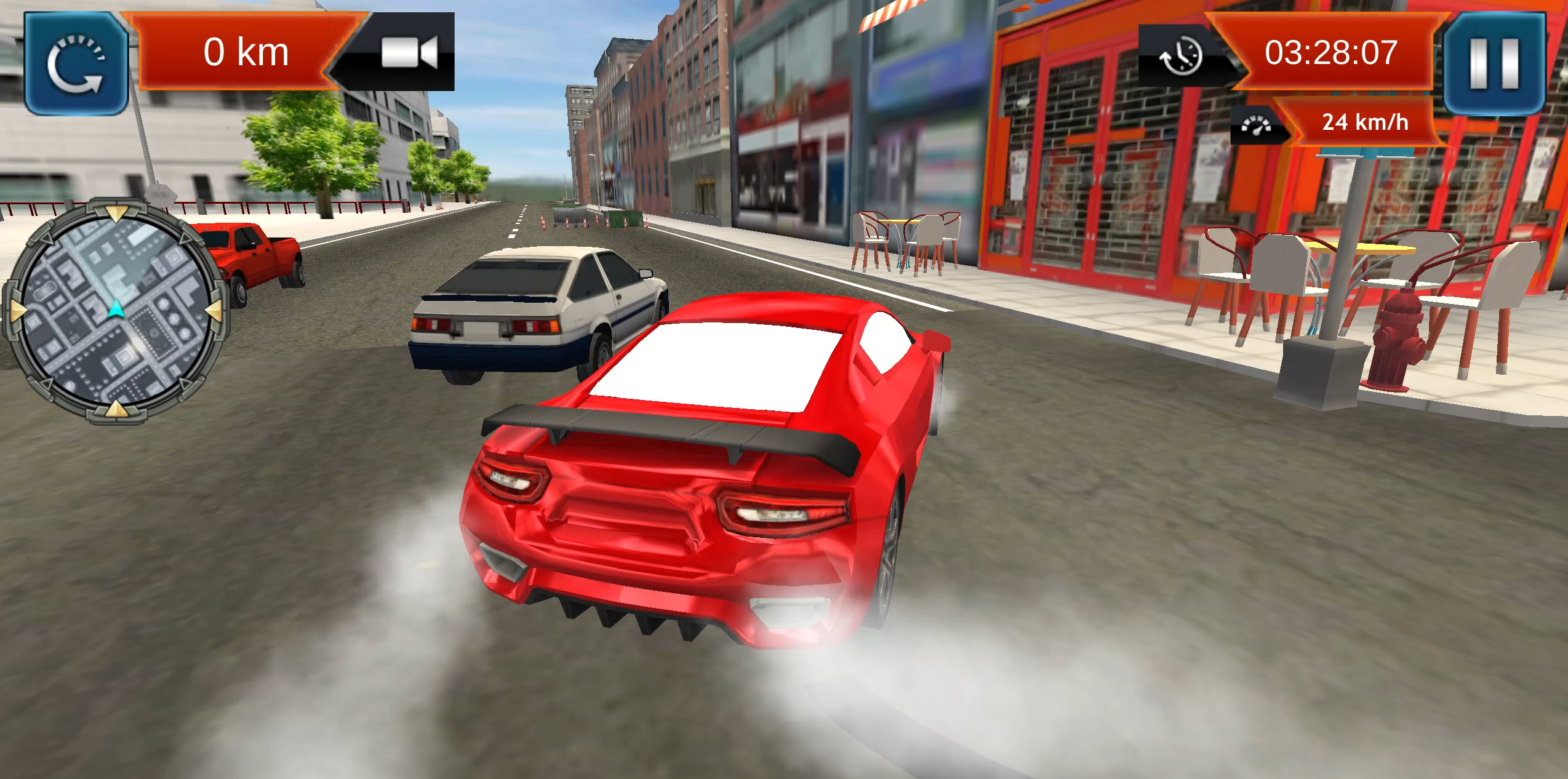
Table of Contents
Summary
City Drift Racing lets you drift around a lively open-world city behind the wheel of several “inspired” supercars, where you’ll race against the clock through checkpoint gates, navigate across town to reach destinations before time runs out, or have fun cruising through the streets.

While it sounds easy, the game modes get harder as you unlock new levels, and the city does its best to catch you out at every turn. Soon you’ll come across road closures, random dumpsters in the middle of the road, and tight backstreets that seemingly come out of nowhere while you’re busy trying to avoid the city traffic.
It’s a simple, pick-up-and-play game with six unlockable supercars (with some of the most entertainingly inaccurate names you’ll ever see!). If you’re looking for a browser game with quick missions and a bit of a challenge on your phone or PC, it delivers exactly that.
City Drift Racing features
- Release date – December 16, 2024
- Difficulty – Beginner
- Levels/environments – 1 (Open-world city)
- Number of vehicles – 6
- Vehicle customization/upgrades – No
- Multiplayer – No
- Mobile – Yes (iOS and Android)
- Developer – Mirra Games
Physics

Compared to most games, the drift physics have a noticeable delay. When you turn, the back end doesn’t snap out immediately like it would in most drifting games. Instead, it (eventually) provides a gradual slide that happens slower than you’d expect, so you’ll need to start turning earlier than you’d expect and then wait for the car to rotate.

It takes a little getting used to, but once the car gets sideways, the mid-drift feel is decent, but you’ll struggle to manji or transition between drifts cleanly. It almost behaves more like an all-wheel drive car, as it keeps pulling itself forward and building up speed. This makes it unpredictable compared to the more “typical” rear-wheel drive drifting physics you’ll find in games like Drift Hunters MAX or the classic Drift Hunters, so you may want to consider trying them if you’re looking for something a little more realistic.

Your ride doesn’t pick up any damage, but our stunts and crash games collection has plenty of options where cars fully crumble on impact, if that’s what you’re after. Deadly Descent is a popular pick among Drifted fans, where you race down insanely steep downhills while trying to reach the finish line as your car falls to pieces.
Graphics

Much like the physics, the visuals are also pretty basic. The city itself is awesome, though, with plenty of backstreets, alleys, and elevation changes to keep things visually interesting, but don’t go expecting anything mind-blowing. The in-car camera view is cool, but the interiors are blurry, with minimal detail.
If you’re looking for a city-driving experience with stunning visuals (that you won’t believe you’re playing in your browser), UNBOUNDED sets the standard here. The jaw-dropping streetlit reflections bouncing off your paint at night look incredible, and you also have the chance to cruise and drift around with your friends in online multiplayer.
City Drift Racing controls
PC/laptop/Chromebook
- W/Up arrow – Accelerate
- S/Down arrow – Brake/reverse
- A/Left arrow – Steer left
- D/Right arrow – Steer right
- Space – Handbrake/e-brake
- C – Change camera
Mobile/tablet (iOS/Android)
- Press the on-screen buttons.
In the settings menu, you can switch between an on-screen steering wheel (that you rotate to steer) or left/right directional buttons, depending on your preference.
Like all the games in our mobile games collection, City Drift Racing is fully optimized for playing in your mobile browser.
How to play City Drift Racing
Initial setup

The Settings menu is in the bottom left (sound toggle and mobile control options), with your coin balance in the top right.
You start with 200 coins, and you can watch an ad for an additional 200. That’s it for the menu.
When you’re ready, hit ‘Play’, and you’ll be taken to the car selection screen, where you can browse the six available vehicles.
With only 200 coins in the bank, you’ll need to stick with the R8-style starter car for now, but we’ll cover the full lineup in the Car List section below.
After selecting your ride, press ‘Next’ to choose from the three game modes:
- Check Point
- Arrival
- Free Mode
We recommend jumping into Free Mode first to get a feel for the handling physics (which will be different from what you expect) before tackling the challenges.
Getting started
Once you’re in the city streets, you’ll see the in-game details that you’ll need to keep an eye on.

‘Distance to target’ and the ‘Reset’ button (if you need to refresh your car) are located in the top left. The radar just below shows green or red dots for upcoming checkpoints or your destination.
The top right displays your elapsed time and a digital speedo. You can also press pause to view the ‘Settings’ menu, as well as ‘Home’ (Exit) and ‘Retry’, which lets you restart the level. This is different from the in-game ‘Reset’ button, which you’ll only use if you get stuck.

Once you venture into the game modes, you’ll want to keep a close eye on the radar from the start, and it’s worth gaining an understanding of what the buildings/roads/gaps, etc., look like, as you’ll soon need to use these to navigate to tricky places.
You’ll soon come across the AI traffic, which roams around the city minding its own business and driving far more sensibly and predictably than you will! However, you’ll soon see that when you’re keeping a close eye on the radar, it’s easy to crash head-on into them!
It’s also worth noting that every object in this game is completely solid and nothing moves when you hit it, so you’ll even find yourself smashing into a stray traffic cone if you’re not careful!
Game modes

Check Point

Drive through illuminated green archways scattered across the city before the time runs out.
You start on level one, and each completed level unlocks the next (10 in total). Results are scored on a three-star system, with three stars earning the biggest coin bonus.
If you only manage one or two stars, it’s worth retrying, as the payout difference is significant. However, you can still progress to the next level, even if you get just one star.
Arrival

Follow the radar to reach the destination point before the timer hits zero. The red dot on the radar shows where you need to head, so you’ll again need to split your attention between navigating the traffic and trying to find the marker.
Arrival is more forgiving than Check Point if you miss a turn, since you can often loop around and take the next street. As you progress, though, you’ll soon come across unexpected road closures and dead ends, and your sat nav isn’t going to give you any warning there. If you’re forced to retry the level, it’s a good idea to remember the closed roads for your next attempt.
Free Mode

Free Mode lets you explore the full city at your own pace, making it perfect for cruising around and learning the physics before the timed modes. You’ll soon find jumps and ramps scattered around, along with elevation changes in the streets themselves.
Remember, there’s zero damage, so feel free to throw the car at anything (but remember you’ll smash into any objects).
If you enjoy open-world vibes and want more of this with some extra variety, Top Speed Racing 3D offers a similar concept along with a massive map, drift events, time trials, and plenty of tuning options.
City Drift Racing car list
The car roster is small but comes with some hilarious naming choices. Every car is loosely based on a real supercar (Madalin-style), but most of the names have no connection to the vehicles whatsoever (often quite the opposite!).
You’ll find that most of them have different styling aspects from various other cars, but here’s what they’re (mostly) based on:

- Karosa Prime (Audi R8) – Free starter car

- Mini Dopper (Lamborghini Gallardo) – $15,000

- XUV iv (McLaren MP4-12C) – $30,000

- Micra Car (modern Ford GT) – $50,000

- Mc Larem (Koenigsegg CCX – not a McLaren, despite the name!)- $100,000

- Lord Mustang (Lamborghini Aventador with some Huracan hints – not even close to resembling a Mustang!) $150,000
The car styling will look familiar to anyone who’s enjoyed Madalin Stunt Cars 3, which features the same mix-and-match approach in its cars. However, MSC also comes with the bonus of 34 cars (all unlocked from the start), online multiplayer, and several stunt arenas with gigantic ramps for ridiculous stunting antics you can enjoy with your friends and other players across the globe.
There are no tuning, customization, or upgrade options in this game (you can’t even change the car colors). The only progression is buying new cars and chasing three-star ratings across each level.
If you’re after a game that features this alongside much more, Drift King offers great physics, plenty of tuning, and the best free online multiplayer drifting experience in the browser right now, with supercars and massive touge mountain roads.
Alternatively, for 90s JDM fans, Drift Hunters Pro is made by the same team but instead focuses on the golden-era Japanese legends.
Advanced tips and tricks
Take a bit of time to learn the radar properly

In both Check Point and Arrival game modes, the radar lets you know what’s coming (even if it still has surprises in store!).
In Check Point, especially, the first corner will surprise you immediately when you first start, if you haven’t taken the time to do this. Check out the green dots (or red in Arrival) before you begin the game, and you’ll save yourself an immediate restart.
Tap the handbrake for quick initiations, but don’t hold
The space key is your best friend for kicking the (reluctant) back end out quickly, which compensates for the delayed steering. However, holding it too long scrubs off all your speed, so opting for a quick tap followed by immediate throttle is optimal.
This can also be super useful for dodging traffic on tight corners where waiting for the natural handling response would be too slow.
Don’t be afraid to restart if you crash
If you crash or lose too much time in Check Point or Arrival level, hit the pause button in the top right and select retry.
Grinding out a run you know won’t earn three stars is a waste of time when you could restart and nail it from the beginning, especially on the harder levels where every second counts.
Note that the reset button in the top left is different from the one in the menu – this only resets your car if you get stuck.
Pay close attention to the map on later Arrival levels
As Arrival gets harder, you’ll soon encounter road closures and dead ends that don’t show up on the map, forcing you to rethink your route on the fly.
The radar map shows the buildings and small back roads, which gives you an idea of where you can and can’t drive. Try to remember where closures are for your next attempt.
Consider grinding the earlier levels for fast cash

Replaying completed levels is the quickest way to earn coins if you’re saving for a pricier car. The earlier ones are shorter, and if you’ve mastered them, three-star runs become consistent, easy money. It’ll still take a while to reach that $150,000 Lord Mustang, though!
City Drift Racing FAQ
Can I play City Drift Racing on my phone?
Yes, it’s fully optimized for iOS and Android in your browser. You can also switch between an on-screen steering wheel and directional buttons in the settings menu.
How do I earn coins quickly?
Replay the earlier levels and aim to secure three stars every time. The star rating directly affects your payout.
Are there any multiplayer or online modes?
No, City Drift Racing is entirely single-player with no online features, leaderboards, or multiplayer options.
What do the game modes offer?
Check Point is a race, where you need to drive through zones before time runs out. Arrival requires you to reach a specific destination on the radar, and Free Mode lets you explore the city with no timer or objectives.
How do I master the drift physics?
Start your turns earlier than you typically need to, and use short taps of the handbrake to kick the back end out faster. You can also practice using left-foot braking by tapping the brake rather than the e-brake.
Can I customize or tune my car?
Nope – there’s no tuning, customization, or upgrades. The only way to use your earnings is to buy new cars from the six available in the showroom.
Do I need to install anything?
No, City Drift Racing runs directly in your browser with no download or installation required.
What happens if my car flips over?
Hit the reset button in the top left corner of the screen. It’ll flip your car back onto its wheels without needing to restart the entire level.
Written by:
Published on:

Bill is a writer and photographer who has been part of the Drifted team since 2015. His work extends to various print and online publications, including Wangan Warriors.
As part of the King of Nations team, he traveled extensively for several years, capturing top-tier international drift events worldwide. His hands-on experience, including rebuilding his own Nissan Silvia S15 drift car, gives him unique insights into drift car building and global drift culture.
When not behind the lens or keyboard, Bill can be found browsing classifieds for his next JDM project or shredding virtual tires on popular simulators like Assetto Corsa, CarX, and Forza.
You can learn more about Bill’s story here or follow his socials on X (formerly Twitter), Flickr, Facebook, and Instagram.


