
CyberCar
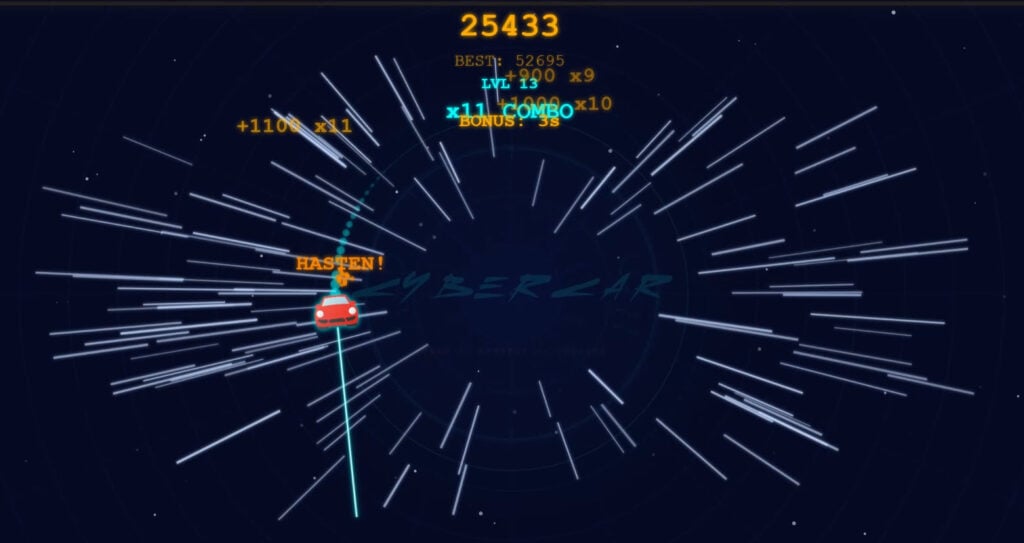
Table of Contents
Summary
CyberCar puts you behind the wheel of a red Porsche 911-style spaceship (you can breathe a sigh of relief that it’s not a Cybertruck!) before sending you orbiting through a dark, neon-lit galaxy where one move in the wrong direction blows the German supercar into smithereens.

It’s a retro-futuristic arcade survival game where you need to stay alive as long as you can by pulling off 180-degree drifts while endless waves of neon-colored enemies close in on your orbit. You’ll need to make the most of power-ups and build the biggest combo multipliers possible to prove yourself on the leaderboards.
With just two controls (change direction or drop a gigantic atomic bomb), it’s deceptively simple, ridiculously addictive, and way harder than it looks.
As you progress, the boss fights add ever-increasing intensity, with named threats like Specter, Reaper King, and Mothership throwing everything they’ve got at you before exploding into a galaxy of collectible stars.
Features
- Difficulty – Beginner
- Levels/environments – 1
- Number of vehicles – 1
- Vehicle customization/upgrades – No
- Multiplayer – No
- Mobile – Yes
Physics
Even on lower-spec devices, the movement is super smooth, predictable, and responsive, which is essential when every millisecond counts.

You’ll orbit your Porsche around a central point at a set distance (which varies slightly with power-ups), and a single tap (Space, or left mouse click) pulls off the drifting equivalent of a backwards entry as it immediately speeds off in the opposite direction.
Although it admittedly sounds (and looks) basic, like many old-school arcade games, the precise control required to drift through the ever-tightening enemies as the levels progress becomes super intense.
Graphics

The visuals are clean, minimalist, and stylish. The dark space backdrop makes the neon-colored enemy rockets, power-ups, and laser effects pop, giving it a retro arcade feel that’ll remind you of classic space shooters.
Admittedly, the simplicity won’t suit everyone, so if you’re after a browser-based drifting game with stunning graphics, you’ll want to check out Drift Hunters MAX or UNBOUNDED, but you’ll need a device with good specs to run these smoothly.
Controls
PC/laptop/Chromebook
- Space/left mouse click – Change direction (180-degree turn)
- B – Bomb (destroys all enemies on screen)
- M – Mute sound
Mobile/tablet (iOS/Android)
- Press the screen to change direction
- Tap the ‘Bomb’ text (bottom left)
- Tape the ‘Sound’ (mute) button (top right)
If you’re looking for another quick-hit arcade game on your phone, Drifting Mania offers a similarly addictive one-tap experience with combo multipliers and a one-hit-kill penalty. You can also browse our mobile games collection for more alternatives that are perfectly optimized for portable devices.
How to play CyberCar
Initial setup
When you load the game, you’ll begin in ‘Training’ mode with your car already orbiting through space. There’s no main menu, no settings, and no garage to browse.
After following the simple instructions, in the bottom left, you’ll see a ‘SKIP PRACTICE’ button if you’re feeling brave. Otherwise, practice mode walks you through the first three levels before kicking you out with a ‘PRACTICE COMPLETE! GOOD LUCK!’ message. We’d recommend sticking with it for your first run.
Your HUD is minimal. The top center shows your current score, best score, and current level, and the bottom right displays your current bomb count. In the top-left corner, you can see your currently active power-ups with their remaining durations.
Getting started

Your car automatically orbits a central point. You’ll follow the outer ring, along with another outer layer that activates temporarily with the ‘Wide Orbit’ power-up. (We’ll dive more into the power-ups below.)
You’ll notice that the enemies drift in from the center of the galaxy toward your orbit, and at the start, you’ll need to avoid them. Tap Space (or left-click) to flip the Porsche 180 degrees, and tap rapidly to hover in a specific area if you want the threats to pass by safely. Soon, you’ll start collecting power-ups that’ll also help you confuse and destroy them.
It’s a one-hit-kill game, so if your car touches any enemy without a shield (or weapon) active, it’ll be game over immediately. There’s no health bar or second chances. This keeps every moment tense, especially when the screen fills with enemies approaching from every angle.
Destroying them in quick succession builds your combo multiplier, which is essential for racking up super high scores. Reaching x20 or x30 transforms a decent run into a leaderboard-worthy one. Miss a kill window, and the combo resets.
Game modes
There aren’t separate game modes. CyberCar is a single, endless survival run where the difficulty increases with each level. Your car gets faster, more enemies (with improved intelligence) spawn, and the bosses become increasingly aggressive.
However, there are clear phases within each run:
Standard waves make up the bulk of gameplay. You’ll start to see different rocket hazards at different levels, but all of them need to be avoided at all costs (besides the stars!).
Boss fights are where things get seriously intense. A ‘BOSS INCOMING’ warning flashes, and named bosses like Specter, Reaper King, Mothership, and Fortress appear. They’ll constantly spawn new objects, and soon you’ll have things like homing drones chasing you down, forcing you to constantly switch direction to avoid them. Soon, the boss runs out of firepower, which is where the fun begins as they explode into the galaxy.

Bonus rounds trigger after each boss is killed. The boss explodes into a shower of yellow stars that flood the screen, and you’ve got a few seconds to grab as many as possible. This is where your combo can spike insanely fast, especially with the Flex Laser active. It’ll latch onto all the available stars, and you’ll earn badges like ‘STAR LORD’ alongside hefty point bonuses.

After each bonus round, you get a brief breather (and a small treat) before the next wave begins.
If this escalating survival gameplay appeals to you, Escape Road offers a similar loop where you’re drifting away from cops as they escalate things, eventually getting the military to bring in the tanks. Alternatively, Survival Race throws you into collapsing platform arenas with online lobbies, where one wrong move sends you into the void. For more weapon-fueled chaos along with online multiplayer and similar power-up mechanics, Smash Karts is also another popular choice that’s well worth a try.
Power-ups
Power-ups spawn as floating icons in the outer orbit and disappear if you don’t drift into them soon enough. Once you drive into them, they activate automatically.

You can stack multiple at once (shown in the top-left with remaining duration), and collecting a duplicate multiplies its impact (which isn’t always ideal – especially if you get ‘Grow’!)

- Laser (light blue arrow) – A forward-pointing laser beam that becomes a triple laser if you stack a second one. Make sure your approach angle is right with the single one, or the pursuers can sometimes get to you before the laser destroys them.

- Flex Laser (yellow asterisk) – Arguably the best weapon in the game (besides the bomb). Multiple flexible beams sweep the area and obliterate everything nearby, even enemies mid-spawn from a boss. During the bonus rounds, it also vacuums up the stars nearby in the galaxy for massive combo spikes. If you see one, grab it immediately.

- Shield (green plus) – A protective bubble that lets you smash into threats. The catch here is that there’s no visible timer, so it could vanish at any moment, so don’t get too reckless unless you’ve just got it.
- Slow (dark blue hourglass) – Slows all enemy movement temporarily, which can be incredibly useful during crowded waves.

- Grow (red circle) – Makes your car bigger and slightly slower. It’s helpful with space around you, but a liability when threats close in as your Porsche becomes huge (and heavy!)

- Shrink (blue X) – Reduces your car’s size and increases the speed. This makes it harder for threats to hit you and easier to slip through tight gaps, but also makes it a little harder to control.
- Wide Orbit (teal star) – Temporarily pushes you to the outer ring for more reaction time. Be warned, when it expires, you snap back to your orbit instantly, which can sometimes launch you straight into oncoming threats.
- Hasten (yellow lightning bolt) – Sends a shockwave through the galaxy.

- Bomb (bottom-right inventory) – Your ultimate panic button. Press ‘B’ on your keyboard to detonate a screen-clearing explosion that destroys all aggressors and deals massive boss damage. You earn one per level, and they can be banked, so save them for when you’re genuinely trapped.
If you enjoy the power-up variety and combat mechanics in CyberCar, Drift.io offers Mario Kart-style racing with rockets, lasers, and chaotic battle arenas that may well be of interest. There’s also plenty more shooting and action games on offer at Drifted if you fancy trying something a little different with a similar level of intensity.
Car list

There’s just one car in this game – a red Porsche 911-style spaceship with hood-mounted lasers. There’s no garage, no unlocks, and no alternatives. What you see is what you get.
If the single-vehicle setup leaves you wanting more variety, Madalin Stunt Cars 3 hands you 34 unlocked cars from the moment you load the game, along with online multiplayer lobbies to play with your friends.
Or, if you enjoy the minimalist one-button arcade feel, Drift Boss and Color Tunnel both share the same addictive ‘one more run’ vibe as this one, with similarly simple controls.
Tuning, customization, and upgrades
As you probably guessed, CyberCar doesn’t have any tuning or performance upgrades – it’s purely about skill and reflexes.
For the most comprehensive car tuning in a browser game, Force Drift Racing: Aussie Burnout offers everything from suspension geometry to forced induction, alongside a unique Summernats-style Aussie burnout pit.
If the leaderboard-chasing aspect of CyberCar appeals more, Polytrack offers global leaderboards where you’ll need to prove your racing skills as you fight to shave milliseconds off your near-perfect lap times across over 100 tracks.
Advanced tips & tricks
If you’re stuck, quickly tap the turn button to avoid going in either direction
When enemies swarm on you from both sides, you can rapidly tap Space to keep your car hovering in a tight spot. This should give enough time to let the enemies pass on either side if you haven’t got an adequate power-up to fend them off. It’s especially useful during the later levels when things get chaotic. Remember, you’ve also got the bomb as a last resort.
Save your bombs for when you’ve got no other option
It’s tempting to drop a bomb the moment things get intense, but you might want to consider whether you’ll be better off saving them for later. Remember, the next level will be harder. A well-timed bomb deals massive damage and clears all the on-screen threats, including the homing drones, while also damaging the bosses. You earn roughly one per level, so hoarding as many as possible for the harder fights is almost always the smarter play.
Prioritize the Flex Laser above everything

If you see that awesome yellow asterisk icon floating in your orbit, change direction immediately and grab it as soon as you can. It clears the aggressors before they fully spawn, and during bonus rounds, it collects all the stars across the entire galaxy. It’s the single biggest factor in hitting those x20+ combos and earning huge points to show off on the leaderboards.
Watch out for the Wide Orbit timer
Wide Orbit gives you a little more reaction time, but the snap-back to the inner ring when it wears off catches players off guard. Keep an eye on the duration in the top-left, and make sure you’re in a clear section before it expires. Getting thrown into a cluster of swarmers is one of the most frustrating ways to get destroyed.
Think about whether the power-up will be beneficial

There are times when certain power-ups will help, and others when you’ll regret picking them up, especially with things like ‘Shrink’ and ‘Grow’.
Treat the Shield as temporary armor, but be ready for it to end
Unlike other power-ups that offer visible timers, the Shield power-up deliberately hides its remaining duration. Don’t get too cocky when it’s been active for a while. Destroy as many hazards as possible early on to build your combo, and prepare for it to suddenly vanish without warning.
Keep your combo alive at all costs
Frequent kills and pickups maintain your combo, while even a brief gap resets it to zero. During quieter moments between waves, hunt down remaining enemies or grab floating power-ups like the Flex Laser to keep the multiplier racking up.
Don’t use the Bomb during the bonus round
You might try to be clever and use this to collect all the stars, but unfortunately, unlike the Flex Laser benefits, this causes them all to explode!
CyberCar FAQ
How do I aim weapons in CyberCar?
You have no control over this. Depending on the angle, if you’re using the single laser, you may need to be patient and flip the car around until an enemy comes into your line of fire, or you’ll risk driving into it before the laser gets a chance to destroy it.
What happens when I hit an enemy?
You’ll see a ‘GAME OVER’ screen, followed by a leaderboard where you enter your initials to record your score. Once recorded, you can jump straight back in. Remember to skip practice (bottom left) if you want to be launched to the game.
Can I skip the practice mode?
Yes. Click ‘SKIP PRACTICE’ in the bottom-left corner, or play through the first three levels, and it’ll end automatically with a ‘PRACTICE COMPLETE! GOOD LUCK!’ message.
Can I stack multiple power-ups?
Absolutely. You can have several running simultaneously, all shown in the top-left with remaining duration. Collecting a duplicate doubles the effect, but be careful with ‘Grow’. Stacking two makes your car massive, which can be a death sentence when the enemies close in.
What’s the best power-up in CyberCar?
The Flex Laser (yellow asterisk). It features radars that sweep the area with multiple beams, automatically destroying hazards before they even spawn. It also captures all the stars during bonus rounds for gigantic combo multipliers.
Is there multiplayer in CyberCar?
There’s no online multiplayer, but there is a local leaderboard where you can enter your initials after each run, which is great for proving your scores and competing with your friends, whether they’re on their own device or taking it in turns.
How many levels are there?
CyberCar is an endless game. As you progress, the levels keep scaling in difficulty with faster speeds, more threats, and increasingly aggressive bosses. The goal is to survive as long as possible while racking up combo multipliers to chase the highest score you can.
Where can I play Cybercar unblocked
You can go directly to cybercar.com to play unblocked
Written by:
Published on:
Philippe Daix is a seasoned automotive writer and entrepreneur who founded TopSpeed.com in 2005. After nearly two decades shaping online car journalism, he brought his passion for drifting and performance culture to Drifted.com in 2024. His work blends technical insight, storytelling, and a lifelong love for high-performance machines.


