
Drift Practice TopSpeed
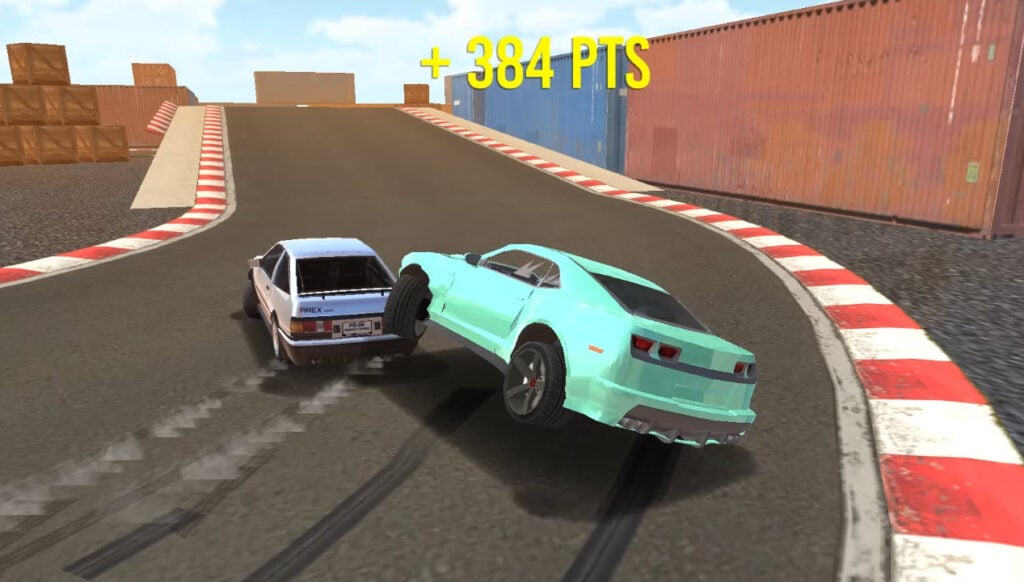
Table of Contents
Summary
Looking to improve your drifting skills? Look no further. Drift Practice TopSpeed offers what the name suggests – a drift training simulator designed to help refine your sideways technique.

There’s nothing quite like this out there these days, so it’s easy to understand why so many fans were frustrated when the game left TopSpeed. Thankfully, it’s now making a comeback!
Think of this free drifting browser game as an unlimited digital track day, where you can practice mastering your initiations, transitions, big-angle entries, and tandem runs without worrying about costs, prep, mechanical failures, or your local track shutting down to build more housing (we’re sure many of you can relate.)
The goal isn’t to grind away, earning car unlocks or chasing leaderboard scores like most games. It’s just to practice your techniques and dial in your proximity without any pressure.

Once you’re ready to do some tandem action, you can spawn the AI car (where a wild Keiichi Tsuchiya suddenly appears) to practice door-to-door runs.
The fully customizable camera system offers full 360-degree control for a close-up look at your pinpoint precision or a bird’s-eye view from afar. If you feel you want to prove yourself (it’s not essential), you can also chase points and combos by linking corners together with consistent, flowing drifts, where the more momentum you maintain, the higher your score will climb.
There’s no tuning, no upgrades, and no car selection on offer here. It’s just you, a stock supercharged V8-powered Camaro, and three layouts to master. Think of it as the perfect warm-up before jumping into something more comprehensive like Drift Hunters MAX, or for a quick practice session when you’re away from your sim rig.
Drift Practice TopSpeed features
- Release date – February 2023
- Difficulty – Beginner
- Levels/environments – 3
- Number of vehicles – 1
- Vehicle customization/upgrades – No
- Multiplayer – No
- Mobile – No
- Developer – TopSpeed Games
Physics

The drifting physics are great for learning the ropes. They’re grippy, predictable, and satisfying once you get the hang of them. Admittedly, the car lacks power slightly and has a tendency to understeer compared to more realistic drifting simulator games, so you’ll need to force the rear end out more with sharper steering inputs and more aggressive entries.
If you want to get the best out of the points and combos on the scoring system, you’ll want to use the old-school Japanese drifting style, which favors high speed, moderate angle, and smooth consistency over massive backwards entries.
The Camaro (just about) has enough power to maintain long slides, but not enough to recover from over-rotation mistakes. You’ll struggle to pull off huge-angle initiations without losing momentum, and you can’t downshift to get the revs up, so instead, focus on linking corners together with clean, flowing lines. This makes it ideal for learning throttle control and left-foot braking.
If you want to dive deeper into the theory behind what you’re practicing, check out our how to drift guide for explanations of weight transfer, transitions, and counter-steering, or watch video tutorials from pros like Chelsea DeNofa and Tsuchiya himself.
Graphics

The visuals are really good. It doesn’t compete with UNBOUNDED (which is truly stunning), but it’s still decent for a browser game. The Camaro is pretty detailed, and the smoke effects are satisfying to watch as you lay down your lines. If you don’t nail them, there’s an additional perk…
Damage

It’s not often you get to see damage in browser games, but there’s plenty here, and it’s much more entertaining than just dents and scrapes. Your hood, bumpers, and other body panels will get battered if you hit the walls or the AI tandem car.
These are purely visual (so you don’t need to worry about performance impact), but they add a nice touch of consequence to your mistakes. If your car starts to look a little battered, you can simply change the level or color to fully reset the damage, rather than paying bodyshop fees!
If you enjoy the damage aspect and want more full-on carnage, Deadly Descent is an awesome high-intensity downhill racer where body panels and wheels fall off before your car eventually gets totally destroyed. Alternatively, Car Crash Test: Abandoned City brings BeamNG-style sandbox chaos to your browser, where you get to find the true breaking point of your cars.
Drift Practice TopSpeed controls
PC/laptop/Chromebook
- W/Up arrow – Accelerate
- S/Down arrow – Brake/reverse
- A/Left arrow – Steer left
- D/Right arrow – Steer right
- Space – Handbrake/e-brake (use with caution – see below)
- Mouse scroll wheel – Zoom in/out (works on ‘Mouse Orbit’ and ‘Look At Camera’ views only)
Handbrake warning – The Space key can be a little buggy in this game, and sometimes triggers other menu buttons. This can shift you to a new track, change your car color, or switch cameras unexpectedly. Given the low power, using the ‘wand’ isn’t absolutely necessary. In fact, you’re better off learning to use brakes and throttle control anyway, since you’d rarely rely on the handbrake in a real-world stock drift car. So, only use this if you’re willing to deal with occasional menu chaos!
Mobile/tablet (iOS/Android)
Drift Practice TopSpeed isn’t available on mobiles. For the best mobile browser drifting experience, Drift Hunters MAX is your best bet if your device can handle it. Otherwise, check out our mobile games collection for other alternatives.
How to play Drift Practice TopSpeed
Initial setup
The main menu shows everything you’ll need in this game, and it stays on-screen while you play:

Top left
- Total points (your points in this run)
- High score (your best total score)
- Three track buttons (Bridge Track, Figure 8 Track, Oval Track)
- Zoom in/out (mouse scroll wheel – only available on compatible cameras – ‘Mouse Orbit’ and ‘Look At Camera’)
Top right
- Mute audio
- Mute music (recommended, as it gets repetitive)
- Camera options (Mouse Orbit, Smooth Follow, Drone Follow, Look At Camera)
- Spawn AI Car (a Toyota AE86 appears for tandems/battles)
Bottom
- Change car color button (variety of colors available)
Getting started
Pick a track, choose a camera (Smooth Follow is the recommended pick initially), and start drifting.

Your goal is to link corners together, learn the ropes, and (maybe) move on to racking up combos, where the more consecutive drifts you string together without crashing (or losing momentum), the higher your score climbs. Combos break when you hit walls, lose control, or stop the wheels spinning. Consistency is key – aim for smooth, flowing lines, compared to massive entries (when you’re getting started, at least).
Camera options
- Mouse Orbit – This offers full 360-degree control. Move your mouse around, zoom with the scroll wheel, and dial in the angle to perfection. It’s great for checking out damage impact or setting up cinematic shots.
- Smooth Follow – Aerial camera with natural movement. Zooms out at high speed, zooms in when you slow down. Best all-rounder.
- Drone Follow – Similar to Smooth Follow, but more fixed. Less dynamic movement.
- Look At Camera – A cool, cinematic camera that’s zoomed out by default. Scroll in with the mouse wheel to get closer, but zoom in too much and the camera can lose track of your car.
AI car tandem practice

When you’re ready, click “Spawn AI Car” to bring out Tsuchiya in his Toyota AE86 (or Takumi – your call!) This AI car will then begin to throw down (unpredictable) laps for you to try and shadow to practice your close-proximity tandems.
Be warned – the AI isn’t perfect or predictable (intentionally), which potentially makes it better for training – you’ll need to react to their unsuspecting moves just like you would in a real-world tandem battle. This is invaluable for learning how to avoid contact while staying door-to-door. Good luck!
When you decide you’re ready to switch tracks, your car’s damage auto-repairs, so you’ll start fresh each time.
Tracks
Although there are no game modes here besides practice, there are three tracks, with each offering something a little different.
Bridge Track
A looped circuit with elevation changes, where you’ll drift under and over a bridge. This adds more to do once you’ve mastered the basics on the other two tracks, but it isn’t the simplest for beginners.

The elevation is likely to throw you off initially, where you’ll need to adjust your typical throttle/brake to avoid overshooting. There are no major obstacles to worry about unless you go way off-track, but you’ll need to watch out for the bridge structure when you’re sideways through that section.
Oval Track

This is a simple oval circuit with containers around the edges. It’s perfect for building combos and perfecting your rhythm.
Once you get to grips with the handling, you can practice imaginary clipping points (inside and outside zones), work on your manjis on the straights, and dial in your entry/mid-corner/exit technique.
This is probably the best track for AI battles and proximity training – treat the inside as an inner clip and the outside as an outer clip, then when you’re feeling spicy, you can try going off-track to run the walls while (narrowly) avoiding contact.
Figure 8 Track

A flat parking lot layout with barriers and tire piles in the center. It’s good for beginners to learn the ropes, as there’s plenty of space to get things wrong and no elevation changes to worry about – just focus on timing, steering catch, and basic transitions. It’s good fun for tandem practice, but since it’s a little slower, it can be tricky to predict the AI’s movements.
Car list

You’re handed the keys to a supercharged 6.2L V8 Chevrolet Camaro ZL1, with no other options (or upgrades, unfortunately) in this game. Still, with 580 horsepower on tap, it doesn’t disappoint!
Thankfully, the power is enough to maintain slides, but it’s not always enough to bail you out, so it’s ideal to learn proper throttle feathering and lift-off when needed. Since it’s an automatic gearbox, there’s no clutch kick or manual gears to worry about. If you do want a realistic simulator with a manual gearbox, Drift Race Simulator is your best bet, also offering a much better car list with plenty of realistic JDM drifting legends.
Tuning and upgrades
There’s no tuning or upgrades in Drift Practice TopSpeed. The Camaro is stock, and there’s no way to customize or boost the performance.
If you’re after in-depth tuning and the most realistic physics, Drift Hunters MAX is the gold standard. There’s 39 cars, tons of tracks (and layouts), full suspension geometry tuning, various tire compounds, forced induction upgrades, and game modes like Drift Attack (where you hit clipping zones for points) and AI traffic. It’s the most popular game at Drifted for a reason.
Alternatively, for something simpler that still offers a decent amount of tuning, the classic Drift Hunters is great for lower-spec PC, laptops, and Chromebooks. You don’t get Drift Attack mode, AI traffic, online leaderboards, or cross-platform saving, but it’s still a solid entry-level game that’s less grindy than MAX.
Customization
You can change your car’s color. That’s it.
For much more visual and performance customizations, check out Drift King, which is the best browser game with free multiplayer online features where you can drift with your friends in real-time. Or, Drift Hunters Pro, from the same team as Drift King (not Drift Hunters!), but it’s purely focused on 90s JDM holy grail cars like the Supra, RX-7 FD, and Skyline R34.
Advanced tips & tricks
Learn on Oval, master your skills on Figure 8, then challenge yourself on Bridge
We recommend progressing through the tracks in that order (or maybe switching the first two). Oval teaches you the basics and gets you nailing consistency, then Figure 8 adds a bigger challenge, where you’ll need to keep the tires spinning at bigger angles and slower speeds. For the final step, Bridge puts everything you’ve learned to the test, while adding some elevation changes to keep you on your toes.
Practice imaginary clipping points on Oval

Work on proximity driving, practicing treating the inside edge as your inner and the outside as your outer clip, and getting as close as possible to the target zone. Then, throw in the AI once you’re ready. For an advanced challenge, use the containers as actual clipping points for wall taps (you’ll lose your combo, but it’s worth the risk to push your skills!)
Bring out the AI car for learning tandem fundamentals
Spawn the AE86 and practice shadowing. Focus on line matching (following their exact path), angle matching (mirroring their drift angle), and avoiding contact while staying door-to-door. The AI’s unpredictability can actually be beneficial for learning, as it forces you to react like you would in a real battle.
Master left-foot braking and throttle control rather than relying on the handbrake
The handbrake is glitchy, so it’s the perfect opportunity to learn proper technique, especially in a lower-powered car. Use the brake and throttle lift for initiations, then use the throttle and steering mid-corner to adjust your angle (go flat-out if need be), and practice left-foot braking for tighter transitions. This builds skills that’ll be perfect when you hop back on your drifting sim rig.
Learn how to overcome the understeer
The Camaro in this game tends to understeer more than in other games. Counter this with sharper initial steering inputs, bigger initiations, and aggressive opposite lock. Once you adapt, you’ll find the sweet spot where the car flows naturally.
Build combos through consistency, not aggression
Big-angle attempts are likely to kill momentum unless you’ve truly mastered them. Instead, focus on high-speed, moderate-angle drifts that connect smoothly.
Once you’ve learned the ropes here, RealDrive is another great simulator to put your skills to use. It offers satisfying, slidey physics with fun body roll where you really need to catch the weight transfer, and the cars don’t bog down as much as they do here.
Drift Practice TopSpeed FAQ
What’s the point if there’s only one car and no progression?
Drift Practice TopSpeed is designed as a practice tool. The goal is skill refinement, not unlocks. It’s perfect for quickly killing some time and getting some productive practice in when you’ve got a spare moment in your breaks at school or work.
Can I play with friends?
Unfortunately, not. There’s no multiplayer. For online tandems, Drift King is your best free option, with great physics and real-time online multiplayer.
Should I use the handbrake?
Try to avoid it, if possible. It’s buggy and can unexpectedly trigger menu buttons. Learn to initiate with brake/throttle lift instead, which is better for real-world skill transfer anyway.
Which track is best for beginners?
Oval is best to get started. It’s a flat layout with big, sweeping corners, making it easy to learn the physics. Move to Figure 8 once comfortable, then Bridge (with big ramps) for advanced practice.
How do I get better at tandems with the AI?
Focus on three things: line matching (following their exact path), angle matching (mirroring their drift angle), and proximity (staying close without contact). The AI is unpredictable, so you’ll often be punished if you get too close.
Is there damage?
Yes, and it’s impressive, but purely cosmetic. The panels get increasingly battered and eventually fall off, but there’s no performance impact to your Camaro.
Written by:
Published on:

Bill is a writer and photographer who has been part of the Drifted team since 2015. His work extends to various print and online publications, including Wangan Warriors.
As part of the King of Nations team, he traveled extensively for several years, capturing top-tier international drift events worldwide. His hands-on experience, including rebuilding his own Nissan Silvia S15 drift car, gives him unique insights into drift car building and global drift culture.
When not behind the lens or keyboard, Bill can be found browsing classifieds for his next JDM project or shredding virtual tires on popular simulators like Assetto Corsa, CarX, and Forza.
You can learn more about Bill’s story here or follow his socials on X (formerly Twitter), Flickr, Facebook, and Instagram.


