
Racing Master 3D
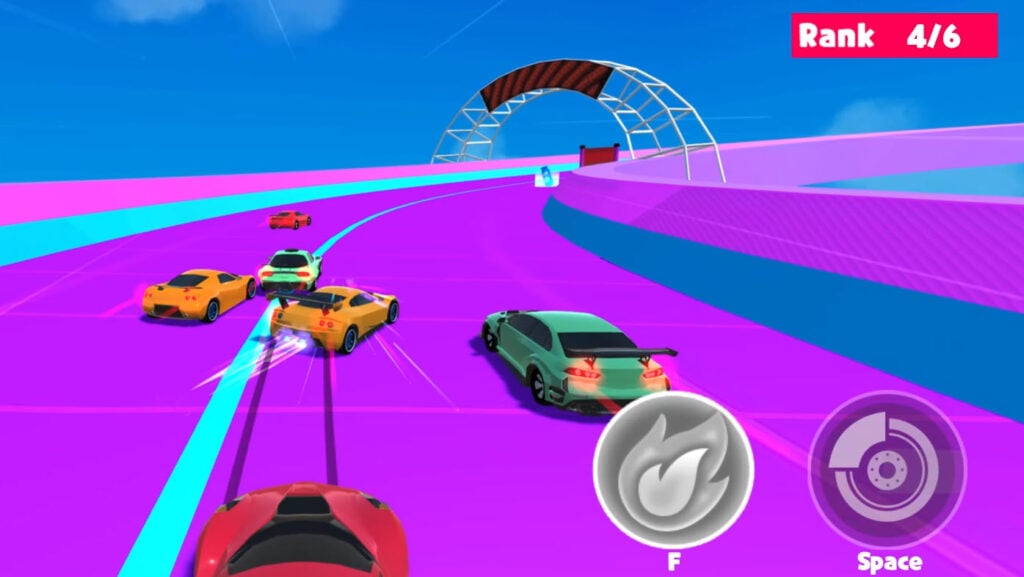
Table of Contents
Summary
Racing Master 3D is a beginner-friendly racing game with simple auto-drive mechanics and simple drifting physics, where you’ll race your way to the finish and avoid the obstacles along the way.

Your car automatically accelerates and follows the track, and all you’ll need to worry bout is steering left and right to avoid obstacles, collecting nitrous bottle power-ups, and holding space to drift through the corners.
You’ll race and drift your way through the futuristic floating platform while dodging the revolving hazards and harsh barriers designed to catch you out, along with random mini-challenges like knocking down bowling pins and launching soccer balls into the sky for added entertainment along the way.

There are 10 cars to unlock (three free from the start), ranging from Japanese drifting classics to single-seater racers, along with upgrades and cosmetic customization. Once you’ve found the perfect ride, you’ll race against AI opponents matched to your level in a sprint to the finish before earning credits to unlock and upgrade the remaining vehicles.
Remember, this one isn’t targeted at those of you who are already familiar with drifting games, and it’s likely to be a little too basic. However, if you like the general styling and want to learn real-world drifting techniques, RealDrive offers a similar vibe but with more challenging, realistic drifting physics.
Alternatively, if you’ve enjoyed this and want to take things up a notch, Sky Car Drift is a perfect pick, featuring similar graphics but with a huge car selection and more challenging gameplay that’ll be more enjoyable for intermediate players.
If you fancy something completely different with the cartoon-based graphics but more depth, SmashKarts delivers Mario Kart-style free online multiplayer battles with drifting and weapons, where you can play in lobbies against your friends.
Features
- Release date – January 2026
- Difficulty – Beginner
- Levels/environments – 1 (endless floating track)
- Number of vehicles – 10
- Vehicle customization/upgrades – Yes (basic)
- Multiplayer – No
- Mobile – Yes (iOS and Android)
- Developer – BestGames
Physics
Racing Master 3D offers basic arcade physics, along with auto-drive and steering assist, making it perfect for beginners in browser-based car games.

While you’re able to drift, it’s a simple hold-button mechanic along with automated transitions, so you won’t learn too much about real drifting.
If you’re keen to learn more about drifting, we recommend checking out our guide on how to drift, and then heading over to more of an arcade/sim-style game that’s ideal for learning the ropes, such as Drift King. The best thing about Drift King is that it offers great physics while also being forgiving. Once you’re used to the way the cars handle, you can head into the free online multiplayer mode to tandem with your friends.
Graphics

The simple, blocky cartoon graphics on a futuristic floating platform will feel familiar to players who have enjoyed the visuals in games like Survival Race, which offers online multiplayer battles, and Epic Racing: Descent on Cars, with its high-intensity downhill spin and awesomely realistic crash physics.
Controls
PC/laptop/Chromebook
- A key – Steer left
- D key – Steer right
- Space – Drift
- F key – Nitrous
The car accelerates and brakes automatically, and you’re unable to use the arrow keys. (Which takes a little getting used to if you’re right-handed!)
Mobile/tablet (iOS/Android)
- Press the on-screen buttons.
If you’re looking for other mobile-optimized games, make sure to check out our mobile games collection.
How to play Racing Master 3D
Initial setup
When you open the game, you’ll see the main menu with your Speed Demon starter car and a selection of buttons.

- Top: Mute toggle
- Selected driver
- Cash balance
- Watch an ad (for 1,000 free credits)
- Center: Current car with left/right arrows to browse garage (current car specs on left)
- Bottom left: Modify button
- Right: Driver selection button
Use the left/right arrows to preview the 10-car roster. You’ll likely recognize many of the JDM-inspired designs. These are based on the likes of the Mazda RX-7 FD, Nissan 350Z, Skyline R34 GT-R, and the Mitsubishi Evo. You also get the option of a Formula-style single-seater and various supercars.
Driver selection

By clicking the button on the right of the main menu, you can choose from Lucy, Evelyn, or Mary. Each driver has their own benefits and skills that suit various driving styles, so opt for the one that you feel matches yours.
Getting started
You start with three free cars right away. To unlock the others, simply select a locked car and click ‘Claim’. You’ll watch a short video, and then it’ll be unlocked and available in your garage instantly.
Once owned, you can then click ‘Modify’ (left side of the main menu) to access the customization. Here, you’ll find four options: Upgrade (improves handling, top speed, and acceleration), along with Wheel, Spoiler, and Spray. We’ll cover these in detail in the Upgrades and Customization sections below.
When you’re ready, press ‘Start’ on the main menu to head to the next race. You’ll then head to the futuristic floating track, where you’ll go up against AI opponents matched to your level.

Your car auto-accelerates and has basic steering through the corners. You simply need to guide the direction (left or right) using the A/D keys to avoid obstacles and collect bonuses – remember, you can’t use the arrow keys! Hold the Space bar to drift through corners, where you can hold the slides indefinitely as you steer, and the car automatically transitions.
As you drive through each level, you need to avoid the (many) revolving obstacles and avoid the red barriers, as hitting either of these resets your position and allows your opponents to zoom past.
However, not everything is bad. Collect the nitrous power-up bottles to (temporarily) fill up your boost meter, then press F to activate. For added entertainment along the way, you also get to hit the bowling pins, kick footballs, and other random objects for fun. While you won’t get any extra points for these, they won’t slow you down either.
Your current position is shown in a bar at the top of the screen, along with the level progress. Your goal is to finish the race in the highest position possible to earn credits for upgrades and unlocks.
Game modes

The endless racing against AI opponents is the only game mode on offer here. There are no additional challenges or progression beyond unlocking and upgrading cars.
If you want more to do, Drift Hunters MAX is the most popular choice among Drifted fans, offering realistic physics, 39 cars, 13 tracks, AI traffic, and a Drift Attack challenge mode. However, the realistic, grippy physics may take some getting used to for beginners, which is where the classic Drift Hunters game offers a perfect introduction to the series. It still delivers great physics, a huge car selection, and plenty of upgrades and tuning options.
Alternatively, if you’d rather enjoy a freeroam mode, Car Crash Test: Abandoned City offers BeamNG-style open-world carnage where the goal is to cause as much destruction to your car as possible to your ride.
For something completely different, soccer fans will want to check out Rocket Goal, which lets you play a Rocket League-style multiplayer online soccer driving game within your browser.
Racing Master 3D car list

There are 10 vehicles total, three that are free from the start:
You’ll have the Speed Demon as your starter car, along with several supercars, and other ‘inspired’ cars that will undoubtedly look familiar, such as the Nissan 350Z, Nissan Skyline R34 GT-R, Mazda RX-7 FD, and the Mitsubishi Evo, alongside a Formula-style single-seater and various other real-world-based blocky cartoon cars.
All of the cars handle pretty similarly, and the main difference is their stats (handling/top speed/acceleration).
If that’s not enough, Madalin Stunt Cars 3 offers the ultimate car selection already unlocked from the start, with 34 vehicles, along with huge ramps, stunts, and online multiplayer. For beginners who want a simple one-click drifting experience, Drift Boss has 31 cars to choose from and runs perfectly on mobiles.
Upgrades

You can’t upgrade individual stats separately. If you click the ‘Upgrade’ button, then click the cash pile on the right, it will simultaneously improve the handling, top speed, and acceleration of your currently selected car. This starts at 500 credits and then increases with each upgrade tier.
You can earn credits by racing, where you’ll get bigger payouts the higher you finish, or by watching the video ads (1,000 credits per ad).
If you want full-blown customization that’s comparable to AAA sim racing titles, Force Drift Racing: Aussie Burnout offers the most in-depth tuning of any browser game, where you can tweak just about every part imaginable. It’s perfect for learning suspension geometry, forced induction, tire compounds, weight distribution, and much more, but it will likely be overwhelming for beginners.
Customization

Alongside the performance upgrades above, there are also three styling options:
- Wheels – Five designs (500 credits each)
- Spoilers – Five options (500 credits each)
- Spray (Paint) – Five colors (500 credits each)
Be warned – there’s no preview mode when you’re checking these out. Clicking any option instantly purchases it, so make sure you check out the thumbnail preview before buying.
Advanced tips & tricks
Collect the nitrous bottles when possible
Nitrous bottles deliver a massive speed boost. Try to collect them all, and then use the F key when you’re ready for the blast. Watch out – if you time it wrong, and you’re going too fast, you’ll crash into obstacles since there’s no brake pedal.
Hold your drifts through the corners, but pick your moments

You can hold Space indefinitely, but you also need to initiate by holding the A or D key (left or right directions) to drift. Once sideways, you can use this to swerve around obstacles, especially when the nitrous has you moving too fast and you need to suddenly get out of tricky situations.
Try to predict the obstacle timing patterns

The various hazards (moving) and red barriers (static) follow specific timing patterns. Watch ahead and plan your steering to stay one step ahead rather than having to react at the last second.
Racing Master 3D FAQ
What is there to do in Racing Master 3D?
You’ll race against AI opponents, where you can drift to avoid obstacles, collect nitrous, and smash into bowling pins and soccer balls, before earning credits to unlock all 10 cars and upgrade them.
Can I preview the customization upgrades before buying?
No. You’ll need to be careful – if you click any wheel, spoiler, or paint option in the ‘Modify’ menu, it instantly purchases it for 500 credits, and you’re not able to sell it again.
Is there multiplayer in Racing Master 3D?
It’s single-player only, with no online features. However, there are plenty of other browser-based mobile game alternatives at Drifted.
Is Racing Master 3D good for experienced players?
It’s unlikely to appeal to players who are experienced with other drifting or racing games, since it’s extremely basic. For that reason, we feel it’s best suited for absolute beginners.
Written by:
Published on:

Bill is a writer and photographer who has been part of the Drifted team since 2015. His work extends to various print and online publications, including Wangan Warriors.
As part of the King of Nations team, he traveled extensively for several years, capturing top-tier international drift events worldwide. His hands-on experience, including rebuilding his own Nissan Silvia S15 drift car, gives him unique insights into drift car building and global drift culture.
When not behind the lens or keyboard, Bill can be found browsing classifieds for his next JDM project or shredding virtual tires on popular simulators like Assetto Corsa, CarX, and Forza.
You can learn more about Bill’s story here or follow his socials on X (formerly Twitter), Flickr, Facebook, and Instagram.


