
Rocket Goal
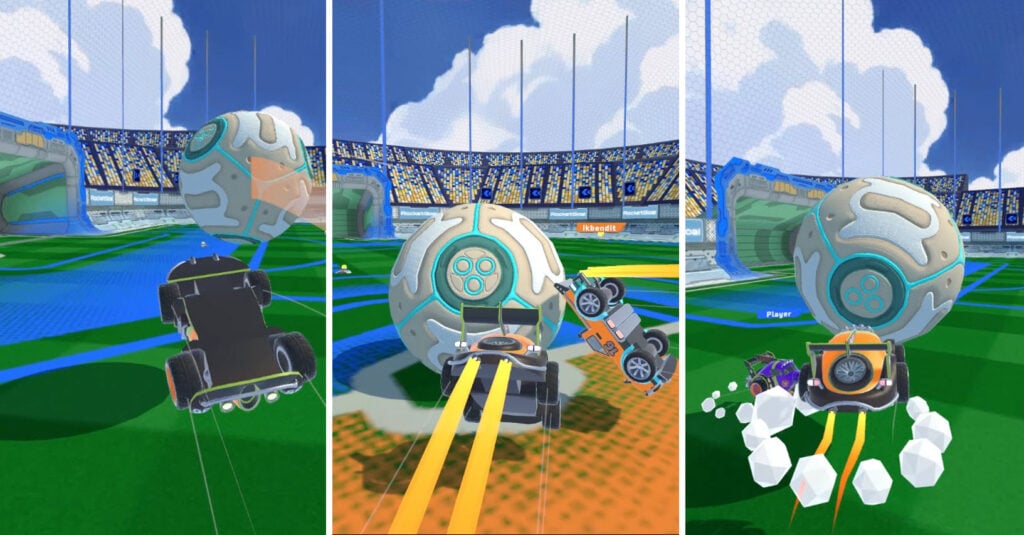
Table of Contents
Rocket Goal summary

This high-intensity 3D car soccer game lets you get behind the wheel of rocket-powered vehicles with awesomely fun physics, where you’ll need to do everything it takes to get the giant ball into the goal.
Think Rocket League, but in your browser, with nothing to install or download, and it’s completely free to play anywhere across all your devices with cross-platform saving.
The visuals and physics are insanely good for a browser game, delivering the same crazy, adrenaline-pumping rush you get from the premium versions. Just like those, it’s not as easy as it looks, either.

You have the choice to practice and build up your skills, jump in at the deep end in the online multiplayer lobbies, or create private parties to play with your friends. Since it works on any device (and with controllers), it’s perfect for quick matches at school, work, or home (during your breaks, of course!).

Along the way, you’ll need to master aerial control, boost management, teamwork, and strategic positioning to outsmart your opponents, score goals, and secure your team’s victory!
Rocket Goal controls
You can use the keyboard and mouse, remap the controls, or assign a game controller in Settings > Controls.
PC/laptop/Chromebook keyboard
Assuming you haven’t changed any of the default keys, here’s what you need to remember:
- W – Accelerate or Rotate forward (Air)
- S – Brake/reverse or Rotate backward (Air)
- A – Steer left
- D – Steer right
- K – Jump / Double-tap for forward roll (Air)
- E – Rotate right (Air)
- Q – Rotate left (Air)
- J – Boost/nitrous
- Space – Ball cam (Locks the camera on the ball)
- Left Shift – Drift or Roll (Air)
- P – Pause
If you head to Practice mode to get the hang of the controls, they’ll also be displayed in the bottom-left corner of your screen until you’re ready to head to the competitive modes.
Mouse buttons (optional)
- Right mouse button – Jump/double-click for forward roll (Air)
- Left mouse button – Boost/nitrous
These can be useful if you prefer using the mouse rather than keeping both hands on the keyboard. They can also be remapped to suit your preferences.
Mobile/tablet (iOS/Android)
- Press the on-screen buttons
How to play Rocket Goal

Initial setup
When you first open Rocket Goal, you’re greeted with the main menu.
Enter your nickname in the box at the top left of the screen.
Below the Nickname box, you can log in with your Google account or email to store your progress in the cloud and enable cross-platform saves, letting you pick up where you left off on your other devices.
Clicking ‘Cars’ in the bottom-left lets you view the full car list. You’ll start with the free ‘Vortex’ vehicle, with seven other rides to unlock as you progress.
Click the cog wheel in the top right to access the in-game Settings:
Region – Set this to where you’re located
Quality – If you have a decent-spec computer, set this to ‘High’ and see if it runs smoothly. Lower-spec machines should try ‘Medium’ or ‘Low’. You can return here if you need to lower this, but it’s worth trying at a higher setting first.
Field of View – This sets how close the camera is to your car. 90 is closest, 120 is furthest. Most people prefer 120 since it gives a much wider view of the arena without being too distant.
Volume – Set between 0 (mute) and 100 (full volume).
Getting started
Anyone who’s played Rocket League will be familiar with the concept here. At the start, you’re placed on either the blue team or the red team, with your car’s paint showing which side you’re on.

Your job is to drive, jump, and drift your nitrous-filled rocket car to smash the huge soccer ball toward the opposition net and score goals. Avoid scoring own-goals at all costs – if you hit the ball into your own net, your team loses a point.
The top center of the screen displays the current score and timer; whichever team has the most goals when time runs out wins. Sounds simple enough, right? I can assure you it’s far more challenging than it looks!

You’ll need to master Boost (J key/left mouse button), Jump (K/right mouse button), flipping (double-tap Jump), and steering at the perfect angles to strike the ball properly and send it flying toward the rival goal. The speed and the angle you hit the ball at are both crucial for aim and power.

Keep an eye on your boost level in the bottom right corner and use it sparingly. It drains super quickly and doesn’t refill automatically – you’ll need to drive into the glowing gold coins scattered around the arena for top-ups.
Rocket Goal game modes
There are three game modes on offer:
Practice

I know what you’re thinking – borrrrring! But if you want to perform well in actual online matches, it’s highly recommended that you get comfortable with the controls here first, without opponent pressure.
Once you’re confident that you’re ready to take on the other players online, you have two multiplayer options…
Play
This is the traditional game mode where you’ll join other players online in the public lobbies. You’ll then face off in 1v1, 2v2, etc, matches, depending on the currently available players.

Unlike practice, you’ll need to work alongside your teammate (even if many of the players online won’t have the same idea!) to score as many goals as you can, while conceding as little as possible, to win the game.
There’s no additional reward for being the top goalscorer on your team, so it’s best to work with your teammate to ensure you both get the win, as you’ll then get to share the rewards.
Party
As the name suggests – it’s party time!

Where ‘Play’ throws you into a random match, Party mode lets you create rooms/lobbies and play privately with your friends.
You can either type (or paste) the code your friend gives you, or create your own private room. Select ‘Create’ to generate a code you can copy and share with your friends. Then, click ‘Private Match’ and wait for them to join.
Rocket Goal vehicle selection
There are eight cars in Rocket Goal in total, and ‘Vortex’ is unlocked for free at the start.

Once you win enough games to reach the next levels, you’ll eventually be able to unlock all of the following cars:

- Overdrive
- Crimson
- Specter
- Frostbite
- Pulsewave
- Blaze
- Nitron
These Hot Wheels-style vehicles range from cars to pick-up trucks to Formula 1-style racers.
There are no tuning, customization, or upgrade options in Rocket Goal. If that’s what you’re after, we recommend checking out Drift Hunters MAX. Or, if you also want to play with your friends in online multiplayer, Drift King is another top pick.
Rocket Goal advanced tips & tricks
Here are a few tips and tricks we’ve found super helpful when it comes to ensuring you land the win.
Spend time learning the controls in practice mode first

Practice makes perfect. While most browser games are easy to pick up, Rocket Goal is much more challenging, especially without a controller or previous Rocket League experience.
Refining these skills makes you much stronger when competing against top players online.
Take a defensive approach when necessary, rather than always attacking
It’s a team game, and you won’t earn more points for personally scoring the most goals. You only win if your team wins.
Remain calm to ensure you don’t make any unforced errors that might result in an own goal – that’s the last thing we want!
Save boost for vital moments
Don’t hold the boost button constantly. Save it for when you really need to move quickly or hit the ball hard.

You’ll also want to monitor your boost/nitrous bar in the bottom-right corner, as it drains super quickly. When it’s running low or empty, make sure you grab the glowing gold gems scattered around the arena for a refill.
Keep your eyes on the countdown timer
If you’re winning near the end of a match, play it safer and waste time to secure the victory. While it might be dull, it’s effective if you want to land the win.
Experiment with using drifting to your advantage
Although the drifting physics aren’t as realistic as other games like Drift Hunters, tapping Left Shift to drift helps you quickly change angles and pull off unexpected moves that’ll surprise the opposition. If you enjoy the sideways action, you’ll love our huge selection of free drifting games.
Try the lock-on ball camera
Hit the Space key to toggle Ball Cam, which locks the camera onto the ball. It’s really helpful because you don’t have to search for the ball constantly, and it often provides a quick alternative view of the action when you need it. Toggle it on and off as required, depending on the situation.
Drive up the arena walls when necessary

Unlike real-world soccer, you don’t need to stick to the pitch to push your skills to the limit and pull off advanced plays that’ll catch opponents off guard and (literally) drive them up the wall.
Rocket Goal FAQ
Can I play with a controller?
Yes. Head to Settings (cog wheel on main menu) > Controls and then click ‘Assign Controller’.
Can I change/remap the keyboard controls?
Absolutely – click the key(s) you want to change in the Controls menu, and choose the replacement. You can also change the settings for mouse clicks and controller buttons.
Does Rocket Goal need installing?
No. It runs in your browser as an HTML5/WebGL game. You don’t need to worry about installing or downloading any files.
Can I save my progress?
Yes. While your progress will be saved in your browser anyway, you can also save it to the cloud to access it across all your devices. Choose ‘Login with Google’ or ‘with Email’ on the game’s main menu.
Is Rocket Goal mobile-friendly?
It’s perfectly optimized for phones and tablets, where you’ll get an on-screen button overlay so you don’t have to remember the correct keys.
How do I stop the game lagging and stuttering?
Try heading to Settings on the main menu and lowering the Quality. Unless you have an old device, go down the steps one at a time until it runs smoothly. If the issue persists, try disabling your browser extensions.
Is Rocket Goal multiplayer?
Yes, you can join public online matches or play with your friends in Party mode using a private invite code.
Similar games we recommend
Once you’ve had your fill of aerial acrobatics and goal-scoring chaos, check out Survival Race for a completely different take on IO-based multiplayer mayhem. Instead of a soccer stadium, you’ll battle for survival on a floating hexagonal platform, where the goal is simply staying alive as you drift, jump, and roll around other online players.
If you enjoyed the high-intensity craziness of Rocket Goal, Epic Racing – Descent On Cars delivers similar adrenaline but swaps goal-blocking for opponent-blocking. With realistic damage and plenty of carnage, you’re thrown into a downhill race where your rivals will do anything to stop you reaching the finish line first.
Written by:
Published on:

Bill is a writer and photographer who has been part of the Drifted team since 2015. His work extends to various print and online publications, including Wangan Warriors.
As part of the King of Nations team, he traveled extensively for several years, capturing top-tier international drift events worldwide. His hands-on experience, including rebuilding his own Nissan Silvia S15 drift car, gives him unique insights into drift car building and global drift culture.
When not behind the lens or keyboard, Bill can be found browsing classifieds for his next JDM project or shredding virtual tires on popular simulators like Assetto Corsa, CarX, and Forza.
You can learn more about Bill’s story here or follow his socials on X (formerly Twitter), Flickr, Facebook, and Instagram.


