
Slow Roads
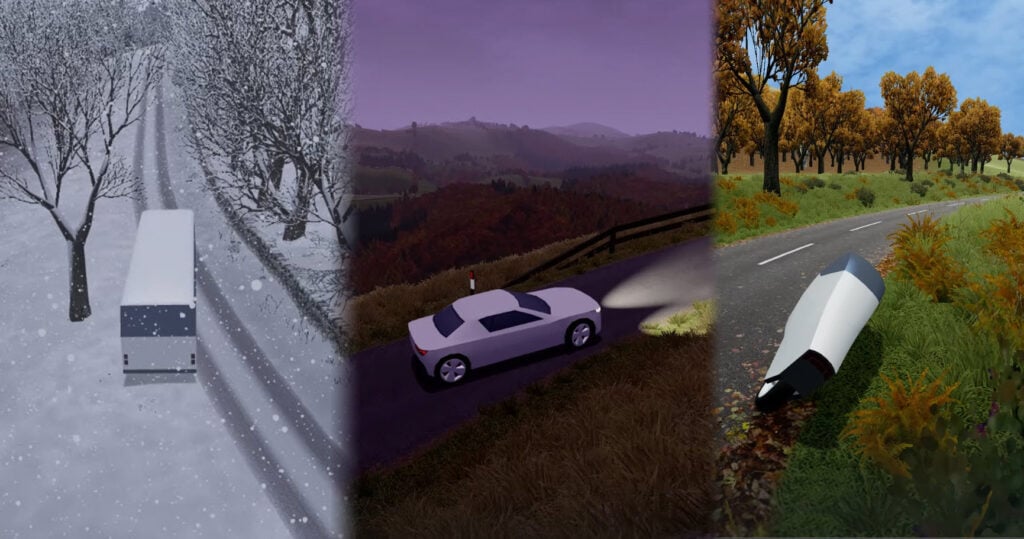
Table of Contents
Slow Roads summary
Slow Roads is a perfectly refined, unique, endless browser driving game. There are no races, missions, or huge crashes here. It’s just you, a minimalist EV, and incredible driving physics on an infinite road that takes you through a variety of stunning landscapes, and far, far beyond.

Unlike the crazier browser games out there, like Epic Racing – Descent On Cars, this relaxing indie driving simulator is all about chilled vibes and driving at your own pace. That said, you can still crank up the settings and have plenty of fun.
The surprisingly advanced 3D graphics, gorgeous lighting, and minimalist UI hide in-depth settings, where almost every aspect of the game is fully customizable.
There’s also dynamic weather and scenery that shift from tight British country lanes to rolling hills and forests. You can even venture ‘off-world’ to Martian terrain.
It’s perfect for unwinding after a stressful day or for new drivers who want to practice driving and understand how different drivetrains behave without any pressure.
Simply pick your ride, set your favorite time of the year, choose how twisty you want the roads, hit play on your favorite tunes, and then just… drive (or drift) to your heart’s content!
Slow Roads controls
PC/laptop/Chromebook
There’s a LOT of control options available, but you can also head to ‘Controls’ in the settings menu to map different keys, if you wish.
Basic driving
- W or Up arrow – Accelerate
- S or Down arrow – Brake/reverse
- A or Left arrow – Turn left
- D or Right arrow – Turn right
- Left Shift – Boost
- Space – Handbrake (momentary)
- B – Handbrake (toggle)
- R – Reset vehicle
- C – Change camera
- M – Mute audio
- P – Pause game
Scene & camera
- E – Next scene
- Q – Previous scene
- T – Toggle cine cam
- U – Toggle UI
- Mouse left-click + drag – Free-look camera
- Mouse scroll wheel – Zoom in/out
Driving assists
- F – Toggle auto-drive
- J – Toggle cruise control
- I – Increase cruise speed
- K – Decrease cruise speed
- V – Lock steering
- H – Headlights
Mobile/tablet (iOS/Android)

- Press the on-screen buttons/overlay
As you probably guessed, Slow Roads is optimized for mobile devices, and the portable experience is as well-refined as the desktop version.
How to play Slow Roads
Initial setup
When you first load the game, you’ll be greeted by a minimalist EV waiting for you in the countryside, along with a discreet UI with small icons in the corners. Everything feels intentionally simple and calming, setting the tone for what’s to come.

To explore the (many) in-game options, start with the settings cog in the bottom-right. Here’s where you can see the game’s unexpectedly detailed settings and customization features.
Gameplay – This lets you adjust the main game settings, including road width (from narrow single-track up to wide highways), vehicle steer assist, one-pedal driving, speed factor, and grip factor.
You can even customize how the auto-drive behaves, set your wheel rotation range (for maximum angle), adjust the seat position (and side) for the perfect cockpit view, and choose between km/h or mph.
Graphics – Here, you can choose the view distance and detail level (both can go up to Ultra if your computer can handle it), along with camera smoothing, vertical Field of View (FoV), and FoV effects.
Audio – You’re able to adjust every in-game sound, with individual sliders for master volume, ambient sound, wind, engine, brakes, tire roll, tire screech, and collisions.
Controls – Covered in detail above, but you’ll also find additional features like Acceleration power, and adjust the steering/various sensitivities. Also, if you want to remap any controls, this is where you’ll do so.
Profile – This tracks total distance traveled and total time spent driving, which is a nice touch for those curious about how many virtual miles they’ve covered. You might be surprised to see how quick and easy it is to rack up the miles!
Getting started
If you’re still in the settings menu, press ‘Close’ in the bottom right.

Now that you’re back in the game, you’ll see three tabs in the bottom-left corner (you may need to move your mouse there to reveal them) that let you choose your experience: World, Style, and Vehicle.
In World, pick a location – Hills or Off-world (which teleports you to another planet!), then choose your road type from Normal, Winding, Straight, or Casual.
After that, head to Style to set your season, weather, and time of day.
Then head to Vehicle to select your ideal ride and drivetrain. You have three options for each. We’ll dive into the vehicles shortly, but for Drive mode, choose from AWD (all-wheel drive), FWD (front-wheel drive), and RWD (rear-wheel drive).
With those selected, head back to the game and get a feel for the controls. You can left-click and drag to manually move the camera. Then press C to snap back and toggle through the default views when you’re ready to roll.
Start gently to get a feel for the grip and steering before cranking up the speed or testing yourself (especially in the snow).
Remember – there’s no rush, no timer, no score to chase. Unless you want to break the rules, that is!
Slow Roads scenery options
Remember, there’s no racing, missions, or anything else in Slow Roads. The beauty of the game lies in the different driving simulation models you get to experience. Let’s dive a little deeper into what each of those offers.
World

Hills takes you to the countryside, based on the hilly Peak District in Britain. Expect to see neat hedgerows, fields, rolling hills, and a classic rural British B-road vibe.

Off-world takes you to an alien planet atmosphere with surreal terrain and sci-fi-esque skies that feel otherworldly. It’s great when you fancy a break from the norm.
Road styles change the layout completely.

Normal offers a mix of flowing roads with ever-changing width and style for maximum variety.
Winding throws constant corners and elevation changes at you.
Straight gives you long stretches ideal for max-speed cruising.
Casual keeps things gentler and more relaxed with no barriers to worry about.
Fancy something exciting and unique? Hit randomise, followed by generate, and let the game create a scene for you.
Style

Season dramatically changes the look and feel of the game.
Spring brings lush, vibrant colors with striking skies.
Summer offers bright, clear days with calmer sky tones.
Autumn adds warmer colors and more muted skies.
Winter covers the roads in snow, changes the lighting to something colder, and also makes the roads far less grippy.
Time lets you choose your favorite time of day.
Sunrise gives soft light and dramatic skies (especially in spring and winter).
Midday typically provides the clearest visibility with neutral lighting.
Sunset delivers warm colors and cinematic views, and you may need to use your headlights depending on the time of year. It gets dark early in the UK!
Night brings full darkness with only your headlights to guide you – no street lighting whatsoever.

Weather lets you choose between moody, cloudy scenes or brighter skies. Clouds during winter typically bring falling snow that makes roads even more slippery.
Vehicle list
There are three vehicles on offer, each offering a completely different experience.

Car – The default, minimalist EV. It’s a clean, simple design that suits the game’s aesthetic and handles well for most situations.

Bus – This big, blocky bus is tall, wide, and heavy, making it both challenging and rewarding to drive on the narrow British lanes and tight roads. Choose this if you want a more difficult experience, especially in winter conditions.

Motorbike – A futuristic motorcycle with a slim, aerodynamic profile that’s grippy and fast. The handling is quite different from the others, but great if you want something unique.
Drivetrain options
Your choice here affects handling; there are three options. Disappointingly, unlike the other vehicles, you can’t make the Motorbike rear-wheel drive!
AWD provides the best overall grip and stability, making it ideal if you’re struggling for traction in snow or on off-road terrain.
FWD offers a safer understeer bias but feels less exciting for enthusiasts.
RWD (our obvious pick) brings a tail-happy rear end that’s much more fun but harder (and somewhat unpredictable) to control on slippery roads.
Handling setup & driving aids
Unlike most driving games, Slow Roads has no money system or unlockable upgrades. Everything is available from the start, and the “tuning” is purely about adapting the game vibes to match your mood.
However, there are some settings that you can tweak if you’re looking to make things a little spicier.

In the vehicle (gameplay) settings menu, you’ll find a few advanced settings:
Speed factor controls the overall pace of the game.
Grip factor sets the vehicle’s grip levels. (Think semi-slicks vs part-worn tires.)
Steer assist adjusts the level of assistance the game provides to keep your vehicle stable.
Wheel rotation range lets you adjust the wheel angle, letting you throw down big entries.
Autodrive mode – Press this on the game screen to pass control over to the AI and let it drive. It’s great for learning where to brake, or just watching the scenery pass by. For a laugh, you can also lock in high-speed cruise control to watch it lose its mind.
Slow Roads advanced tips & tricks
Making it relaxing
Pick Casual roads with wider road width and higher grip. Choose RWD or AWD for stable handling. Lower the speed factor if you’re after slow, chilled-out cruising. Pair that with sunrise or sunset in spring or autumn for an atmospheric sky.
… Or fun and insanely challenging

Playing around with the settings can also make this chill game hilarious fun.
Choose the narrow road width, combined with Winding roads, the car with RWD drivetrain, and winter snow, to create a real test for your drifting skills!
Then switch to the bus and opt for a “thread the needle” challenge on the tight lanes. Increase the speed factor, set a high cruise-control speed, then see how long you can survive.
Staying on the road
Use the space bar (handbrake) as a last-second save if you feel like you’re potentially about to crash. On narrow roads, especially when using the bus, zoom out on the camera for a bird’s-eye view to see the verges.
In snow, you can reduce the grip factor slightly and select AWD if you’re struggling for traction.
Slow Roads FAQ
Is Slow Roads endless?
Yes, the roads are infinite. You can just keep driving for as long as you want, and check the Profile section occasionally to see how far you’ve traveled.
Is there any scoring or missions?
Slow Roads doesn’t feature any game modes, scoring, or missions. The focus is on clean driving, or hooning around in stunning scenery.
What happens if I crash?
You lose momentum, but there’s no penalty, damage, or game over. If you get stuck, hit Reset.
Can I save my favorite routes?
Yes. Use the World menu code system to copy your seed, then paste or share it later to revisit the same road layout and visual settings.
Is this suitable for new drivers?
It’s perfect for anyone, from beginner to advanced. You can experiment with different drivetrains, speeds, grip levels, and assists to practice your driving.
Does it run on low-end hardware?
Yes, Slow Roads is great on lower-spec computers and mobile devices, but you’ll want to tweak the View distance and Detail settings in the Graphics menu until it runs smoothly.
Similar games we recommend
Once you’ve spent some time in the peaceful scenery, for a similar (but less-countrysidey) vibe, Polytrack is the ultimate opportunity to put your newfound driving skills to the test against the clock.
If you’ve enjoyed the stunning visuals but are craving more sideways action, we highly recommend Drift Hunters MAX.
For a drifting game that you can play online with your friends with online multiplayer, look no further than Drift King or Survival Race.
Written by:
Published on:

Bill is a writer and photographer who has been part of the Drifted team since 2015. His work extends to various print and online publications, including Wangan Warriors.
As part of the King of Nations team, he traveled extensively for several years, capturing top-tier international drift events worldwide. His hands-on experience, including rebuilding his own Nissan Silvia S15 drift car, gives him unique insights into drift car building and global drift culture.
When not behind the lens or keyboard, Bill can be found browsing classifieds for his next JDM project or shredding virtual tires on popular simulators like Assetto Corsa, CarX, and Forza.
You can learn more about Bill’s story here or follow his socials on X (formerly Twitter), Flickr, Facebook, and Instagram.


