
Tap Drift
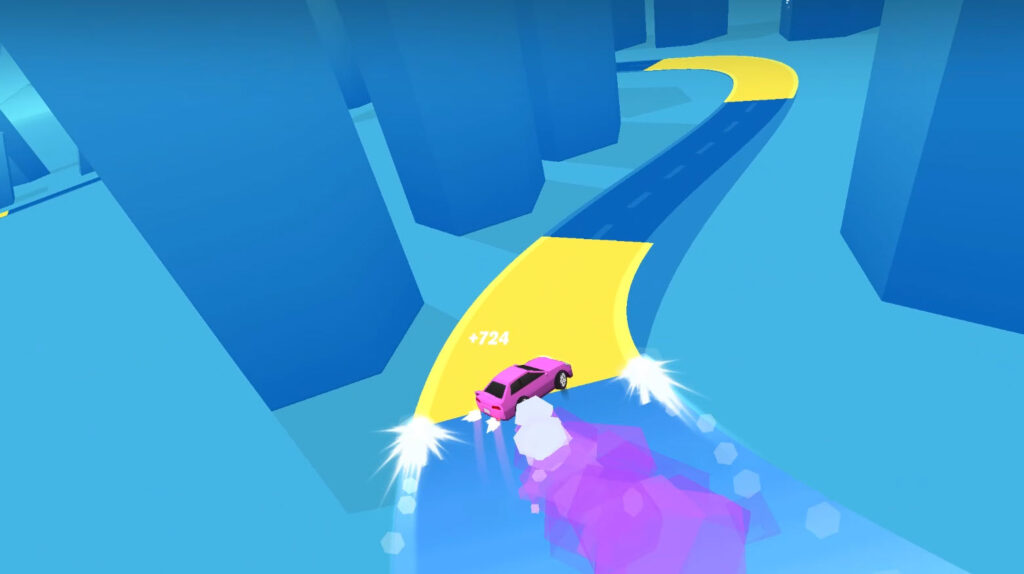
Table of Contents
Summary
Think of Tap Drift as drifting meets Guitar Hero. It’s a simple one-button game where precision is everything, and you’ll be punished for mistiming your slide by a millisecond.

As your car automatically drives through endless corners on a blocky, cartoon-style futuristic road, all you need to do is hold the left mouse button (or tap your screen) at the right perfect moment. Sounds simple enough, right?
The yellow markings on the road show when you’ll need to initiate (tap, or press and hold) and then straighten (release) after each drift. If you click too early or hold too long, it’ll be game over immediately.

However, if you time it perfectly, you’ll get massive combo multipliers and maximum EXP earnings. It starts off nice and easy, but the speed and intensity quickly ramp up.
The physics are simple and arcade-like, and you don’t need to worry about advanced drifting techniques like weight transfer or transitions as you would in more realistic sim-based drifting games. But don’t be fooled by the simplicity – this game is surprisingly challenging, harsh, and unforgiving if you misjudge the timing.

Once you’ve started mastering the game, there’s a huge selection of new rides, each with its own unique upgrades, along with the chance to prove yourself on the online global leaderboards. The graphics keep things light and fun, and the fast-hitting high-intensity gameplay loop will keep you coming back for more.
Features
- Release date – December 3, 2025
- Difficulty – Beginner
- Levels/environments – 1 (endless road with ever-changing scenery)
- Number of vehicles – 28
- Vehicle customization/upgrades – Yes (cosmetic only)
- Multiplayer – No (online leaderboards available)
- Mobile – Yes (iOS and Android)
- Developer – ZapGames
Physics
Tap Drift features simple, one-button arcade physics. Hold to drift, release to straighten, where timing and precision are everything.
The look and feel is similar to the popular Drift Boss game, though Drift Boss is even simpler, with only left/right drifting to worry about, and no leaderboards or upgrades.
Drift Donut also uses the same one-click-and-hold physics where you drift around loops. Again, the timing is everything.
Graphics

Tap Drift’s design delivers a simple yet visually pleasing, blocky, cartoon-style aesthetic set in a futuristic desert cityscape. There’s evolving scenery the longer you can go on for, and the colors change as you progress.
The low-poly graphics are similar to Polytrack, where you’ll aim to shave milliseconds off time-trial-based lap times by racing to perfection across a huge selection of challenging tracks.
If you’ve enjoyed the graphics of either of these, but fancy a totally different take, Epic Racing: Descent on Cars offers bonkers, maximum-intensity downhill racing carnage against aggressive AI opponents.
Controls
PC/laptop/Chromebook
- Left mouse button (tap/hold) – Drift
Mobile/tablet (iOS/Android)
- Screen tap/hold – Drift
Tap Drift is optimized for play on your portable devices in your browser, and the minimalist graphics mean you don’t need the latest tech. If you’re looking for more mobile games to play on the go, we’ve got plenty of options in our ever-growing free mobile browser games collection.
How to play Tap Drift
Initial setup

When you open the game, you’ll see the main menu. In the top left, there’s a settings button where you can change your name and mute the audio. We recommend changing your name before playing so you (eventually) can earn your bragging rights on the leaderboards!
Next to settings is the leaderboard button, which displays the day/week/month/all-time rankings, with 10 players per page. There are tons of active players, so there’s plenty of competition. You can also challenge your friends to see if they can beat your top scores.
At the bottom of the screen, there’s a flashing yellow “Garage” button. Click this to view the 28 cars you’ll soon be unlocking. Each car has three vital stats:
- MULT – Scoring multiplier
- SEC – Earnings per second
- MPH – Speed
Unlockable vehicles have significantly better stats than the free starter car, making them worth upgrading to as soon as possible. You’ll notice the difference immediately, as they’re much faster and snappier.
While they mostly feel similar (aside from speed), shorter-wheelbase cars have quicker transitions, while longer-wheelbase cars feel more controlled.

Before jumping into the game, with your current car selected, it’s worth checking out these free customization options since they’re unlocked right away:
- Car color (11 options)
- Wheel color (12 options)
- Smoke/trail color (7 options)
Getting started
Once you’re ready, press back to exit the garage, then “Click to play” in the middle of the main menu, where you’ll launch into a tutorial level.

The yellow markings on the road show exactly when to drift. For a long corner, you need to hold the left mouse button (or screen) through the entire corner. For the short yellow lines, you’ll need a quick, perfectly-timed tap to transition on the straight sections.
If you’ve ever played Guitar Hero, think of it the same way. Sometimes you hold the “notes” (drift, in this case), and sometimes you tap them. The length of the yellow markings indicates how long to hold.
Timing rules

- Click too early or too late within the yellow area, and you’ll lose your combo
- Pressing or releasing outside the yellow area results in immediate game over
- Time it perfectly, and you get massive combo multiplier increases along with maximum EXP earnings

After completing the tutorial, you’ll earn your first loot box (crate). Tap it to open and claim your first reward (typically the rear bumper), then head to the garage to get it fitted.

You’ll also unlock the 80s Challenge mode after the tutorial, which has three car-specific challenges where you need to hit score targets (starting at 7,500 points) to unlock new vehicles before unlocking the next one. However, be warned, this is significantly harder than Classic mode if you’re just getting started, so practice in Classic first, then return with a better car (and skills) later!
Tap Drift game modes
Classic Mode

Endless drifting, where you’ll need to get as far as you can by showcasing perfect timing skills. This is the best mode for practicing and unlocking new cars.
As you earn EXP, the orange bar at the end of the level shows how close you are to unlocking the next loot box(es). Keep building your combo streak for maximum points.
The scenery evolves as you progress: starting in a barren desert cityscape with skyscrapers, the colors and visuals shift as speed increases, but try not to get distracted by your surroundings.
80s Challenge
This mode features three car-specific challenges with score targets to unlock the retro rides displayed, with the first unlock requiring 7,500 points.
This mode is much more challenging compared to Classic, especially with the starter car. Once you’ve unlocked better vehicles along with their higher multipliers, it becomes easier to rack up points quickly. Even then, you’ll need to bring your A-game and pull off risky timing to hit the targets
Leaderboards
These aren’t a game mode, but your top score will automatically be displayed on the global day/week/month/all-time rankings to see where you stack up.
If you’re after multiplayer games, we’ve got plenty of alternative options. For something with similar cartoon graphics and online battles, try Survival Race for multiplayer chaos where you’ll fight it out on floating platforms.
Alternatively, for Mario Kart vibes with drifting and weapons in battle arenas, Smash Karts is another cartoon-based online game with a free online multiplayer option.
Or give Rocket Goal a try if you’re after something different or prefer teamwork. It’s a soccer-based game similar to Rocket League, but free and browser-based, so you can play it anywhere.
Tap Drift car list

There are 28 vehicles to unlock through loot boxes and leveling up. While these are obviously unlicensed replicas with reimagined blocky styling, they’ll undoubtedly feel familiar to drifting enthusiasts.

Among the selection is:
JDM Legends – The likes of the MKIV Toyota Supra, Honda Integra DC2, Nissan Skyline R34 GT-R, and even widebody Subaru BRZ
Supercars – Everyone’s dream cars, including Ferraris, Porsches, Lamborghinis, and much more
Better cars have significantly improved stats. Higher MULT (multiplier) shows the combo you’ll start off with, improved SEC means more passive earnings, and higher MPH means increased speed. Prioritize unlocking cars with higher multipliers to progress faster.
Tap Drift upgrades
There are no performance upgrades in Tap Drift. Instead, you’ll focus on unlocking cars with superior base stats. Therefore, it’s worth upgrading to new cars as soon as you can for the bonus earning potential.

However, each car can be upgraded with five levels of 90s JDM-inspired aftermarket body kit parts, with five options for each:
- Rear bumper
- Side skirts/mid section
- Front bumper
It’s worth noting that these upgrades are fixed to your current car. So, if you unlock a new ride, you’ll need to unlock its parts separately. Your wheel and smoke colors will also reset to the default values until you customize the new vehicle.
If this isn’t cutting it and you’re after in-depth tuning and performance upgrades alongside awesome, fun physics, RealDrive offers more realistic drifting physics, similar low-poly graphics, and a range of game modes, including highway racing and drift challenges. It’s a perfect step up if you’ve enjoyed Tap Drift and want something a bit more sim-like.
However, for the ultimate upgrade and tuning experience along with realistic drifting physics, Drift Hunters MAX is the benchmark sim-style browser game offering far more features, challenges, AI traffic, and a Drift Attack mode. You also get 39 stunning, realistic cars to choose from, with the option to slide across 13 tracks. You’ll need a decent-spec phone or computer to make the most of it, though.
Tap Drift customization

Although the tuning and upgrade options are lacking, there’s plenty of customization to choose from:
- Paint Color – 11 free colors from the start, with more unlockable via loot boxes
- Wheel Color – Many color options
- Smoke Trail Color – Many color/style options
- Smoke Trail Type – Standard, helix, lightning, and more unique effects (unlockable via loot boxes)
- Wheels – Huge selection of styles (unlockable via loot boxes)
- Stencils – Simple decals to make your car stand out, but no full liveries (unlockable via loot boxes)
- Body Kit Parts – Front/rear bumpers and side skirts (5 levels each, unlockable via loot boxes)
The customization (and car roster) is surprisingly impressive for a simple one-button game. Fitting body kit parts transforms the look of your ride, and the smoke trail effects add a modern, funky visual flair.
Advanced tips & tricks
Drift for slightly longer than you think
It feels as if you need to hold the button for a fraction longer than your natural instinct might suggest. However, be careful, because if you release too early, you’ll lose your combo. Too late, and it’ll be game over.
It (surprisingly) gets more forgiving at higher speeds
Although the speed soon becomes intense and chaotic, the timing window becomes a little more lenient. When you start, the beginning is (arguably) harder because you need absolute perfect precision at the slower speeds.
Focus on the yellow markings, not your combo

Your combo multiplier appears in the top-right corner, but the game is so fast you won’t have time to watch it. Focus on the drifting action, and you’ll soon see your earnings when it’s game over (especially if you’re distracted!).
Risky timing means bigger earnings
Although playing it safe feels logical, it won’t build massive combos. You need to cut it close to the edge of the yellow zones for maximum multipliers, so you can rack up EXP quickly.
Remember, you can accumulate points over multiple runs
Don’t worry if you feel you’re progressing slowly at the start and making no progress. Each run adds up. The orange bar that unlocks loot boxes fills based on cumulative points. So, even if you’re not nailing high scores yet, each of those small runs still adds up over time.
Practice in Classic mode first
The 80s Challenge is significantly harder, and you’ll need to be super talented if you head there in your starter car. We recommend building your skills in Classic mode first, and unlocking better cars, before attempting these big-score targets.
Tap Drift FAQ
What is the main objective in Tap Drift?
Drift perfectly to build combo streaks, earn EXP, level up, unlock loot boxes, and collect all 28 cars. Compete on global leaderboards for day/week/month/all-time rankings.
How do I earn cars and upgrades faster?
Build bigger combo multipliers by timing your drifts perfectly. Better cars with higher MULT stats earn points much faster. As long as you don’t break your combo, you’ll soon be earning massive EXP rewards.
What ends the combos?
Clicking too early or releasing outside the yellow zone. Small mistimings within the zone result in you losing your combo, while big mistimings (outside the zone) will end the run.
What are loot boxes?
These are crates containing new bonus rewards. The orange bar at the end of each run gradually fills based on your points across all your runs. When it’s full, you receive a new crate containing car parts, unique upgrades, or vehicles.
Can I upgrade my car’s performance?
No, you need to unlock better cars with improved base stats (MULT/SEC/MPH). Tap Drift’s customization and upgrades are purely cosmetic.
Is there an online multiplayer mode?
No. However, the global top score leaderboards let you compete against other players and your friends.
Can I play on mobile?
Yes. The game is perfectly optimized for iOS and Android with simple one-tap-and-hold controls.
How many cars are there?
There are 28 in total, ranging from JDM legends to supercars and retro-inspired rides.
Written by:
Published on:

Bill is a writer and photographer who has been part of the Drifted team since 2015. His work extends to various print and online publications, including Wangan Warriors.
As part of the King of Nations team, he traveled extensively for several years, capturing top-tier international drift events worldwide. His hands-on experience, including rebuilding his own Nissan Silvia S15 drift car, gives him unique insights into drift car building and global drift culture.
When not behind the lens or keyboard, Bill can be found browsing classifieds for his next JDM project or shredding virtual tires on popular simulators like Assetto Corsa, CarX, and Forza.
You can learn more about Bill’s story here or follow his socials on X (formerly Twitter), Flickr, Facebook, and Instagram.


