
Arcade Car Drift
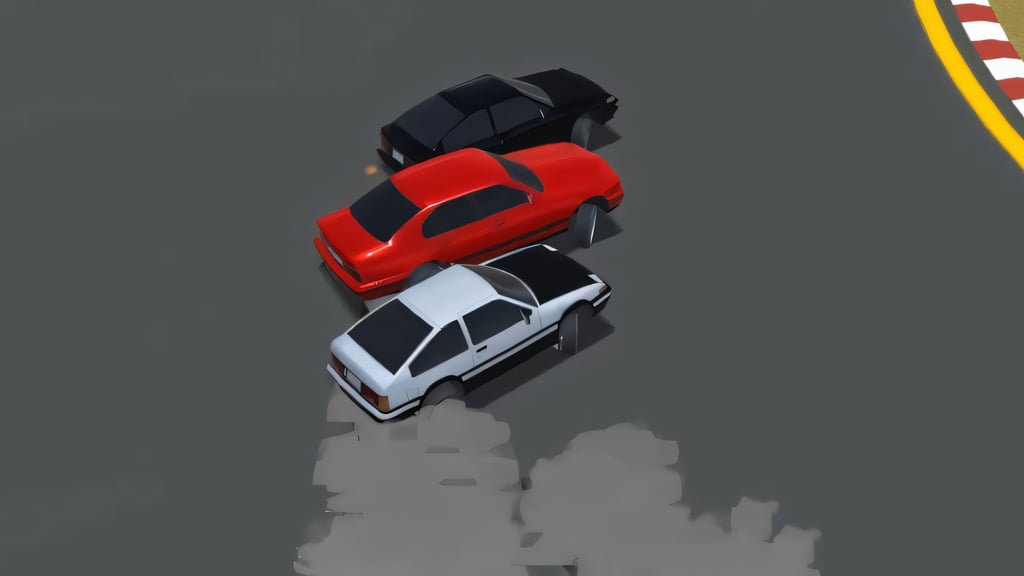
Table of Contents
Summary
There’s only a handful of browser drifting games out there that let you go door-to-door and create drift trains with AI drifters ready to slide at any moment, and Arcade Car Drift is up there with the best.

The lightweight offering features a great selection of cars, fun (and challenging) tracks, and physics that let you bash doors all day long without worrying about being penalized, creating the perfect recipe for near-endless tsuiso chaos.
While the handling is closer to ice-rink-with-a-V8 than controlled oversteer, you’ll soon start mastering the art of staying sideways. Admittedly, your first lap is likely to be a write-off (no matter how good you are at Assetto Corsa), but soon, you’ll confidently find yourself stuck to the rear quarters of the other cars like you’re glued together.
Despite looking like a racing game (and it can be, if you want), your position doesn’t actually decide the rankings; drift points do. If you’re not already sold, all the cars and tracks are unlocked from the very start, so jump in behind the wheel of your favorite ride and give it a try.
Arcade Car Drift features
- Release date – October 23, 2019
- Difficulty – Beginner/Intermediate
- Tracks – 2
- Number of vehicles – 4
- Vehicle tuning/upgrades – No
- Multiplayer – No (Optional AI opponents)
- Mobile – Yes (iOS/Android)
- Developer – JulGames
Physics

Expect the back end to fly out unpredictably and to end up in the barriers on the first corner. The cars don’t need much encouragement to get sideways, so careful throttle management and weight transfer will be essential. Don’t simply mash the pedals and hope for the best.
You’ll need to use the brakes to get a little more angle, and use the handbrake when you need to scrub off some speed mid-corner, as the momentum will likely be too much to handle if you don’t keep it under control.
Graphics

The visuals are low-poly and perfectly match the game’s vibe. You get a selection of top-down-ish chase cameras that give the whole thing a drifty Micro Machines feel (admittedly, probably showing my age a little too much there!) The cartoon styling also helps keep frame rates solid on older laptops and lower-spec mobile devices.
Controls
PC/laptop/Chromebook
- Up arrow – Accelerate
- Down arrow – Brake/reverse
- Left/Right arrows – Steer
- Space – Handbrake/e-brake
- C – Change camera
- On-screen ‘R’ button – Reset car
Note: Pressing ‘R’ on your keyboard (to reset your ride) does nothing. You need to click the on-screen ‘R’ in the top-right corner, next to the camera icon and speedo.
Mobile/tablet (iOS/Android)
Arcade Car Drift is fully mobile-friendly with on-screen touch controls and runs well on lower-spec devices. If you’re after more optimized picks for your phone or tablet, our mobile games collection has plenty worth trying.
How to play Arcade Car Drift
Initial setup
The main menu has three options: ‘Start Game’, ‘Settings’, and ‘Statistics’. Head to Settings first.
Here, the quality can be set to Medium, High, or Ultra. This isn’t a demanding game, so try Ultra first, as even lower-spec devices tend to handle it fine.

You’ll also find a sound mute toggle and, importantly, the ‘Enable AI’ option. Keep it on (the default choice) for the full four-player chaos alongside three tail-happy bots, or switch it off if you want to learn the tracks in peace initially (but definitely try it eventually!). Alternatively, if you’d prefer to try free online drifting against real players, you can head over to our multiplayer games category.
‘Statistics’ tracks your all-time best Total Score, Best Score, Race Time, and Total Distance, which can be a useful long-term benchmark to check back on as you improve.
Getting started

Clicking ‘Start Game’ takes you to the track selection screen, where you can choose from ‘Race Track’ or ‘Port’. Start with Race Track. Port’s added challenges and obstacles are better saved until you’re more adapted to the physics.

After that, you’ll head to the car selection. Four cars are on offer, each with a ‘Power’, ‘Control’, and ‘Mass’ (weight) rating, with the option to change the body color. The full lineup is covered in the car list section below.
Once you’ve headed to the track, you’ll see that the top left has your Time, Total (banked) score, Best score, Lap, and live position. The top center shows your current drift points and combo multiplier bar. The top right has the speedometer, camera toggle, and on-screen ‘R’ (which you’ll need to click to reset your car).
It might look like it, but this isn’t an actual race. The rankings are decided by drift points, not by who crosses the line first. Speed still matters because driving faster gets higher rewards and lets you naturally link more corners together, but the combo multiplier is where a decent score turns into a great one.

Hold a drift, and the combo bar fills up. Once it tops out, your multiplier ticks up from x1 to x2, then x3 (and so on). Lose the drift, or go straight for too long, and it resets.
Be warned that barriers, fixed objects, and the water at Port will wipe your current unbanked score. You can get away with putting all four wheels on the grass, ramming other cars (accidentally, of course!), and hitting trackside objects like cones and signs.

Expect the handling to take some adapting to initially, as some players do find the lack of grip a little challenging. If you’d prefer something easier to get the hang of while you’re finding your feet, Drift Boss lets you transition side-to-side with a single button, but it’s way more fun (and addictively difficult) than it sounds.
Track list
Race Track

Take on three laps around a winding circuit with curbs, hairpins, tighter bends, and a longer straight. The layout is narrow, which becomes immediately obvious the first time you try to wrestle the Muscle Car around it!
Going on the grass will cost you some grip, but you won’t lose your points by going on it, so use it to your advantage once you’re confident (just obviously avoid the barriers!). There’s no water, jumps, or container-shaped surprises to worry about here, making it the ideal place to start.
Port

We’d save Port until you feel confident on the Race Track. You’ll go out for five laps through a dockside layout with shipping containers (conveniently placed on the racing line). Add two large ramps, an overlapping section where the route crosses over itself, and water along the edges, and you’ll soon see why this is the more challenging of the two.
Venturing into the water triggers an instant auto-reset back to the track, but your score goes with you. The water rule is similar to Escape Road, except there you’re also outrunning the police and military, which soon escalates to tanks and helicopters, and it’ll be game over the second you go for a dip.
If two tracks feel a bit lean, Slippery Drift Racing gives you five twisty touge courses to unlock, along with pink-slip car wins, and a skilled rival AI constantly breathing down your neck. The main difference is that the goal there is beating your rival to the line, not focusing on combo chaining.
Car list
All four cars are unlocked from the start. Each handles significantly differently and comes with seven color options (which are also free).
PG86 mk2 (Toyota Sprinter Trueno AE86)

As with most browser games, the legendary Hachiroku is the perfect starting point. Lightweight, nimble, and the most forgiving of the four. Takumi Fujiwara (in Initial D) and Keiichi Tsuchiya made this one of the most iconic JDM machines of the nineties, and it’s the perfect place to start getting familiar with the slippery handling in Arcade Car Drift.
MuscleCar 1969 (1969 Dodge Charger)

While it fills out the power bar, the weight is also maxed. Getting this around the narrow Race Track feels like steering a boat through a car park initially.
The raw power makes the momentum hard to handle, and it feels enormous on both tracks, which makes it hilarious for tandems once you’ve got the physics under control. But save it until then, or you’ll spend more time crashing than sliding!
BMG v34 (BMW 5 Series E34)

The balanced Euro option. It balances a respectable amount of power, decent handling, and a weight rating that sits between the AE86 and the Charger.
While it’s got the same control rating as the Muscle Car, having less power and weight makes it significantly easier to navigate. It’s a great step up for anyone not quite ready for the Chargers’ drama.
SunLine GTE (Nissan Skyline GT-R R34)

Paul Walker’s (R.I.P) weapon of choice is the best all-around pick once you’re past the AE86 and want to stick with JDM rather than going for the “v34” right away.
The handling-to-performance balance is the strongest in the lineup, and it comes in proper Skyline colors. Bayside Blue and Midnight Purple (well, sorta) are both in the seven-shade palette.
Tuning and upgrades

We’d love to tell you there are coilovers to dial in and a 2JZ swap to argue about, but this isn’t that game.
If that’s a dealbreaker, Drift Hunters offers plenty here, where you get to upgrade most of your components, alongside tuning with boost and brake balance, camber, ride height, and 26 JDM legends to unlock. Forgiving physics make it an ideal introduction to browser drifting, and the unlock pace keeps you motivated without tipping into grind territory.
For the no-compromise experience, Drift Hunters MAX takes things to the next level with even more tuning and upgrades across 39 cars, along with stunning graphics, unique game modes, and cross-platform saving. It does require a more capable device than this one, but it’s still fully mobile-optimized.
For even more options, there’s plenty more to dig into in our wider car games selection if you’re after something with more progression to sink your teeth into.
Advanced tips and tricks
Start on the Race Track with the “PG86”

Race Track and the PG86 are the perfect combo to open with. The narrow layout and weight transfer feel unforgiving at first with the larger, heavier cars. Port’s containers, ramps, and water make it worth saving until you’ve mastered the basics. Rack up your combos here first as a proving ground, then graduate to Port.
Don’t panic about hitting smaller objects or other drivers

While the likes of barriers, containers, and the water at Port wipe your score, everything else (grass, cones, small trackside signs) is fine to hit. So, you can use grass to your advantage when it helps, and feel free to knock on the doors of the AI cars to introduce yourself!
Treat the e-brake as an angle refiner, not just an emergency stop
A quick tap of the ‘Space’ key mid-drift lets you scrub a bit of speed and adjust your line without killing the drift. Use it as a precision tool rather than as a panic brake, and when you’ve gone too hot into a corner, a short tap will often give you just enough room to keep it clean.
Save the e-brake and brake combo for situations where you need to slam on the anchors.
Build left-foot braking into your technique
You’ll soon realize that throttle management is one of the main skills here. The cars want to slide forward constantly, and managing that with braking mid-drift, scrubbing off a little speed while potentially staying on the throttle, is essentially left-foot braking on a keyboard.
Practice lifting off the throttle and letting the momentum carry the car, and using the brake and accelerator pedals calmly when they’re required.
Plan your Port ramp approach well before you reach it

Port’s ramps are bigger than you’ll expect. Carrying too much angle or speed going in, and there’s nothing you’re able to do mid-air to save it, so slowing down proactively pays off.
Get the angle and speed sorted before the jump, and you’ll land in much better shape for what’s coming next.
Have fun tandeming with the AI rather than racing against them

Thankfully, the bots are predictable enough to make decent tandem partners, even if they have their random moments. They often create opportunities to glue yourself to their door on the big sweeping corners, so take full advantage of the opportunity.
Rather than trying to beat them to the finish (which, again, isn’t the objective), try following them door-to-door through the sections. It builds combos naturally, often means you won’t hit the barriers, and is one of the better AI tandem setups you’ll find in a browser game.
When you’re ready for actual online tandems, Drift King offers real-time lobbies where you can tandem with your friends, form drift trains on an enormous mountain touge track, or just cruise together in public and private rooms. JDM fans will want to check out Drift Hunters Pro from the same team, offering a near-identical experience but with a full Japanese roster (S15, DC5, AE86, S2000, etc.).
Arcade Car Drift FAQ
What’s the best car in Arcade Car Drift?
The PG86 mk2 (AE86) is the ideal starter car, as it’s lightweight and manageable while you’re still getting used to the physics. Once you’re comfortable, the SunLine GTE (R34) offers the best handling-to-performance balance in the roster.
What’s the fastest car in Arcade Car Drift?
This undoubtedly goes to the MuscleCar 1969 (Charger), but you’ll soon realize that speed isn’t everything when you end up slamming into the guardrails on the first corner!
How do I reset my car?
Click the on-screen ‘R’ button in the top-right corner (it’s not assigned to a keyboard key.) If you end up in the water at Port, the reset happens automatically.
Will I lose points for bumping into other cars?
No. Contact with AI cars, the grass, and small objects like cones and signs has no impact on your score. Only crashing into barriers, larger fixed objects, and the water at Port will reset your (unclaimed) points to zero.
What does money do in Arcade Car Drift?
Nothing, unfortunately. All the cars are unlocked from the start, and there are no upgrades or anything to splash the cash on. Earnings seemingly exist purely as personal progress markers (or brag points to your friends, if that’s your thing!)
Can I play Arcade Car Drift on my phone?
Yes. It’s fully mobile-friendly and playable in your browser with on-screen controls. It also runs well on lower-spec devices.
How do I disable the AI opponents?
Open ‘Settings’ from the main menu and toggle off ‘Enable AI’. You’ll then have the tracks to yourself, which is great for learning layouts and dialing in lines without worrying about three bots smashing into you.
Written by:
Published on:

Joe is an avid writer and car enthusiast. When he’s not cruising the streets alongside his friends in his Nissan Silvia S15, he’s drifting on his VR racing simulator.
Joe’s passion for cars is always on display. With a keen eye for detail and a deep understanding of the automotive industry, he hopes his writing conveys his excitement and knowledge of cars and games.
Joe’s work has been featured on many platforms including drivetribe.com, 180sx.club, carthrottle.com, smartdrivinggames.com, smartbikegames.com, databox.com and ceoblognation.com.
When he’s not behind the wheel or at his keyboard, he’s likely daydreaming of his ultimate ride – the legendary Lexus LFA.
Follow Joe on X.


