
Car Crash Multiplayer
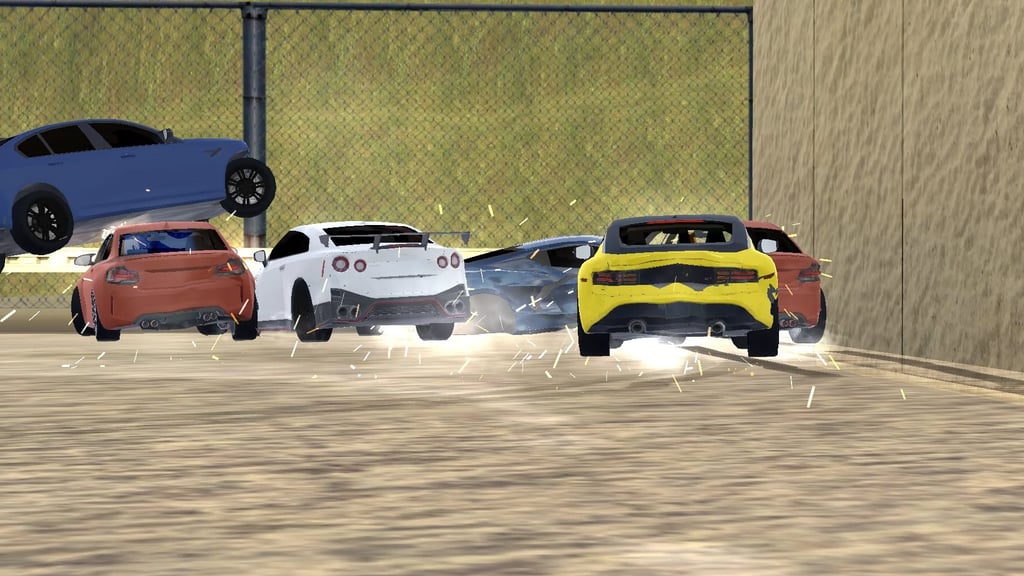
Table of Contents
Summary
Fans of Madalin Stunt Cars 3 are going to be in for a treat here. Car Crash Multiplayer takes the same concept while throwing in a BeamNG-style damage model and a realistic car roster spanning from old-school Ladas all the way up to a Bugatti Chiron, with a selection of the latest drift weapons on the market thrown in for good measure.

As the name suggests, you’re also treated to the same real-time multiplayer lobbies that earned the MSC series its legendary title, with a choice of several free-roam maps. You also get the same theme – no set objectives beyond causing carnage, and no in-game currency to think about.
Alongside the awesome cars and tracks, the damage physics are what make this truly stand out, though. As you crash, your wheels tear off, bumpers scrape along the ground, panels get crumpled, and your supercar slowly turns into a mangled wreck while you hunt friends (or get hunted) through vast city streets, and off the sides of mountains. It’s (arguably) the closest you’ll get to BeamNG, without needing to install anything.
You get the option to go solo to learn the maps, add AI opponents that’ll chase you down like an angry ex, or jump straight into a public lobby where anything goes. Want your own rules (or none at all)? The private lobbies let you and the homies decide exactly how chaotic the next session will be.
Car Crash Multiplayer features
- Release date – June 2023
- Difficulty – Beginner
- Levels/environments – 4
- Number of vehicles – 22
- Vehicle customization/upgrades – Paint only
- Multiplayer – Yes (public and private lobbies)
- Mobile – Yes (iOS and Android)
- Developer – ActionGames
Physics

The damage model is up there with the best you can play in your browser. Take your car off a massive ramp, land nose-first, and you’ll watch the front crumple, wheels fly off into the distance, and the windshield spider-web.
Outside of BeamNG, the closest thing until now is Beam Drive Car Crash Test Simulator, which offers similar soft-body deformation with a built-in map editor for building your own carnage from scratch. Fans have always hoped for that one to introduce online lobbies, and this is the closest they’ll get (for now, at least.)
Weight transfer and body roll are modeled well, too, which is rare for crash games. You can actually feel the difference between wrestling the Lada Niva, the all-wheel-drive GT-R, and a rear-wheel-drive E92 M3. Turn sharply at speed, and you can feel the weight shift as the chassis leans. Yank the handbrake, and you’ll be able to throw it around even more.
Unsurprisingly, the rear-wheel-drive cars are best for letting the back end hang out nice and loose, where the AWD options are still drift-friendly, but you can feel the front doing more work.
Graphics

Cranked up to ‘High’ in the settings menu, the cars look awesome, with accurate badges and names across the roster.
The overall quality isn’t far off the best browser games going. Touge Drift & Racing delivers jaw-dropping mountain scenery that makes you feel like you’re inside your own Initial D episode. UNBOUNDED goes the other way with a neon-lit nighttime city where reflections bounce off the wet tarmac and your paintwork, producing some of the most cinematic visuals in any free browser drifter.
Bear in mind that the higher settings require a decent machine since they’re working overdrive with the physics. So, if things stutter or lag, consider dropping down to Medium or Low in the settings menu.
Car Crash Multiplayer controls
PC/laptop/Chromebook
- W/Up arrow – Accelerate
- S/Down arrow – Brake/reverse
- A/Left arrow – Steer left
- D/Right arrow – Steer right
- Space – eBrake/handbrake
- F – Nitro (refills quickly, no bar shown)
- C – Change camera
- B – Look behind
- R – Repair car
- I – Engine on/off
- Q/E – Left/right turn signal
- Tab (hold) – Hide mouse cursor
- M – View full map
- Esc – Pause menu
- Mouse – Move camera around car (default view only)
Mobile/tablet (iOS/Android)
- Press the on-screen buttons
The game runs better than you’d expect on a phone or tablet. One small catch is that you can’t swivel the camera around the way you can with a mouse. So, for the ultimate experience, a PC or laptop is the way to go.
If you fancy trying something else, our mobile games section offers plenty of other options that are perfectly optimized for mobile/portable devices.
How to play Car Crash Multiplayer
Initial setup
When you first load the game, you’ll be asked to enter a name. Enter whatever you want, and click ‘Continue’ to land on the main menu. Here, your name is displayed in the top-left corner (and easily changed later if you wish).

The main menu offers ‘Multiplayer’, ‘Single Mode’, ‘Daily Reward’, and ‘Settings’. As always, we recommend heading to ‘Settings’ first. You’ll find a sound toggle, master volume slider, and quality options from Low through to High. It defaults to Low, so if you’re on a decent device, push it straight to High and see how it runs before dropping back down.

Before you drive anywhere, collect the ‘Daily Reward’. This hands you a free car each time you log in across a seven-day cycle. Day 1 is a basic ride, but the rewards ramp up fast, with a BMW M2, Lamborghini Aventador SVJ, and eventually a G-Wagon (perfect for off-roading) waiting at Day 7.
Once you claim the first one, a 24-hour timer starts before the next becomes available, so popping in daily is the only way to build out the full roster.
Getting started

With the daily reward sorted, pick ‘Single Mode’ or ‘Multiplayer’ and choose one of the four maps. Single Mode then lets you go alone, ‘ride with light opponents’, or ‘ride with difficult opponents’. We’d recommend solo for your first run so you can feel the handling out before AI cars start slamming into you from every angle.
After selecting a map, you’ll land on the car selection screen. Nine rides show up initially, but scroll up, and you’ll notice you actually have 22 in total, with several locked behind the daily rewards. Pick your ride, click ‘Choose’, and you’re in. Press ‘R’ at any moment to repair your car, or open the pause menu to switch cars, change color, or retry the map entirely.
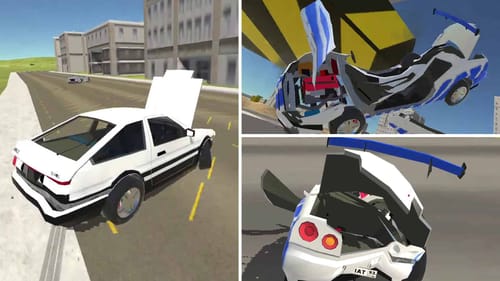
There’s no currency, grind, or unlocks beyond the daily reward system. Everything available is free to use from the moment you begin. If you’d like to try something else with similar soft-body physics and more aggressive obstacles, Car Crash Test: Abandoned City is a similar game (without multiplayer). You get multiple vehicles parked around the map for you to hop between, along with a variety of car crushers, slow-motion mode, and massive ramps for testing every scenario you can think of.
Game modes
Like most other stunts and crash games, there are no structured modes. You pick a map, pick a car, and decide how much chaos you want thrown into the mix.

Single Mode
This solo mode drops you alone on the map of your choice. It’s the best way to roam around each track and get a feel for the different cars.
You’ll get to choose whether you want to add AI players, with two options:
Light opponents will throw in a handful of AI drivers who bump into you occasionally and keep things interesting without going too wild. It’s the mode we’d recommend if you want a bit of action without being dogpiled by a pack of bots.
Heavy opponents mode is where things get (properly) hectic. The AI becomes relentless, trapping you in corners and endlessly ramming into you. Think of it as being stuck with a five-star wanted level in GTA with no way to shake off the cops. It’s funny for a couple of minutes, then you’ll probably want to switch it up.
If you’ve enjoyed the varied levels of chaos, Survival Race is another great option that offers online multiplayer rounds with no grinding required. You’ll drift, jump, and fight against your opponents where the arena floor collapses under everyone’s tires until only one driver remains.
Multiplayer

The online lobby screen lets you create your own room or join an existing one. Public lobbies are listed on the left, and you can jump into whichever has a slot open. Creating a room lets you pick a name, set the player limit, and decide whether it shows up publicly or stays private.
Private lobbies are perfect if you’ve got some friends wanting to play, too. Share your room name, agree on some ground rules (or don’t), and off you go. You could make up your own races, or just cruise and meet up for a proper wreck-fest. The chat box on the right-hand side lets you talk trash if that’s your thing!
For open-world multiplayer mayhem with a much bigger roster, the OG stunt game, Madalin Stunt Cars 3, also offers online lobbies but with 60-plus cars that are unlocked from the start, and three massive maps packed with loop jumps and ramps. It’s perfect to pair with this once you’ve wrecked everything on offer.
Track list
Four maps are on offer, each with a completely different vibe.

Parking is a big parking lot lined with lampposts and hedges to drift around (or through!) The hedges let you drive through them without damaging your car too much, but watch out for the kerbs around them. This track is perfect for learning the handling and feeling of each car out before tackling the busier maps.

Descent 1 is a floating sandbox with scattered obstacles, a grassy hill in the middle, and BeamNG-style test areas with concrete slabs and ramps to see how the physics react.

The AI is a bit buggy on this map (they tend to drive straight off the edge), so expect to be going solo even if you choose the heavy AI. You’re also able to fall into the abyss, so you’ll need to be careful!

City is a full-blown urban map with insane amounts of obstacles, including barriers, trees, buildings, highway ramps, and near-endless roads to drift around. Unlike Parking, there’s enough room to dodge the heavy AI here if you need a breather. It’s arguably the best map for online sessions thanks to the scale and the sheer variety of things to smash through.

Countryside is the rural alternative to City, packed with hay bales, tractors, lighthouses, and rocky mountain terrain. It’s where the G-Wagon and other off-road-capable cars come into their own, and where supercars will often meet their fate.
Fancy venturing somewhere different? Top Speed Racing 3D crams a city, airport runways, shipping docks, desert dunes, and mountains all into a single open-world map alongside plenty of game modes (which are lacking here), making it one of the most varied offerings of any free browser game.
Car list

All 22 cars are listed below in the order they appear in the game, and you’ll likely be surprised at how modern some of them are. The ones marked as daily reward unlocks are tied to the seven-day login cycle covered earlier.
- Lada Niva
- Lada Priora
- Vaz 2107
- Vaz 2108
- Lada Vesta (Daily reward unlock)
- Toyota Camry 40 (XV40)
- Toyota Camry XV70 (Daily reward unlock)
- Nissan Skyline GT-R R34
- BMW M3 E92
- BMW M4 F82
- Nissan 400Z
- Audi RS5
- Mercedes C63 AMG
- Nissan GTR R35
- BMW M2 G87 (Daily reward unlock)
- BMW M5 F90
- Lamborghini Aventador SVJ (Daily reward unlock)
- McLaren 720S
- Chevrolet Corvette C8
- Lamborghini Huracan STO (Daily reward unlock)
- Bugatti Chiron
- Mercedes-Benz G-Class (Daily reward unlock)
Each car handles completely differently. Obvious rear-wheel-drive picks like the E92 M3 are the most natural drift-happy options, and it’s great to see the 400Z in a browser game.
Supercars like the Chiron, on the other hand, grip up and hit triple-digit speeds so quickly that you’ll probably wrap it around a lamppost before you’ve figured out the brake balance!
Tuning and upgrades
There are no upgrade options in this one, but there are plenty of great alternatives out there if it’s what you’re after.
For the ultimate pick, Drift Hunters MAX has pretty much every tuning and upgrade you can think of. There’s also an open-world AI traffic mode where you weave through unpredictable cars while chaining drift combos on an endless street, or a unique Drift Attack mode with clipping points and judged runs. If you perform well enough, you might even make it to the global leaderboards.
Customization
You can change your car’s paint color with a range of options from the pause menu, but that’s the extent of it.
Drift Hunters Pro is a great option for JDM purists who want to customize and tune their cars, featuring old-school legends like the Nissan Silvia S15, Toyota AE86, and Mazda RX-7 FD (basically a holy grail drift roster) alongside online lobbies for tandem sessions.
Advanced tips & tricks
Pick the right car for the right map
You’re going to be limited if you want to head to the stunt arena with a supercar, as it’ll just bottom out, so consider going for something with raised suspension to make the most of it. For off-roading on the Countryside map, stick with the G-Wagon or have fun with one of the Ladas. For City drifting, the Skyline, E92, and 400Z are your friends.
Light AI hits the sweet spot

Heavy AI sounds fun on paper, but it gets annoying quickly if you can’t escape. Save heavy mode for when you specifically want to see how long you can survive against impossible odds (it probably won’t be long if you choose Parking!)
Use the sandbox map to learn, not just to crash
Descent 1 might look a little basic compared to City, but it’s the best place to get a feel for the physics out without worrying about lampposts, buildings, and everything else. The test areas with concrete slabs and ramps let you see how each car reacts to impact at various speeds, which pays off when you move onto the busier maps in a lobby with friends trying to end your run.
Get your friends to join you in a private lobby
Public lobbies are fun for a while, but it often turns into a bit of an unstructured ram-fest. Private lobbies with friends let you create your own objectives, whether that’s races, demolition derby sessions, or no-rules free-for-alls. Our multiplayer games collection has plenty more options if you fancy moving on to something else after.
Try the highest graphics settings you can, but be prepared to go down a notch

If your machine can handle it, push the quality straight to High in the settings menu to appreciate the game in all its glory. The damage model is way more satisfying when you can see every dent and smash in full detail.
Car Crash Multiplayer FAQ
Can I play Car Crash Multiplayer on mobile?
Yes, the game works on iOS and Android devices in your browser with nothing to install. A computer will offer the ultimate experience, but this offers a great on-the-go compromise.
How do I get the locked cars in Car Crash Multiplayer?
Through the ‘Daily Reward’ system on the main menu. Claim the first car, wait 24 hours for the timer to reset, and the next one becomes available. A full seven-day cycle unlocks the whole locked section, including the G-Wagon on Day 7.
Is there any way to earn money or upgrade cars?
No, there’s no currency or performance upgrades, so all the cars are stock. You can change the paint color mid-game from the pause menu, but that’s the only tweak available.
How do I repair my car mid-game?
Press ‘R’ to reset damage and repair your ride instantly. If you’re truly stuck, open the pause menu (Esc) and hit the reset button, which will give a full reset.
What’s the best car for drifting in Car Crash Multiplayer?
The BMW E92 M3 and Nissan 400Z are arguably the best cars for getting sideways thanks to their rear-wheel-drive setups and balanced chassis. As you’d hope, the all-wheel-drive rides fight a little more when you try to kick the back out, but it’s still possible.
How does the multiplayer work?
Create a room with a name and player limit, or join an existing public lobby from the list on the left. Private rooms let you share a private room name with your friends, which is the best way to set up your own sessions without randoms joining.
Can I change the AI difficulty mid-session?
No, you’ll need to leave your current run and go back to the main menu to switch between solo, light, and heavy opponents. The same goes for switching maps.
Written by:
Published on:
Bill is a writer and photographer who has been part of the Drifted team since 2015. His work extends to various print and online publications, including Wangan Warriors.
As part of the King of Nations team, he traveled extensively for several years, capturing top-tier international drift events worldwide. His hands-on experience, including rebuilding his own Nissan Silvia S15 drift car, gives him unique insights into drift car building and global drift culture.
When not behind the lens or keyboard, Bill can be found browsing classifieds for his next JDM project or shredding virtual tires on popular simulators like Assetto Corsa, CarX, and Forza.
You can learn more about Bill’s story here or follow his socials on X (formerly Twitter), Flickr, Facebook, and Instagram.
 Beam Drive Car Crash Test Simulator
 Car Crash Test: Abandoned City
 Real Drift Multiplayer 2
 Downhill Car Ride: Crash Test
 Rocket Goal
 Arcade Car Drift