
Drift Rider
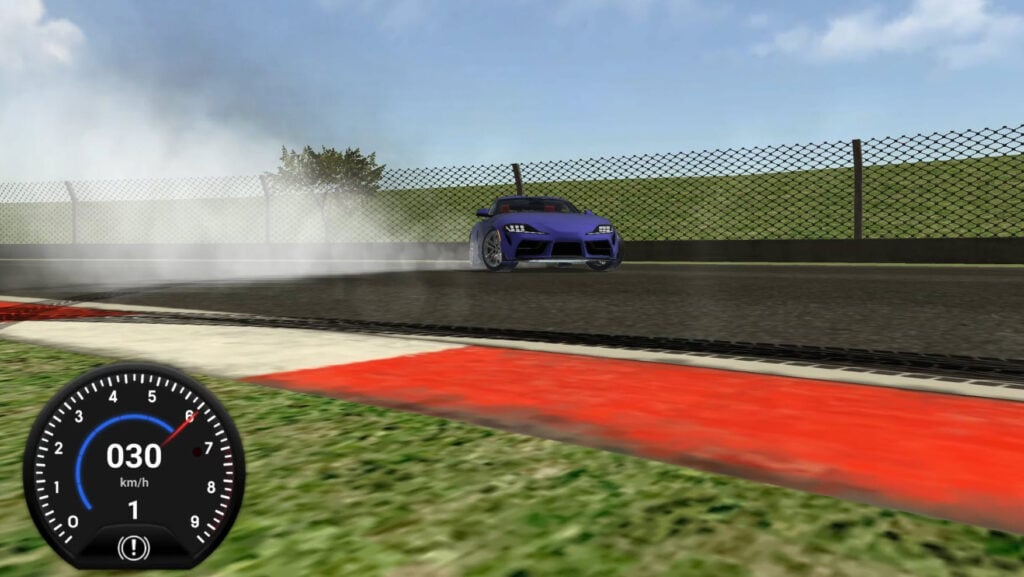
Table of Contents
Summary
Drift Rider combines great graphics with realistic physics, along with a wide variety of cars, from old-school classics to supercars, modern drift weapons, and even drifting SUVs.

You’ll get to tune, upgrade, and customize your favorite rides before choosing whether you want to head to the city or the track, with a unique scoring system that rewards long drifts.
The physics are predictable and easy to get the hang of, making it an ideal game for learning while still offering a decent amount of depth for improving your technique further down the line.

All tuning options (suspension height, camber, brake balance) and paint customization are free, so you can dial in your perfect setup and style from the start. You also get a free boost right away, thanks to the generous nitro system, which lets you pull off massive drifts and start bagging big combos to put towards parts upgrades and new rides.
The tracks (all unlocked and free from the start, too) offer a real mix of locations, from tight city circuits with challenging curbs to sweeping racetracks that are perfect for sustained slides (and bigger combos), highway sections that feature big ramps and elevation drops, and a touge-style mountain road lined with unforgiving walls.
Drift Rider is made by Freezenova (the same team behind the popular Drift King and Drift Hunters Pro games). Unlike those two, there’s no online multiplayer here, but if you enjoy the physics, tracks, and cars on offer here, and want to tandem or battle online with your friends, those are perfect alternatives.
Drift Rider features
- Release date – December 2023
- Difficulty – Beginner/Intermediate
- Levels/environments – 5 tracks
- Number of vehicles – 10
- Vehicle customization/upgrades – Yes
- Multiplayer – No
- Mobile – Yes (iOS and Android)
- Developer – Freezenova
Physics

Drift Rider brings predictable ‘sim-lite’ handling. Think of this as a step-up from arcade-style drifting games in the realism department, while not trying to be a full-blown simulator.
One thing you’ll notice that can get a bit frustrating is that the cars often lack power and bog down mid-drift, especially on steep elevation changes, which isn’t something you have to deal with in other popular sim-based drifters like Drift Hunters MAX or UNBOUNDED.
Another great alternative with more natural-feeling physics where the lack of power delivery doesn’t hold you back is Drift Race Simulator, offering great handling along with a (compulsory) manual gearbox to get used to, and a 90s JDM focus that’s perfect for die-hard Japanese drifting fans.
Graphics

The clean visuals look great, and while the graphics in the tracks and cities are nowhere near Drift Hunters MAX, the actual cars themselves are really detailed and refined.

One nice touch is the car interiors, which look super realistic (even if there’s a lack of hands on the wheel), and switching from an old-school car to a modern option is just how you’d expect, with the intricate details going from classic leather and old-style knobs and buttons to a modern, clean infotainment system.
While there’s damage, it’s really minor, where your car gets small dents and dings after a few too many crashes. If this is disappointing, there are plenty of games out there with much more realistic crash physics, such as Car Crash Test: Abandoned City, which offers open-world sandbox carnage, where you get to break individual components or completely crush your car (if you wish!)
Or, you can give Epic Racing: Descent on Cars a try, which brings adrenaline-fueled, cartoon-based downhill chaos along with similar satisfying destruction physics. If that’s a little too intense, Deadly Descent is another popular choice among downhill racing game fans, which is a bit less chaotic.
Drift Rider controls
PC/laptop/Chromebook
- W/Up arrow – Accelerate
- S/Down arrow – Brake/reverse
- A/Left arrow – Steer left
- D/Right arrow – Steer right
- Space – Handbrake/e-brake
- Shift – Nitro
- M – Rear-view mirror
- C – Change camera
- R – Reset car
- U – Toggle kmh/mph
- I – Start/stop engine
- P – Fullscreen
- Z – Upshift (switch to manual gearbox for full control)
- X – Downshift (as above)
You can also click the H/M/L buttons in-game to quickly toggle the graphics settings and the musical note to mute the audio.
Mobile/tablet (iOS/Android)
- Press the on-screen buttons.
As with all the games in our mobile games collection, Drift Rider is optimized for mobile browsers and features on-screen touch controls.
How to play Drift Rider
Initial setup

When you first launch the game, you’ll see that the main menu has these buttons at the top: Race, Cars, Parts, Tuning, Paint, and Options.
Head to Options first and configure the following:
- Gearbox – We recommend leaving this on Automatic until you’re confident with the handling and physics
- Graphics – Try High if you’re on a decent PC. For older Chromebooks or lower-spec devices, try starting on Medium. Drop to Low only if needed for smooth performance. You can quickly toggle the graphics mid-race using H/M/L keys (top-right shortcut).
- Volume – Adjust as needed
You now have the option to get drifting right away or visit the other menu sections (covered in detail below).
- Cars (browse the unlockable car roster)
- Parts (premium engine/turbo/gearbox/handling upgrades)
- Tuning (free suspension/camber/brake adjustments)
- Paint (free body and rim colors)
Getting started
When you’re ready, click Race to choose from 5 tracks (detailed in the Game Modes below), then click Start Race and get drifting!
Once you begin racking up points, the score shown in the top-left corner converts to money when you return to the main menu, which you can then use for upgrades and new cars for your garage.
Scoring rule: Unlike most drifting games, Drift Rider specifically rewards long, sustained drifts more than linking lots of drifts together. Transitioning (switching direction even while drifting) breaks your combo, making giant combos harder than games that typically reward this. However, you’re able to drift off-track and still rack up points and combos, and bumping into the barriers doesn’t kill your combo either.
Nitro: The amount of nitrous you get is generous from the start. Look for the blue line around the speedometer, which shows the nitro you have remaining, which will go down as you use it, then top itself up. Throw the car into a drift, then activate the nitro (Shift) to pull off huge, extended skids. If you manage to retain your combo, the nitro keeps topping itself up as long as you maintain the drift.
Game modes

There are 5 unique tracks in Drift Rider, each offering something a little different:

Track 1: City with highways – This street circuit combines city sections with highway on/off-ramps with elevated back-roads. You might even stumble upon the mini stunt arena if you search for it.

Watch out, though, as the raised highways can suddenly end, dropping you down into the grassy area below. Fortunately, going off-road is fine, and you can still drift on the grass and rack up big scoring combos.
Track 2: Traditional high-speed racetrack – This track is lined with walls, and is less focused on big, giant sweeping corners, making combos harder to hold. It reminds us of the default Drift Hunters track, featuring high-speed straights that let you swing side-to-side, but unlike Drift Hunters, the sweeping manji’s you’re used to aiming for won’t be earning you big combos here. Despite fewer big corners, speed can earn points quickly.

Track 3: Tight and twisty city – This one is much tighter and more technical than the other tracks in the game. If you’ve opted to lower your car for a stanced look, the big curbs are going to be a major hazard, and you’ll likely slam into them before you know it.
However, it can also be realistic with how the wheel/tire reacts depending on the impact angle, and sometimes you can get away with it. While this track is perfect for skill-building and getting used to the manual gearbox, it’s not ideal for easy point farming.

Track 4: Mountain/touge road – Japanese drifting fans will welcome the familiar touge vibe of this one, featuring steep elevation changes. Unlike Drift Hunters MAX, which feels perfectly refined for the incredible touge layouts on offer, if you scrub off momentum and lose speed, your car often bogs down and stops drifting in Drift Rider, which can be frustrating. This is most noticeable in the uphill sections, where you’re punished for just lifting off the throttle for a split second.

Track 5: Big sweeping racetrack (Best for big combos) – Unlike the other tracks, which have a lot of obstacles you need to avoid, this one offers a huge open space for drifting. Given how the scoring system works, this lets you use the full track, or you can even go off-track onto the grass to make massive loops and build huge combos. Once hazard you will want to watch out for, though, is the red metal bollards at the inner clipping points, which are solid (who put those there?!). They’re not to be confused with the orange cones, which are fine to hit and will simply bounce off your car.

While all these tracks are great fun, there’s no denying that there’s a bit of a lack of things to do in Drift Rider beyond drifting and earning. If this bothers you, Force Drift Racing: Aussie Burnout is worth checking out, offering unique features including an exclusive burnout pit mode (which is super rare for browser games), making it a great stress reliever where you get to explode your tires in front of the roaring Summernats-style fans.
Car list

There are 10 cars in total, from affordable to expensive:
- Chevrolet Corvette C3 Stingray (free starter car)
- Audi TT Roadster (2,000 credits)
- Toyota GR Supra (A90) (5,000)
- Lamborghini Countach (8,000)
- Cadillac ATS-V Coupe (10,000)
- Rolls-Royce Cullinan (12,000)
- McLaren 720S (14,000)
- Aston Martin Vulcan (15,000)
- Ferrari F12 TRS (16,000)
- Widebody RWB Porsche 911 (964) (20,000)

It takes a while to unlock the cars, so it can be a little grindy, especially if you’ve got your eyes on one of the more expensive options. If you’d rather have everything right away, check out Madalin Stunt Cars 3, which offers 34 vehicles all unlocked from the start, along with open-world stunts, drifting, and online multiplayer.
Tuning and upgrades

Upgrades (Parts menu)
There are four categories: Engine, Turbo, Gearbox, and Handling. Each of these has 4 upgrade tiers:
- Stock (free)
- Street – 200 credits
- Racing – 400
- Pro – 600
Although we don’t always recommend upgrading the engine first (usually brakes and suspension), it’s worth it in this game due to the loss of power when stock, as it’s then easier to pull off longer drifts. If you plan to keep a car long-term, consider going straight to Pro rather than upgrading every time you have the cash to avoid forking out for each tier separately.
Tuning
All the tuning adjustments are completely free and unlocked from the start, so you can dial in your setup immediately on any car.

Suspension Height – Front and rear sliders let you set your desired ride height. While it’s always tempting to slam it on the ground and go for a stanced look, you’ll want to consider where you’ll be heading, as it’ll often smash into curbs and struggle to go over jumps on some tracks.
Camber – Front and rear sliders. Keep your eyes on the plus/minus controls, as these are reversed from what you’d expect. For negative camber (top of the wheels pointing inward), slide slightly to the right on both sides. Our suggested setup is a little negative camber on the front, which helps achieve maximum contact at full angle, along with a very slight negative camber at the rear. You can’t adjust the offset, so if you go too wild on the camber, it’ll probably look a bit weird.
Brakes – Brake balance lets you choose the front/rear split for braking, and brake pressure lets you decide how abruptly the brakes will be when you press them.
Customization

Paint (Free) – You’re able to paint the Body and Rims separately. There’s a full color palette available, along with four finish types: Gloss, Matte, Metallic, and Chrome. (If you ignore the typos!)
Make sure you press “Set Color” after making any paint changes, or the changes won’t apply. (Ask me how I know…)
Unlike Drift King and Drift Hunters Pro (from Freezenova), you can’t change the actual wheel designs in Drift Rider – only the color.
Advanced tips & tricks
Farm points on Track 5 by using the unlimited nitro
Use the wide, open space on the racetrack to pull off long, sustained drifts to earn the maximum combos (remember, this game doesn’t reward you for transitions/linking drifts). Feel free to go off-track onto the grass to make massive loops, but just make sure you keep the momentum going by activating the nitro. Don’t forget – the nitro never runs out as long as you manage to maintain your combo.
Upgrade the engine first when you get a new car

The stock vehicles in this game noticeably lack power and bog down easily. Engine upgrades should be your first pick when you’ve got the cash, as this will make the biggest difference for holding drifts, letting you rack up much bigger scores and combos to get the other cars and upgrades.
Master long drifts, and try to avoid the usual transitions

At first, the scoring system feels weird, as it prefers single-direction drifting rather than proving your skills by linking multiple drifts and pulling off manjis as you’d typically expect.
While these advanced drifting techniques are usually rewarded, as soon as you transition in Drift Rider, you lose your combo. So, if you want to earn points, focus on maximizing the space and using nitro to keep the momentum rather than chaining quick direction changes.
Drift Rider FAQ
What is there to do in Drift Rider?
You’ll drift on 5 tracks (cities, touge, and racetracks) to earn money to unlock all 10 cars, before painting, upgrading, and tuning them to their maximum potential. There’s no campaign, missions, or multiplayer, but you can enjoy open-world, free-roam drifting.
How do I earn money quickly?
Use Track 5 (big racetrack with big open spaces) and then hold down nitro. Don’t be afraid to go off-track onto the grass for massive loops. A long, sustained drift will reap maximum rewards, and if you keep your combo alive, you’ll have unlimited nitro available.
Can I play Drift Rider online?
No. Drift Rider is single-player only. For online multiplayer by the same developers, try Drift King (with more supercars) or Drift Hunters Pro (with a 90s JDM focus – think MKIV Supra, RX-7 FD, Skyline R34, Nissan Silvia’s, etc).
Can I switch to a manual gearbox?
Yes. You can enable this in Options, then use Z (upshift) and X (downshift). Automatic is recommended for beginners, but manual is much better for letting you use the full power band once you’ve gotten used to the game.
Why do my paint changes disappear?
You need to press “Set Color” each time after changing the body and rim colors, or they won’t apply.
How many upgrade tiers are there?
Four per category (Stock, Street, Racing, Pro). Street costs 200, Racing costs 400, and Pro costs 600 for each. Consider skipping straight to Pro rather than upgrading each tier individually to save money.
Written by:
Published on:
Philippe Daix is a seasoned automotive writer and entrepreneur who founded TopSpeed.com in 2005. After nearly two decades shaping online car journalism, he brought his passion for drifting and performance culture to Drifted.com in 2024. His work blends technical insight, storytelling, and a lifelong love for high-performance machines.


