
Moto Traffic Rider
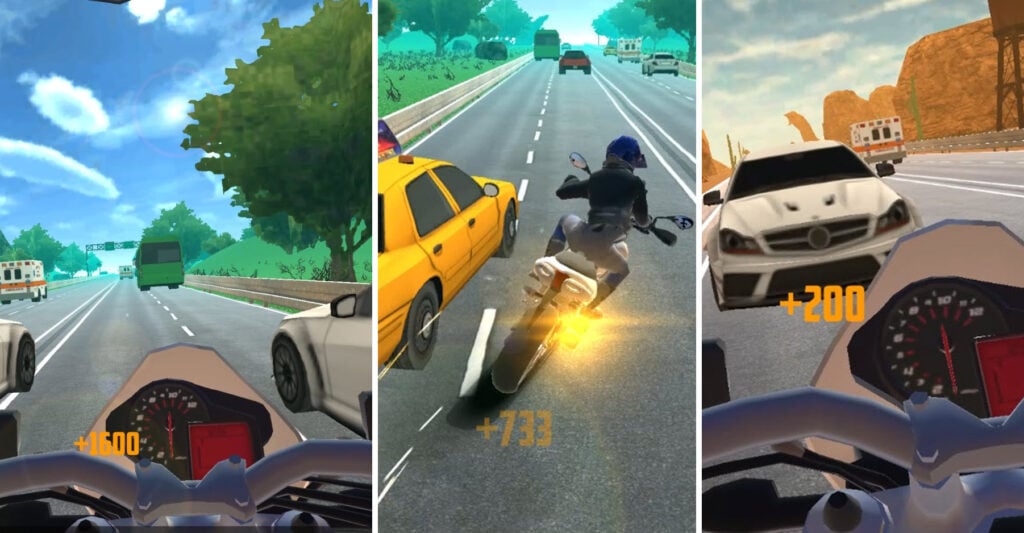
Table of Contents
Moto Traffic Rider summary

Get on the riding seat of a tail-happy motorbike as you weave through rush hour traffic at breakneck speeds and get your adrenaline rushing. Along the way, your goal is simple: rack up the most points by threading the needle between cars, trucks, and buses while pushing your bike to the limit.
You’ll earn the ultimate rewards by driving into oncoming traffic and pulling off high-speed near-misses that’ll get your heart racing. Each close call stacks your combo multiplier, turning a casual ride into a massive payday (assuming you don’t end up as roadkill).
There’s a great selection of motorbikes, each with plenty of upgrade options, along with multiple game modes and locations to choose from. It’s perfect for testing your reflexes and nerves, both of which will be useful when you go back to getting sideways in Drift Hunters MAX.

You get to ride through stunning scenery, including desert highways, snowy city streets, and rural routes, each offering its own challenges. But, while you’re admiring the views, remember – it only takes one wrong move to go flying over the handlebars!
Moto Traffic Rider controls
PC/Laptop/Chromebook
- W/Up arrow – Accelerate
- S/Down arrow – Brake/reverse
- A/Left arrow – Turn left
- D/Right arrow – Turn right
- F key – Boost/nitro
- C key – Change camera
Mobile/tablet
- Press the on-screen buttons
How to play Moto Traffic Rider

Initial setup
When you first open Moto Traffic Rider, you’re immediately gifted some generous rewards. You can either claim a free 10,000 CR bonus or watch an ad for double earnings, netting you 20,000 CR immediately. (It’s worth watching the ad if you’ve got a few seconds to spare.)
After that, you’re thrown straight out onto the highway before you even get to check out the menus. You’ll see the in-game controls displayed on screen, and your goal is simple – see how far you can ride without crashing.
There’s no pressure at this point. Just learn the ropes and try toggling the camera (C key) to see which view you prefer, as they’re totally different. The first option gives you a handlebar cam for an immersive first-person feel, while the other tracks you from behind for better awareness of the surrounding traffic.

Small crashes will make the red health bar at the bottom start filling up. Once the bar maxes out, it’s game over. However, be prepared, as big smashes will send you straight to the ER!
Getting started
Since you’ve been thrown in at the deep end already, it’s time to explore what else the game offers and how to navigate the menus.

In the main menu, you’ll see your current (free) bike along with various buttons and icons. The top left corner has the Settings cog wheel for adjusting audio volume, plus a CONTROL button that reminds you of the in-game controls whenever you need them.

Your current bank balance is in the top right corner next to the daily rewards button, and you can claim that first daily bonus right away. Want even more cash? Click the currency icon at the bottom of the screen to earn another 1,000 CR.
Since you already grabbed the initial bonus when you first opened the game, you can press the left/right arrows on the sides of the screen to browse through the bikes, or click the blue engine icon to upgrade your current ride.
We’ll discuss both of these more in-depth in the ‘Bike selection’ and ‘Tuning & upgrades’ sections below.
Heading to the highway

If you’re ready to start earning some real money and getting to grips with the game, click the PLAY button in the bottom right corner, where you’ll need to choose your game mode and track.
Moto Traffic Rider game modes

One Way
- Four lanes all moving in the same direction
- No oncoming traffic to worry about
- Great for beginners to get a feel for the controls
Two Way
- Four lanes, two with oncoming traffic
- More difficult and unpredictable
- By far the best way to quickly earn money once you get the hang of it
- High-speed riding into oncoming traffic gives massive bonus payouts
Time Attack
- 100 seconds on the clock
- See how far you can travel before your health runs out
- Perfect for competing with friends to see who gets the highest score
Highway selection

Each game mode lets you choose from three different locations:
- Desert Valley
- Grasslands
- Snow City
All of these offer different visual experiences, though the traffic patterns remain nearly identical.
Earnings & bonuses
Your payout at the end of each run depends on several factors:
Total distance – How far you managed to travel before crashing, or running out of health
Near miss – Your total near miss combo count
Keep above 100km – See how long you’re able to maintain the speed over 100km/h without dipping under
Opposite direction – Time spent driving the wrong way in Two Way mode
Moto Traffic Rider bike selection
Six bikes are available, ranging from everyday cruisers to high-performance superbikes. Prices can reach up to 25,000 CR for the top-tier machines.
Scroll through them using the arrows on the sides of the screen to check out each one and see its stats. You can test ride any bike by watching an ad, but you’ll need to purchase each bike to unlock its upgrade potential.

Starting with the free bike and working your way up is perfectly viable, as the upgrades matter just as much as the bike itself. A highly-modified bike can outperform some of the best stock bikes, so if you love the look of one, upgrade it all the way!
Tuning & upgrades

With any motorcycle you currently own, you can access the Upgrade menu by pressing the blue engine icon above the bike in the garage.
Five upgrade options are available, each with five tiers of improvement (except NOS, which is a one-time purchase):
Acceleration – Faster speed buildup from a standstill or low speeds
Handling – Improved and sharper control when weaving through traffic
Brakes – Shorter stopping distance when you need to slow down quickly
Top speed – Higher maximum speed for bigger combo multipliers
NOS – You only need to purchase this one to unlock it. Then, press the F key in the game for a temporary nitrous boost, but use it wisely as it needs to refill occasionally.
Prioritize acceleration and handling first, as they will have the biggest impact on your early earning potential.
Although the bikes slide around a little at high speeds, you’ll want to check out our drifting games if you’re looking for some real sideways action!
Moto Traffic Rider advanced tips & tricks

Drive into oncoming traffic at max speed for ultimate earnings
If you want to earn quick cash, choose Two Way mode and spend as much time as possible driving at high speed in the oncoming lanes. The opposite direction bonus, combined with high speed and near-miss combos, creates huge payouts.
Tap the buttons for ultimate precision
Rather than holding the keys or touchscreen buttons, rapid tapping often gives you much better control over the bike. Proximity is everything in this game – just a few millimeters can mean the difference between affording a new motorbike and game over.
There’s no shame in using the brakes

While we’re big fans of the “when in doubt, flat out” philosophy, Moto Traffic Rider sometimes forces you to slam on the brakes or ease off the throttle when there’s nowhere to go.
The bike won’t come to a complete standstill. It’ll hover around 30 km/h, even with the brakes applied, so keep this in mind and watch for the nearest gap to squeeze through when you can.
Don’t get too risky with close passes

Other vehicles on the road will change lanes with barely any warning, and they’ll soon catch you out if you’re riding too aggressively. While near misses give the highest points, getting slightly safer passes and stacking combos will often earn you more money in the long run than constantly crashing while going for hero moves.
Avoid scraping your handlebars on vehicles
Get too close, and you’ll scrape your handlebars against passing traffic. Not only will this kill your combo streak, but it will also take a hit to your health bar. Leave a tiny bit more space than you think you need until you’re confident about how close you can get.
Use your nitrous wisely

Although you get a generous amount of nitrous, there’s no gauge showing when it’s running out. Don’t rely on it for extended periods, especially if you’re counting on it to squeeze through a tight gap. It might suddenly empty and leave you in a bad spot.
Moto Traffic Rider FAQ
Here are a few commonly asked Moto Traffic Rider questions:
Is Moto Traffic Rider mobile-friendly?
Yes, it’s optimized for iOS and Android devices, whether you’re on your phone or tablet. It also runs perfectly on low-spec Chromebooks and laptops.
How many bikes are there to unlock?
Six bikes in total, with the first one given to you from the start. These range from cruisers to superbikes.
Can I tune and upgrade the bikes?
You can upgrade each bike’s acceleration, handling, top speed, braking, and even fit a nitrous bottle for added boost. Each upgrade (besides NOS) has five tiers.
How many game modes are there?
Three game modes – Two Way, One Way, and Time Attack.
Which game mode earns the most money?
Two Way gives you an additional bonus for driving into oncoming traffic, which isn’t available in One Way or Time Attack. This makes it the fastest way to earn currency if you can avoid crashing.
Similar games we recommend
If you enjoyed Moto Traffic Rider, you’ll love Sky Riders and Moto Boss. The old-school fan-favorite Moto X3M is also a classic that never gets boring.
If you fancy something a bit different, give two of the most popular recent additions, Drift King and Survival Race, a try.
Written by:
Published on:

Bill is a writer and photographer who has been part of the Drifted team since 2015. His work extends to various print and online publications, including Wangan Warriors.
As part of the King of Nations team, he traveled extensively for several years, capturing top-tier international drift events worldwide. His hands-on experience, including rebuilding his own Nissan Silvia S15 drift car, gives him unique insights into drift car building and global drift culture.
When not behind the lens or keyboard, Bill can be found browsing classifieds for his next JDM project or shredding virtual tires on popular simulators like Assetto Corsa, CarX, and Forza.
You can learn more about Bill’s story here or follow his socials on X (formerly Twitter), Flickr, Facebook, and Instagram.


