
Time Shooter 2
Table of Contents
Summary
Ever wondered what it’d be like to dodge bullets in slow motion while picking off a room full of enemies one by one? That’s what makes Time Shooter 2 so popular, and it’s way more satisfying and addictive than you’d expect from the screenshots, which really don’t do the physics justice.
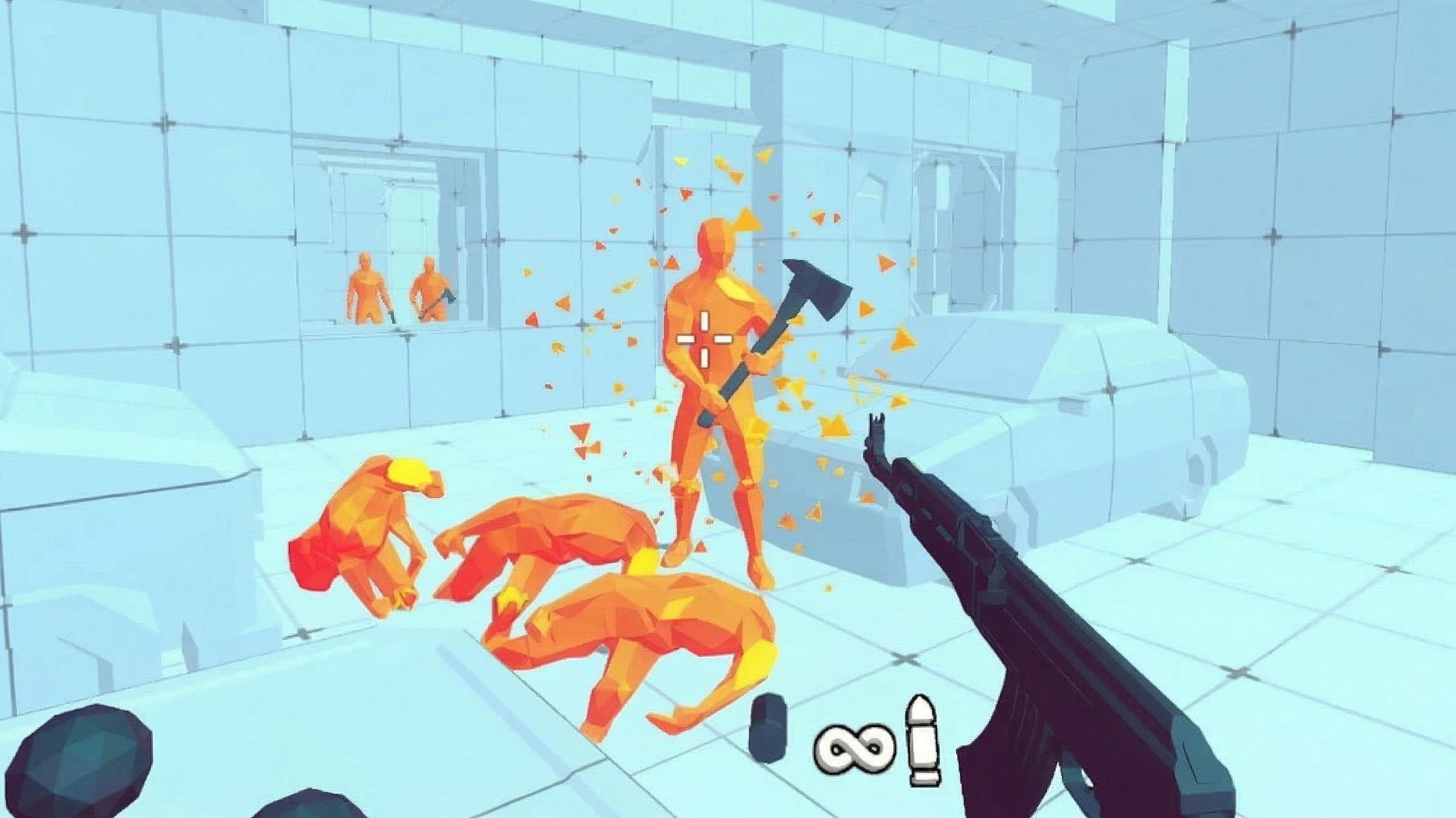
If you’re new to the Time Shooter series, it’s a first-person shooter where time only moves when you’re moving. Stand still, and everything goes into slow-motion, giving you a chance to plan your next move, line up the perfect shot, avoid axe-wielding enemies, or dodge incoming fire.
As soon as you start moving again, the chaos kicks back in immediately as you dodge and swerve bullets in a desperate attempt to stay alive. Think of it as a stripped-back SUPERHOT that runs smoothly in your browser without needing to install a thing.

The early levels ease you in with running axe-carrying enemies that are easy enough to deal with. But it doesn’t take long before you’re surrounded by gun-poppin’ bad guys firing at you from every angle, where one stray bullet is all it takes to have to restart from the beginning.
Time Shooter 2 features
- Release date – January 19, 2022
- Difficulty – Beginner/Intermediate
- Levels/environments – Progressive (increasing difficulty)
- Multiplayer – No
- Mobile – Android only (in browser)
- Developer – GoGoMan
Physics

Realism isn’t the focus here, and that’s part of the game’s charm. The time-manipulation aspect is what makes it great, where every tiny movement advances time slightly, where even a small step to the side lets you fire off a round, dodge incoming bullets, or reload while you reassess the situation.

When you hit them (with bullets or weapons), the enemies shatter into orange polygon fragments, which is super satisfying without being unnecessarily gory.
Unlike the bullets, the throwable items like the heavy metal balls have a realistic weight to them, so you’ll need to account for that when you’re chucking them across the room.
If you enjoy this kind of satisfying destruction, Deadly Descent offers a similar experience but in vehicle form, with realistic crash deformation on increasingly chaotic downhill courses where your body panels fly off, and cars crumple around you. Simply having enough wheels left on your car to reach the finish is often all it takes to win.
Graphics

The low-poly design is clean and minimalist with plain-looking rooms (that make it weirdly trippy after a while), bright orange enemies, and a weapon selection that keeps things simple and lightweight, helping it run smoothly on just about any device. If you want something a little more realistic, be sure to check out Bullet Force.

Each level looks like a weird, frozen car garage, and eagle-eyed drifting fans will soon spot what appears to be a car with pop-up headlights that looks suspiciously like the legendary Toyota AE86 that you’ll soon use to hide behind! Sadly, you can’t drive it (we checked to see if the keys were in the ignition, of course), but it’s a welcome little detail.
While there’s no drifting or driving on offer, that hasn’t stopped it from becoming one of the most popular titles alongside the drifting games on offer at Drifted, and once you play it, you’ll soon see why. It looks way better in motion than it does in screenshots, and once you’re actually playing, you won’t care about the graphics at all.
If you fancy a break from this, a perfect racing game option is Polytrack, which shares the same deceptive simplicity. The similar low-poly visuals look casual, but underneath is possibly the most challenging racing game in our collection, with over 100 tracks and global leaderboards where you’ll need nothing less than absolute perfection to secure a spot on the rankings.
Controls
PC/laptop/Chromebook
- WASD keys – Movement
- Left mouse button – Pick up weapon/Shoot
- Right mouse button – Throw weapon
Thankfully, that’s all you need to remember, as there’s no crouch or dodge mechanics. You’ll need to use the walls, pillars, windowframes, JDM cars, and other objects to break the line of sight with your enemies.
Mobile/tablet (iOS/Android)
Time Shooter 2 is available to play in-browser on Android devices. However, since it works best with a mouse, it’s not as refined as the optimized offerings in our mobile games collection. For quick-session action, Escape Road is a perfect choice if you fancy switching it up with an intense police chase survival game that’s equally fun and addictive as this one.
How to play Time Shooter 2
Initial setup

The main menu is super basic. In the top right, you’ll find ‘Settings’ where you can toggle sound effects and music, adjust mouse sensitivity, and choose a language.
In the bottom left, the controls are displayed on the screen. Hit ‘Play’, and you’ll be straight into the action.
Getting started

You’ll spawn into a large, divided room with enemies scattered around. Your top priority is to walk to the weapons table and grab something useful. Items that can be picked up (on tables and the floor) are highlighted when you hover over them, ranging from pistols and assault rifles to axes and heavy metal balls that you can throw.
You’ll soon get used to the game mechanic, which feels a little weird at first. While you’re standing still, everything moves in extreme slow motion. Bullets slowly head towards you, enemies creep forward (while sprinting!), and you can take your time planning your next move before they get to you.

The moment you move in any direction, the time speeds up proportionally. Tiny movements give you just enough time to fire off a shot, while big movements let you avoid bullets heading your way.
There’s no health bar here – one hit (from an axe or bullet) kills you, and you’ll be forced to start the level from scratch (which thankfully takes about a second). The instant-retry factor provides the same addictive quality as driving games like Drive Mad, where you’ll fail dozens of times on a single level but still can’t resist the urge to keep hitting retry! (Just one more, of course…)
As you progress, the levels quickly get harder. Early on, you’ll simply be dealing with axe-wielding enemies that need to get close to hit you.

Soon, you’ll encounter multiple enemies with guns pointing at you, and you’ll be dodging bullets from all directions while trying to line up your own shots and figuring out who to pop first. The identical-looking walls sometimes make it challenging to figure out what’s going on clearly, but thankfully, the enemies and exploding canisters stand out clearly.
After completing the first level, you’re offered a choice. You can watch an ad for endless ammo or invulnerability, or just keep going without either. We’d recommend skipping both for as long as you can, since the challenge is what makes the game fun. Save them for when you get properly stuck on a level (which probably won’t take too long!).
If you’re after more games you can play straight in your browser, we’ve got a massive collection. If you want more shooting action, Road of Fury 4 lets you get behind the wheel of a variety of vehicles while also throwing in plenty of weapons and upgrades as you progress through a series of post-apocalyptic levels.
There are no separate game modes here, and no multiplayer either. Survival Race is another online multiplayer game that’s perfect for online multiplayer action, delivering chaotic rounds where you’ll drift and jump across collapsing hexagonal platforms while knocking rivals off the edge.
Weapons & throwables
Each level offers different weapons on the tables and scattered around the floor from defeated enemies. Here’s what you’ll commonly find:

- Pistol – The ol’ trusty. It’s reliable and quicker at reloading than most (and especially useful with unlimited ammo). It’s a great all-rounder for the early levels
- Assault rifle – (Arguably) the best weapon in the game. Its higher fire rate makes it ideal for quickly getting multiple enemies in crowded areas

- Shotgun – Sprays pellets in a spread pattern, which can be perfect for hitting multiple enemies or a gas bottle to cause an explosion. The trade-off is a noticeably longer reload time between shots, and the aim isn’t as precise as other options.
- Axes – Melee range only. Useful in a pinch, but you’re better off grabbing a gun if there’s one around.

- Heavy metal balls – Throwable, reusable, and satisfying. They arc due to their weight, so you’ll need to aim higher than you’d think. They’re perfect for taking out nearby axe-brandishers without wasting ammo.

- Gas cylinders – You’ll find these big pink cylinders scattered around the levels. Shoot them, and they’ll explode, taking out any nearby enemies in the process. Just make sure you’re not standing next to one when it blows if an enemy shoots it.
When you run out of ammo, you can throw your empty gun at an enemy to take them out. Defeated enemies also drop their weapons, so the more chaos you cause, the more options you’ll have lying around.
Fancy something different? Smash Karts offers a Mario Kart-style vibe in your browser with online multiplayer, loads of pickups, and fast rounds. Or if destruction is more your thing, Car Crash Test: Abandoned City is a BeamNG-style sandbox browser game with similar soft-body damage physics and complete freedom to wreck everything.
Advanced tips & tricks
Prioritize enemies with guns over axe-wielders

Axe enemies need to get close to take a swing at you. However, the gun enemies can drop you almost instantly from across the room. Identify and eliminate the gunmen while moving away from the axe runners first, then deal with the closer threats once the bullets stop flying. If you’re low on ammo, they’re the perfect victims for the throwables.
Use micro-movements to advance time just enough to fire
Tiny taps on the WASD keys move the time forward slightly, speeding up your reloads so you can fire again without exposing yourself to much danger. Think of it like feathering the throttle on a drift car rather than flooring it and smashing into the barriers.
Save your best weapons for the harder sections

If you spot an assault rifle early in a level, consider using axes or metal balls on the first few nearby enemies if they’re not carrying guns. Keep the good stuff for when the room fills up with the gun-toting opponents later on.
Explosions are your best friend in crowded rooms
The pink gas cylinders scattered around the levels take one shot to blow, and they’ll take out anyone standing remotely nearby. The explosion is the perfect opportunity to destroy multiple enemies at once if they’re close together.
Don’t forget you can steal enemy weapons
If you’ve destroyed an enemy, their weapon drops to the floor, and you can grab it, along with whatever ammo they have left. This is a lifesaver when you’re running low on ammo in your current weapon, and there’s still half a room to clear.
Time Shooter 2 FAQ
What do I do when I run out of ammo?
Throw your empty weapon at the nearest enemy, then pick up something else from the floor or a table. Defeated enemies also drop their weapons, so there’s almost always something within reach.
How do I throw weapons?
Right-click to throw whatever you’re holding. Thrown guns will break on impact, but still take out the enemy. Metal balls can be picked up and reused.
What’s the best way to dodge bullets?
Stand still to slow time, spot which direction the bullets are heading, then move quickly in the opposite direction. Small, controlled movements will then keep you safe while letting you return fire as they reload.
What’s the best weapon?
The assault rifle is the most effective overall. The pistol reloads fairly quickly and works well in the early levels, while the shotgun’s spread is great for groups of enemies or hitting gas bottles, but it’s a little slower.
Why can’t I fire my gun?
Your crosshair will spin while reloading. Move around slightly to speed it up, and you’ll be able to fire again once it stops.
What should I do if an enemy is running at me?
Back up (if possible) to create distance so they can’t swing their axe, then shoot when you’ve got a clear line.
Is there multiplayer in Time Shooter 2?
No, it’s single-player only. If you’re after multiplayer action, we’ve recommended plenty of alternatives throughout the article, so check out the links above.
Can I play Time Shooter 2 on mobile?
Android devices can play the game within the browser, but it’s best suited to a PC/laptop/Chromebook due to the mouse controls.
Written by:
Published on:

Joe is an avid writer and car enthusiast. When he’s not cruising the streets alongside his friends in his Nissan Silvia S15, he’s drifting on his VR racing simulator.
Joe’s passion for cars is always on display. With a keen eye for detail and a deep understanding of the automotive industry, he hopes his writing conveys his excitement and knowledge of cars and games.
Joe’s work has been featured on many platforms including drivetribe.com, 180sx.club, carthrottle.com, smartdrivinggames.com, smartbikegames.com, databox.com and ceoblognation.com.
When he’s not behind the wheel or at his keyboard, he’s likely daydreaming of his ultimate ride – the legendary Lexus LFA.
Follow Joe on X.


