
Touge Drift & Racing
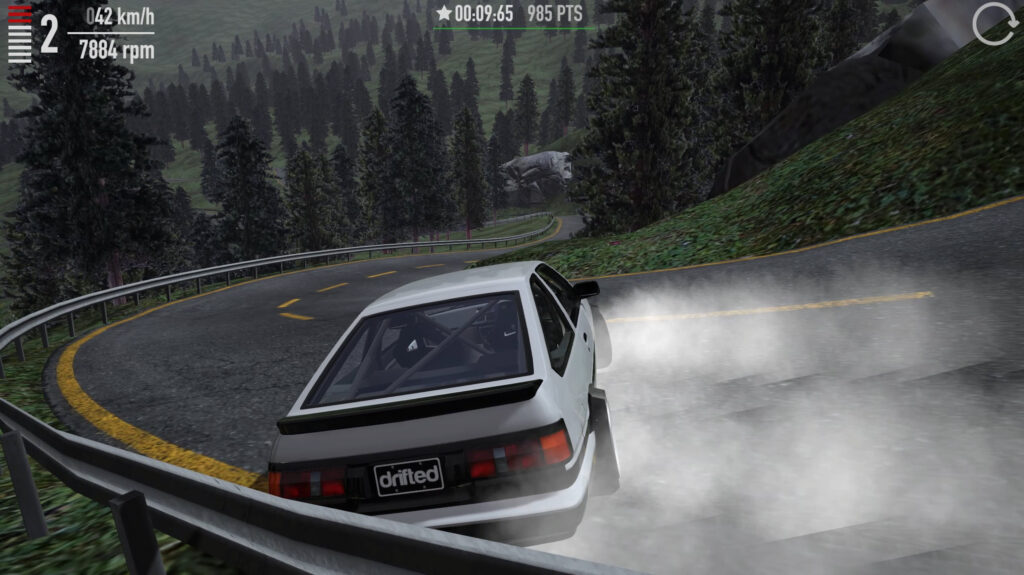
Table of Contents
Summary
Touge Drift & Racing is a Drifted-exclusive browser game that puts you behind the wheel of some of the most iconic JDM machines ever built (and more), as you visit some of the most breathtaking touge roads you’ve ever seen. The challenging gameplay backs it up with demanding, technical touge racing that’ll push your skills to their limits.

Based on the popular mobile app, this browser version takes the best aspects of the original and takes them all to the next level. You’ll get to shred your tires in awesome, highly-tuned cars, or chase down perfect lap times across the selection of jaw-dropping mountain layouts where you’ll feel like you’re in your very own Initial D episode.

We’ll warn you now – this isn’t your casual browser game. The physics take some getting used to as the cars are seriously grippy. On top of that, the narrow, winding touge roads lined with metal barriers are super unforgiving, and it’ll push your skills further than most drifting games out there. But once you get the hang of it, you’ll realize why it’s one of our most popular games.
Touge Drift & Racing features
- Release date – March 2020
- Difficulty – Intermediate/Advanced
- Levels/environments – 5 tracks (up to 20 configs/layouts each)
- Number of vehicles – 14
- Vehicle customization/upgrades – Yes
- Multiplayer – No
- Mobile – External app download only
Physics
As you may have guessed from the name, the physics combine time attack and precision racing rather than purely focusing on drifting.

The cars are super grippy, and when you get started, the stock vehicles have an open differential. This means you won’t get both rear wheels to spin up together until you splash out for a drift setup. While it’s super realistic, it can also be a little frustrating if you’re desperate to get into the sideways action.

Upgrading to a Drift setup gives you a limited-slip diff (and many other benefits) and immediately transforms the car, but it’ll still be a challenge. If you’re determined, check out our how to drift guide, which covers the fundamentals if you want to fast-track your technique, and there are also some great tutorials from pro drifters worth checking out.
If this sounds like too much effort, check out Drift Hunters MAX for something more forgiving that focuses purely on drifting. It combines similarly stunning visuals with insanely realistic drift physics, 39 cars, loads of tracks (including plenty of touge roads), and a dedicated Drift Attack mode with clipping points to help sharpen your skills.
Graphics

Before you start, head to ‘Settings’ and crank the graphics quality to Ultra. It’ll completely blow your mind that a browser game looks this good. The mountain scenery, the car detail, the lighting – it’s genuinely jaw-dropping. The only games that could realistically compete are Drift Hunters MAX and UNBOUNDED, but for pure visual atmosphere, this one is right there at the top.
If Ultra is causing lag, try dropping to ‘Higher’ quality, keeping 60fps enabled, and reducing the tree density slider to medium. That tends to hit a solid sweet spot on most PCs.

There’s no damage to the cars in this game, but if that’s what you’re after, head over to our Stunts & Crash games section, where you’ll find popular choices like Epic Racing – Descent On Cars and Deadly Descent, where your body panels will fly off as you crash and throw your car off huge ramps.
Touge Drift & Racing controls
PC/laptop/Chromebook
- W/Up arrow – Accelerate
- S/Down arrow – Brake/reverse
- A/Left arrow – Steer left
- D/Right arrow – Steer right
- Space – Handbrake/e-brake
- Left Shift – Shift up (manual gearbox)
- Left Ctrl – Shift down (manual gearbox)
Manual gearbox is available and well worth switching to once you start getting the hang of the physics. Toggle it in the Settings menu alongside frame rate and graphics quality.
Mobile/tablet (iOS/Android)
The browser version is PC only. The original app is available on iOS and Android if you want to take it on the go. We also have plenty of other choices that work perfectly in our ever-growing mobile games catalog.
How to play Touge Drift & Racing
Initial setup
Loading the game drops you straight into the garage (and showroom), which is your main hub for everything.
Before you get started, press the settings cogwheel (top right) and set graphics to Ultra with 60 fps to unlock the game’s true potential, if your computer can handle it. You can always revisit later if you find it stutters or lags. You’ll probably want to take a moment to spin the car around with your mouse and check how awesome it looks at this point!
The other top-right icons handle the remaining navigation options: the car icon with a dollar sign takes you back to the garage/showroom, the garage icon takes you to tuning, and the marker icon is your track selector.

Your current bank balance (Cr.) is next to those. You start with Keiichi Tsuchiya’s weapon of choice, the Toyota AE86 (Hachiroku), and $25,000 credits to either save or spend straight away, but we’ll get to the spending decisions in a moment.
Getting started
Take a look at what’s on offer in the showroom before committing to anything. You can pay 500 credits to test-drive any car (in stock form), which is a great way to try out a dream ride before you’ve saved up. Keep in mind you can’t tune or earn money during a test drive, so you’ll struggle to throw it sideways.

Once you’ve formed a plan (upgrade the AE86 right away, or save towards a specific car), head to the location selector. ‘Training Base’ and ‘Fuji Mount’ are unlocked from the start, with Touge City (5,000 credits), Drift School (10,000 credits), and Velocity Hill (20,000 credits) available to unlock.

If you start at the Training Base, Drift Hunters MAX fans will immediately recognise this, as it’s the same burnout pit with a hangar, pillars, and scattered obstacles outside. It’s perfect for getting familiar with the car before attempting to push it on the harsher mountain roads. Don’t panic if the stock car feels stubborn and reluctant to slide, as it changes significantly as soon as you upgrade.
An important thing to note is that earnings only come from completing the track configs (including drifting bonuses), not from free-ride sessions. So, as soon as you’re comfortable, you’ll want to head to Fuji Mount to take on your first challenge and begin stacking your credits!
Tracks
There are five locations on offer.

Fuji Mount is free and unlocked from the start, offering a long, winding point-to-point touge with sweeping ascents and descents, and stunning mountain scenery. The configs range from short blasts that take only around 11 seconds to longer, technical layouts with huge earning potential.
Training Base is also free, and it’s where you’ll learn the basics without worrying about the guardrails, combining an open practice area with a hangar full of tight corners and pillars when you’re ready. There’s no earnings on offer, but it’s perfect for getting started or dialing in a new drift setup.
Drift School (10,000 credits) is a flat racetrack, similar to what you’d expect to see in Drift Hunters. It’s great for practicing big entries and learning to keep the car tidy without the guardrails punishing every mistake.

Touge City (5,000 credits) is a wild mix of everything. From highway-style straights to insane elevation changes, and some of the tightest, twistiest corners the game throws at you.
Velocity Hill (5,000 credits) sits deep in the Japanese forest and brings just about every challenge imaginable in one location. While it’s not cheap to unlock, it’s worth saving for as soon as you can. The earning potential there is massive once you’ve got a capable car, and you’ll begin unlocking everything in no time.
Car list
There are 14 cars in total, from JDM legends to European supercars, and you’re handed the keys to the AE86 (Hachiroku) from the start. Here’s the full car list, sorted by price:

- Hachiroku (Toyota AE86) – Free
- Kanjo (Honda Civic) – 24,280 credits
- Type S (Nissan Silvia S13/180SX) – 27,500 credits
- Sharp (Toyota GT86/BRZ/FR-S) – 28,900 credits
- Beatz (Nissan 370Z) – 29,000 credits
- Screamer (Mazda RX-7 FD) – 29,900 credits
- Gear Grinder (BMW E30 M3) – 35,000 credits
- Legacy (Toyota GR Supra) – 38,000 credits
- Super (Toyota Supra MKIV) – 39,900 credits
- Slider99 (Nissan Silvia S15) – 41,000 credits
- Generation (Mitsubishi Evo IX) – 48,300 credits
- Model G (Nissan GT-R) – 74,000 credits
- Storm (Lamborghini Huracán) – 90,000 credits
- Opposite (Porsche 911 GT3 992) – 91,000 credits
Admittedly, the cars take some time to save up for, so if the grind starts to feel heavy, other popular games, such as Drift King and Drift Hunters Pro, offer faster progression along with online multiplayer lobbies if you want to drift with your friends.
Tuning & upgrades
Each car has two preset upgrade options – Drift and Racing, each with three stages, and these completely transform your car.

Choosing any of the Drift setups provides the LSD you’ll need to properly spin up both rear wheels, and you’ll notice the cars undergo a visual transformation at each stage. From Stage 2, you’ll also be provided with huge widebody kits, carbon fiber canards, roll cages, bucket seats, and aftermarket exhausts.

… The Lambo even throws its roof away!

On top of that, the power gains are also significant. For example, the AE86 goes from 125hp stock to 318hp at Drift Stage 3, while the S15 gets a full engine swap and a tire-destroying 1,100hp, along with a Rocket Bunny widebody. Every car handles the upgrades differently, so it’s worth previewing Stage 3 before you buy to avoid potential disappointment!
Racing upgrades provide an optimal grip setup to maximize your config times and help you earn credits faster, but the drift bonus points you pick up alongside your timing score stack up quickly, too, so don’t automatically assume Racing is the faster path to riches.

After upgrading, you can adjust the suspension settings with camber, steering angle, spring and damper rates, and anti-roll bars in the garage.

Aftermarket wheel options (25 in total, including recognizable JDM favourites like Volk TE37s and Work) and a comprehensive paint selector covering metallic, matte, faded, and chrome finishes round out the customisation, with body and rims adjustable separately.
While there are plenty of options here, you’re mostly stuck with the preset upgrades. If you’d rather have more flexibility with tuning and upgrading your cars, Force Drift Racing: Aussie Burnout offers the most customization of any browser game, from tweaking just about every suspension component imaginable to installing forced induction power upgrades.
Advanced tips & tricks
Try out the ‘Ultra’ graphics settings before you get started
Go to ‘Settings’ when you load the game, and select ‘Ultra’ graphics and 60fps. If your PC struggles, opt for ‘Higher’ quality with medium tree density as a solid fallback. The visual difference is huge, making the whole experience far more enjoyable – you won’t believe you can play this in your browser without installing anything!
Upgrade to a ‘Drift’ upgrade stage before expecting big angles

Stock cars have open differentials, which stop both rear wheels from spinning together, making drifting genuinely difficult, no matter how talented you are! If you want to get sideways, opt for a Drift stage upgrade right away to get an LSD, which immediately transforms how the car handles. The drift bonus points you earn in configs will quickly make it worthwhile.
Consider your spending before you splash out
It’s tempting to save straight for your favorite drift car(s), but upgrading the AE86 first often makes more sense in the long haul. An upgraded car generates much bigger earnings every run, which quickly compounds your income. Think of it as investing before upgrading.
Don’t ignore the drift bonus scoring
Even in time attack configs, you’ll still earn additional credits alongside your main time-based reward for any sideways action during the run. You don’t have to choose between fast or sideways, and linking slides through the corners is a sweet spot for maximum fun and earnings on each run.
If you’ve enjoyed the grip aspect of this game, Polytrack is the ultimate browser pick for racing, with leaderboards to prove your skills for those obsessed with shaving hundredths off their lap times.
When you’re ready, give the manual gearbox a try
Once you’ve got the basics down, switching to manual gives you much more control over the power delivery, especially through the slower, more technical touge sections, where you’ll want to keep the revs higher without it automatically shifting up a gear. It might feel like a lot to handle at first, but stick with it. At least you don’t need to worry about the clutch!
Touge Drift & Racing FAQ
What’s the main objective(s)?
Complete the (many) track configs within the target time brackets to earn credits. You also pick up bonus points for drifting during each run, with faster laps earning bigger payouts. Credits go towards new cars, tracks, and upgrades.
Why won’t my car drift properly?
Stock cars use an open differential, so the rear wheels don’t spin together, which is a basic requirement for a drift setup. Upgrading to any ‘Drift’ stage gives you an LSD (limited-slip differential) alongside many other preset upgrades, which completely changes how the car behaves.
Is the browser version available on mobile?
No, the browser game is PC only. The original Touge Drift & Racing app is available on iOS and Android if you’re looking to play it on your phone or tablet.
How do I earn credits faster?
Complete configs and avoid free ride, as it doesn’t pay out. Aim for the fastest time brackets where possible and focus on generating drift bonus points in the same run. Unlocking tracks like Velocity Hill opens up significantly bigger per-run payouts once you’ve got a competitive car.
What cars should I buy first?
Consider sticking with the AE86 and investing in upgrades initially. Once you’ve got cash to spare, Screamer (Mazda RX-7 FD), Slider99 (Nissan Silvia S15), and Super (Toyota Supra MKIV) are all awesome picks for the price.
How many track layouts are there in total?
Five, most of them with multiple configs (including reverse versions). There’s plenty to work through before things start feeling repetitive, and some of the tracks are huge if you’re happy to use free ride, but you won’t earn credits, unfortunately.
Written by:
Published on:

Joe is an avid writer and car enthusiast. When he’s not cruising the streets alongside his friends in his Nissan Silvia S15, he’s drifting on his VR racing simulator.
Joe’s passion for cars is always on display. With a keen eye for detail and a deep understanding of the automotive industry, he hopes his writing conveys his excitement and knowledge of cars and games.
Joe’s work has been featured on many platforms including drivetribe.com, 180sx.club, carthrottle.com, smartdrivinggames.com, smartbikegames.com, databox.com and ceoblognation.com.
When he’s not behind the wheel or at his keyboard, he’s likely daydreaming of his ultimate ride – the legendary Lexus LFA.
Follow Joe on X.


