
City Bus Driver: Clean Drive
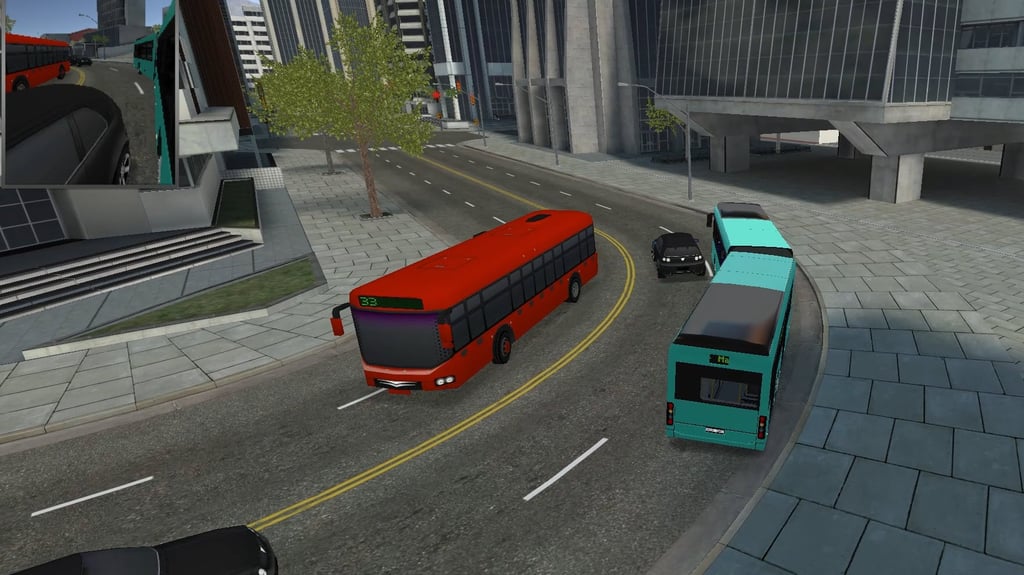
Table of Contents
Summary
After spending hours going sideways, sometimes you’ll fancy a breather with a completely different challenge. City Bus Driver: Clean Drive can be the perfect switch-up if you want to swap tire smoke and door-bashing for a more sensible option where you’ll need to obey the rules of the road while still getting passengers to their destination on time.

If you’ve ever wondered what it’s like to drive a bus, this is the perfect opportunity. The city is packed with tight corners, lampposts that are waiting to catch you out, and AI drivers who often seem to think traffic laws are optional (even though yours aren’t). You’ll need to balance sticking to the schedule with driving carefully enough to avoid penalties, even if the temptation to floor it through a red light will soon become very real.
It’s much slower-paced than the typical drifting games we usually cover, but that’s what makes it a great alternative. Once you settle into the rhythm of checking your mirrors, switching your blinkers on, planning your lane changes, and timing your stops, your patience will be rewarded.
City Bus Driver: Clean Drive features
- Release date – September 2023
- Difficulty – Beginner/intermediate
- Levels – 60
- Number of vehicles – 6
- Vehicle customization/upgrades – Yes (paint only)
- Multiplayer – No
- Mobile – No
- Developer – Mathf Games
Physics

The buses feel weighty and predictable, which might not make for the most exciting browser game, but it’s ideal for a realistic simulator.
As you’d expect, the acceleration is slow, but the speed soon picks up if you’ve got the throttle pinned down. You’ll need to think about braking distances at lights and stops, and the suspension reacts to corners in a way that feels realistic for a sim.

I can’t say I’ve had the pleasure of drifting a real bus (yet) to compare, but the weight transfer here feels how you’d expect. While you won’t be throwing these sideways into the corners, if you push it too fast into a turn, the rear end gets noticeably floaty, especially with the longer buses.
The handbrake locks up the wheels rather than letting you initiate into the corner (unfortunately), so it’s mostly just for emergency stops (which you’ll often find yourself doing).
If you fancy something similar with a bit more variation, Slow Roads offers a different take on the bus driving sim concept, letting you drive an EV bus through never-ending British countryside, where you don’t need to worry about deadlines or passengers.
Graphics

The city is clean and detailed, with enough visual variety in the traffic and surroundings to keep things interesting.
Digital side mirrors in the top corners give you a convenient view of what’s going on around the bus (which can be a little challenging) in all four camera views, which you’ll want to constantly keep an eye on (more on that in the tips below).

Despite the near-identical name, browser-based bus game fans might be familiar with City Bus Driver, but that’s a completely different game by a different developer (with rougher graphics). However, it does offer the ability to drive a little more recklessly and even take your bus off-roading, so it might be worth a try if that’s what you’re after.
City Bus Driver: Clean Drive controls
PC/laptop/Chromebook
- W/Up arrow – Accelerate
- S/Down arrow – Brake/reverse
- A/Left arrow – Steer left
- D/Right arrow – Steer right
- Space – Handbrake
- Enter – Open/close doors (at stops only)
- 1, 2, 3, 4 – Various camera views (more below)
- Q – Left indicator
- E – Right indicator
- F – Hazard lights
- H – Horn
- R – Reset
- P – Pause
Camera views – Unlike most games, where the C key toggles between views, you press the specific number for the camera you want. View 1 is a first-person cockpit perspective, 2 is a follow cam, 3 is a hood cam, and 4 gives you a side view that’s useful for tight corners (but only shows one side of the bus, so it’s not ideal). You can also use your mouse to pan around in the first three views, which is great for looking at the sides.
Mobile/tablet (iOS/Android)
City Bus Driver: Clean Drive isn’t available on mobile devices. If you’re on your phone or tablet, we’ve got plenty of picks in our mobile games section optimized for portable device touchscreens.
How to play City Bus Driver: Clean Drive
Initial setup

The main menu is super simple. The cog icon lets you choose the ideal quality settings (fast, good, or high), language, and sound. There’s also a ‘Delete Data’ option if you want to start fresh.

The medal icon lets you view your current in-game achievements, and also lets you see which ones you’re yet to unlock.
Information (i) icon simply shows the credits for the game developers.

Click ‘Play,’ and you’ll find yourself in a large aircraft hangar, with your currently selected bus parked up in the middle. Everything is free in this game, so click one of the six buses (we’ll cover those in more detail below), then choose from nine paint colors, and click ‘Play’ in the bottom right.
Next up, the level selection screen shows 10 levels per page with a total of six pages, and while the game suggests starting at level 1, you can skip ahead (or jump to Level 60) if you fancy a bigger challenge.
Getting started

Each level starts a countdown timer the moment you load up your first passengers. A bold red line on the radar in the bottom right shows your route to the next bus stop, and two shiny down arrows mark each stop on the road.
I’d personally recommend using view 1 (the first-person cockpit) with your left hand on WASD and your right on the mouse for the most realistic sim vibes. Moving your mouse around is like turning your head and looking around the bus, which makes checking for hazards (especially through the side door) and planning upcoming turns feel much more natural and useful than the other angles.

When you reach a stop, pull into the marked bay and press ‘Enter’ to open the doors. The passengers then board the bus, the timer (at the top of the screen) resets, and you’re off again.

You’ll need to complete all of the stops within the time limits, and you’ll then be presented with a score based on the number of passengers, clean driving (or lack of!), time bonuses, and potential deductions for driving penalties and/or crashes.

Be warned that the other drivers aren’t always the most courteous. They’ll often jump red lights and cut you off, or simply not leave enough space on the corners, so treat them the same way you would in real life and don’t trust their next moves. You can try using the blinker keys, ‘Q’ and ‘E’, but whether they’ll pay attention is another matter.

Red light violations, crashes, and going off-road all count against your score, but the good news is that this doesn’t unlock anything, so you can have as much fun as you want without worrying about the repercussions, if that’s your thing.

The score is there to promote clean driving, but if you’ve spent time swerving around AI buses and traffic while chaining combos in Drift Hunters MAX, you’ll know exactly how chaotic the city streets can get, except this time you’re on the sensible side of it all.

If you’ve enjoyed the bus driving, but obeying the rules starts to feel a bit too responsible, City Bus Simulator is basically the rebellious cousin of this game, where the bus picks up speed like it’s had an ECU remap, and nothing is stopping you from flipping it at 150km/h. City Bus Rush is another option that sits somewhere in between, with the same passenger pickup loop but a faster pace and customers that are far more impatient and will get angry if you don’t get there on time.
Bus selection
All six buses (and all nine colors) are free from the start, so you don’t need to worry about perfectly clean driving.
Your first four options are standard single-decker passenger buses. They handle predictably and differ slightly in size and shape, but nothing too wild.

However, number five is articulated (also known as the bendy bus, slinky bus, or accordion bus), which throws a whole new level of difficulty into the mix. It’s essentially two buses joined by a flexible section in the middle, making those 90-degree turns around a lamppost a real headache in heavy traffic. You’ll need to rethink your approach to even the most basic turns, so save this one until you’re confident with the others.

Last up is a double-decker that’ll likely remind you of the London buses. Although it’s tall and top-heavy, there aren’t too many handling surprises beyond the extra height.
If you want to take a bus beyond the city streets, Uphill Passenger Bus Drive Simulator lets you swap the tarmac for mountain roads and a variety of off-road terrain, like the viral videos you’ve undoubtedly seen of buses navigating impossible rural mountain tracks. Offroader V6 goes even further, letting you take a bus (or a supercar) across huge areas of open countryside with gnarly terrain, ramps, jumps, and total sandbox freedom.
Customization
Before each run, you get to pick from nine colors in the bus selection screen. There are no decals, liveries, wheel options, or tuning or performance upgrades, unfortunately, (although it’d be fun!).
If you’d rather have a garage to build toward, where your cash goes towards new cars and upgrades, Drift King takes a big jump from bus driving, instead offering the likes of Lamborghini, Ferrari, and Porsche supercars waiting in the showroom, as well as the ability to play with your friends in online lobbies.
Or if you’ve mastered (or gotten bored with) the sensible approach and want to see what happens when vehicles are truly pushed to their limits (and beyond), Deadly Descent is all about watching your body panels peel away, and wheels detach as you race downhill and attempt to beat your rivals to the finish.
Advanced tips & tricks
Try getting used to the first-person view (along with the mouse)

Using view 1 with your left hand on the WASD keys and your right on the mouse lets you quickly look around to observe any hazards the blind spots in your side mirrors might miss.
Plan your lane changes using the radar

Your radar doesn’t just show the route, it also shows the upcoming turns. If you can see a left turn coming, start preparing to move into the correct lane early. Some lanes are turn-only, and getting stuck in the wrong one with the articulated bus and a ticking clock is far from ideal.
Keep your eyes on the side mirrors on tight corners

The lampposts throughout the city are right on the edge of the 90-degree corners, and they’ll catch the side of your bus if you’re not careful. Don’t forget to check the opposite mirror to see if any traffic is approaching in the next lane, if you need to pull out a little to avoid a collision.
Slam on the anchors if you overshoot a corner or stop
Combining the brake and handbrake lets you lock all four wheels and grind to a halt when you need to. Your passengers won’t be too delighted, but thankfully, they don’t complain too much!
Don’t panic if you take a wrong turn
Just like a sat nav, the navigation map recalculates a new route automatically. You’ll likely lose some time on the detour, so prepare to play catch-up, but it’s a much better option than trying to reverse your bus through a busy intersection!
Use the blinkers if you want the full experience
The ‘Q’ and ‘E’ keys control the left and right indicators manually. They do come on automatically if you hold the steering key, but using them before lane changes adds another layer of realism. Between that and the first-person view, it’s about as close to an actual bus driving lesson as you’ll get in a browser game.
If realistic bus driving becomes a little too dull, our stunts and crash games are the perfect antidote. Or, if you’ve been quietly enjoying the challenge of squeezing these huge buses through tight gaps, Bus Parking Simulator 3D lets you put your newfound skills to good use in a game that provides progressively tighter bus parking challenges.
City Bus Driver: Clean Drive FAQ
Can I play City Bus Driver: Clean Drive on my mobile?
No, it’s a PC/Chromebook-only browser game. You’ll need a keyboard and mouse to play.
How many levels are there in City Bus Driver: Clean Drive?
60, spread across six pages of 10 on the level selection screen. The difficulty increases as you progress, but you can jump into any level from the start.
Does the score unlock anything?
No. Your score tracks clean driving, crash penalties, and time bonuses, but it doesn’t feed into a currency or unlock system. It’s purely there to motivate you to drive better.
What happens if I run a red light?
You’ll get a red light violation warning and a penalty against your final score. The same goes for crashes and driving off the road.
Which bus should I start with in City Bus Driver: Clean Drive?
Any of the first four single-decker options are fine for learning, or even the double-decker. However, we recommend saving the “bendy” articulated bus for later, and you’ll probably understand why when you see the length! It makes even simple corners a much bigger challenge, and you’ll need to be super careful not to hit the traffic.
Can I play City Bus Driver: Clean Drive online?
No, it’s single-player only. The other vehicles on the road are AI traffic.
Written by:
Published on:

Bill is a writer and photographer who has been part of the Drifted team since 2015. His work extends to various print and online publications, including Wangan Warriors.
As part of the King of Nations team, he traveled extensively for several years, capturing top-tier international drift events worldwide. His hands-on experience, including rebuilding his own Nissan Silvia S15 drift car, gives him unique insights into drift car building and global drift culture.
When not behind the lens or keyboard, Bill can be found browsing classifieds for his next JDM project or shredding virtual tires on popular simulators like Assetto Corsa, CarX, and Forza.
You can learn more about Bill’s story here or follow his socials on X (formerly Twitter), Flickr, Facebook, and Instagram.
 Charger City Driver
 Bus Parking Simulator 3D
 Bus Parking Out
 ACR: City Drift Racing
 City Classic Car Driving: 131
 Car Crash Test: Abandoned City