
Drift Max Pro
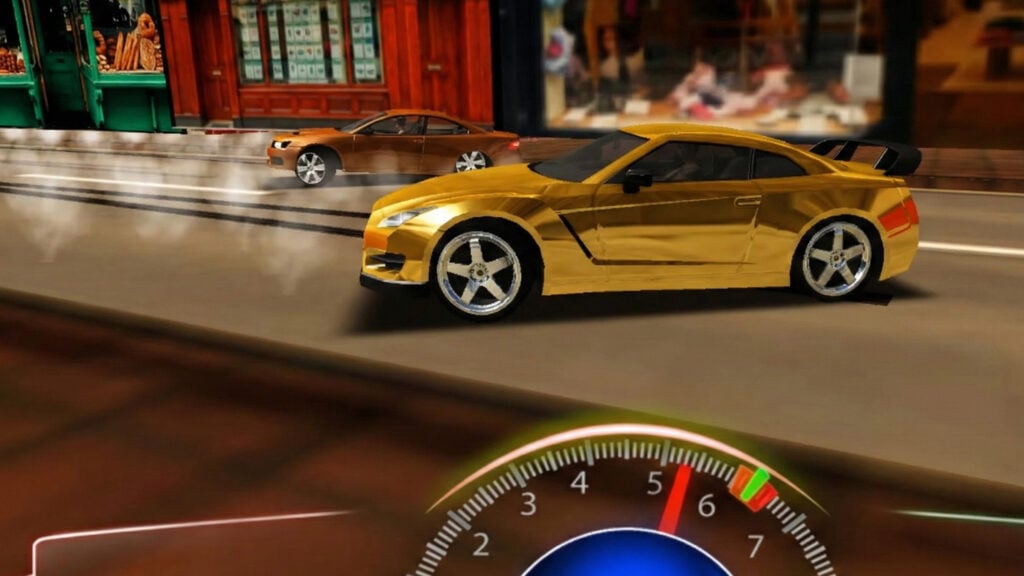
Table of Contents
Summary
Drift Max Pro is a drag racing game with a unique twist (quite literally!) Instead of simply racing point-to-point, you need to fling the car 180 degrees halfway, before racing back to the start to claim the victory.

It’s an interesting mashup that’ll keep you on your toes. As you shift through the gears, you need to time your shifts perfectly within the optimal green zone and nail the crucial drift turn without overshooting into the red, or your car will explode into the flammable barrels that lie beyond the halfway point.
There are 10 cars to unlock and 10 levels that quickly get progressively harder. Each car has unique stats for top speed, nitro, shift speed, and suspension. There are no upgrades or customization options, so you’ll need to save for better rides as soon as possible to take down the harder opponents.

While the game offers a PvP-style multiplayer mode, it takes some figuring out, and single-player is where most players will get the most out of the game.
If this isn’t quite cutting it for you, it’s worth seeing how far drifting browser games have come since the release of Drift Max Pro. You’ll be amazed by the modern, feature-rich alternatives that games such as Drift Hunters MAX now offer. With realistic physics, a huge 39-car roster, advanced upgrades and tuning, Drift Attack mode (with clipping zones), and street drifting with AI traffic, it’s like having a full-blown console game in your browser. Best of all? It’s all totally free.
Drift Max Pro features
- Release date – July 14, 2020
- Difficulty – Beginner/Intermediate
- Levels/environments – 10
- Number of vehicles – 10
- Vehicle customization/upgrades – No
- Multiplayer – Yes
- Mobile – No
- Developer – RealGame Studio
Physics

Drift Max Pro offers simple arcade-style drag-racing physics, with a one-click drift feature where you don’t need to worry about handling the drifting (although it’d be a lot more fun if you did!)

The manual gear shifting requires precise timing of shifts in the green zone to maximize acceleration and top speed, and then you need to click the ‘Drift’ button to ensure you don’t end up a fireball in the flammable barrels beyond the halfway point. If you enjoyed this part, you’ll definitely want to check out our other stunts and crash games for (MUCH) more destructive fun.
If you like the manual gearbox aspect and want to test your newfound skills with a drifting game, Drift Race Simulator offers a 90s JDM focus where you’ve got no choice but to go with a manual gearbox, along with much more realistic drift physics.
Graphics
The basic 3D visuals feature car designs that blend elements from multiple real-world vehicles, with a vibe similar to the popular Madalin Stunt Cars series. They’re certainly not as polished as the likes of Drift Hunters MAX, where the cars look identical to their real-world counterparts.
Controls
PC/laptop/Chromebook
- Left mouse click – Gear up/down (click + or – on screen)
- Left mouse click – Drift button (on-screen, middle-right when in 5th gear)
- Down arrow – Brake
- Space – E-brake (handbrake)

Important: After the tutorial, the drift button may disappear when you’re racing, but it’s still there (technically!). You’ll need to remember its location from the tutorial (middle-right of the screen) and click that area when you reach the red line at the halfway point.
Mobile/tablet (iOS/Android)
Drift Max Pro isn’t available on mobile browsers, but you can check out our ever-growing mobile browser games collection for plenty of awesome alternatives that’ll play perfectly on portable devices.
Alternatively, you can download the popular Drift Max Pro game on the Android Google Play Store or Apple App Store.
How to play Drift Max Pro
Initial setup

When you start the game, you’ll see your Nissan GTR-style free starter car. At this point, you can click Settings to toggle music and sound.
With those complete, click Play in the bottom-right corner. Although the game offers a multiplayer mode at this point, it doesn’t seem to work well right now. You can try it, but if this is specifically what you’re after, you may be better off playing some of the other multiplayer games in our catalog, all of which work perfectly. For this reason, we recommend Single Play.
After this, you’ll be taken to the garage. In the top-left, you’ll see your current cash balance, which starts at $0, but don’t worry – you’ll quickly start earning money once you complete races.
You can use the left/right arrows to browse through the showroom’s 10-car roster and view their stats. It’s worth planning for the car you want to start saving for.
Getting started
When you’re ready, click ‘Play’, then select ‘Single Player’. Then, ‘Play’ again to choose Level 01. You’ll start in the garage.

The initial game tutorial guides you through everything. Watch the tachometer (rev counter) and shift gears when the needle reaches the green zone for a “Perfect Shift”, and avoid hitting the red zone or shifting too early.
Once you hit 5th gear, the drift button appears in the middle-right of the screen. Click it when you reach what would normally be the finish line, and your car will automatically spin 180 degrees, putting you back in 1st gear. Now the race begins for real as you prepare for the nail-biting final sprint back to the start line.
After the tutorial is complete, the drift button might vanish. Be sure to remember its location and click the area when your car reaches the red line at the halfway point.

At the optimal point (fifth gear is the most predictable), hold the nitrous button (don’t just tap it) to fully empty the bottle. Perfect shifts, along with well-timed nitrous, and nailing the 180 drift are essential for defeating your opponent.
Completing levels earns you cash. If you don’t win, you don’t earn money (but unlike some drag racing games, you don’t lose any either).
After each race, you can move on to the next level right away, or return to the menu to see your updated balance and decide whether to buy the next car or keep grinding.
Game modes

Single Player – This offers 10 increasingly challenging levels against opponents with slightly better cars than yours, so you’ll need to outpace them with your perfect shifting, drifting, and nitrous timing skills. You need to beat each rival to unlock the next.
Multiplayer – While this is available in the in-game menu, it takes some figuring out to get working properly, as the keys/buttons to control 1P and 2P aren’t clear in the guides.
For a (much) more refined multiplayer experience, we recommend checking out Drift King, which is the hottest free multiplayer drifting game right now. Instead of sharing a keyboard, you can head onto online lobbies to drift with, or against, your friends.
Alternatively, if you’re a die-hard JDM car fan, Drift Hunters Pro offers a near-identical free online multiplayer from the same team at Freezenova. However, this one focuses on the finest drift cars Japan has to offer, from the Toyota Supra to the Mazda RX-7 FD, Nissan Skyline R34, and a selection of Nissan Silvias.
Car list
There are 10 vehicles in the game, with each offering styling cues from various real-world cars. You might recognize the front, then realize the rear looks like a totally different car, but here’s what they’re (mostly) based on:
- Nissan GTR (Free starter car)

- Pontiac GTO (Holden/Vauxhall Monaro) – $25,000
- Nissan 350Z/BMW Z4 – $48,000

- Ford Mustang – $67,000
- Lamborghini Huracán – $86,000
- Chevrolet Camaro – $110,000

- Bugatti Veyron – $137,000

- BMW E36 M3 – $175,000
- Audi R8 – $210,000
- Plymouth Barracuda – $255,000
Each car has its own unique benefits, which you’ll find in the stats. While you’ll quickly unlock the first cars, it takes quite a while to grind away and often lose races unless you execute them to perfection if you want the more expensive cars.
If grinding away isn’t your thing, Madalin Stunt Cars 3 offers 34 similarly styled cars to this game, all of which are unlocked from the start and completely free and customizable, along with endless open-world stunt modes and online multiplayer.
Tuning and upgrades

There’s no tuning, upgrades, or customization in Drift Max Pro. To progress to the later levels, you’ll need to splash out on the better cars with improved stats.
If you want a similar experience but with much deeper customization, Drag Racing Rivals is the most popular drag racing game among Drifted fans. It offers a far superior experience, along with plenty of tuning, allowing you to upgrade your engine, transmission, and tires, and even strip the chassis to save weight. There’s also a much more interesting storyline. The only real downside is there’s no 180-degree drifting at the halfway point.
For an old-school drag racing game with retro styling, Drag Racer V3 is another great alternative that offers a heap of cars, plenty of tuning, and the risk of blowing up your engine if you push too hard!
Advanced tips & tricks
Make sure you learn the perfect timings in the tutorial

Perfect shifts are essential as levels get harder, and you’ll often need to shift up slightly earlier than you think. If you revisit the tutorial, you’ll see that the optimal timing is JUST before the tacho needle hits the green area. If you miss the gear and hit the redline or shift too early, you’ll scrub off speed and likely lose the race.
Hold the nitrous button until the bottle’s completely empty
Unlike most games, don’t just tap the nitro button. You need to hold it until you’ve fully emptied the nitrous bottle. Early cars, such as the GTR and GTO, have minimal nitrous capacity that lasts only a couple of seconds. On the other hand, superior cars deliver massive boost bursts, where the timing can make or break a race in the closing moments.
Memorize the drift button location
After the tutorial, the button may disappear, but it’s still clickable at its original location (in the middle-right of the screen). Click this area the moment you reach the red line at the halfway point for a perfect 180 and a sweet burnout before you head to the finish.
You’ll need to upgrade your rides as soon as possible
When the game recommends buying the next car, do it. Trying to beat tougher opponents with a slower car requires flawless shifts and perfect execution the entire way. Otherwise, you’ll be relying on a mis-shift on their part, which rarely happens.
Drift Max Pro FAQ
What’s the main objective in Drift Max Pro?
You’ll drag race through 10 increasingly difficult levels while shifting gears perfectly to defeat your rivals, along with hitting a unique 180-degree drift at the halfway point. Your earned cash will be used to unlock the cars in the showroom.
How do I shift gears?
Left mouse click the + (shift up) or – (shift down) buttons on the screen when the tachometer needle reaches the green zone for perfect shifts.
Why can’t I see the drift button?
Weirdly, after the in-game tutorial, the button is still there, but it’s often hidden. To press it, click the middle-right area of the screen when you reach the red line at the halfway point.
Can I upgrade my car?
No. There’s no tuning, upgrades, or customizations. You progress by buying better cars with improved stats (max speed, nitro burst, shift power, suspension).
Is there multiplayer?
Although the game has a PvP mode, it’s a little buggy, so we recommend sticking with Single Player (unless you can figure it out!)
Written by:
Published on:
Philippe Daix is a seasoned automotive writer and entrepreneur who founded TopSpeed.com in 2005. After nearly two decades shaping online car journalism, he brought his passion for drifting and performance culture to Drifted.com in 2024. His work blends technical insight, storytelling, and a lifelong love for high-performance machines.


