
Drift Race Simulator
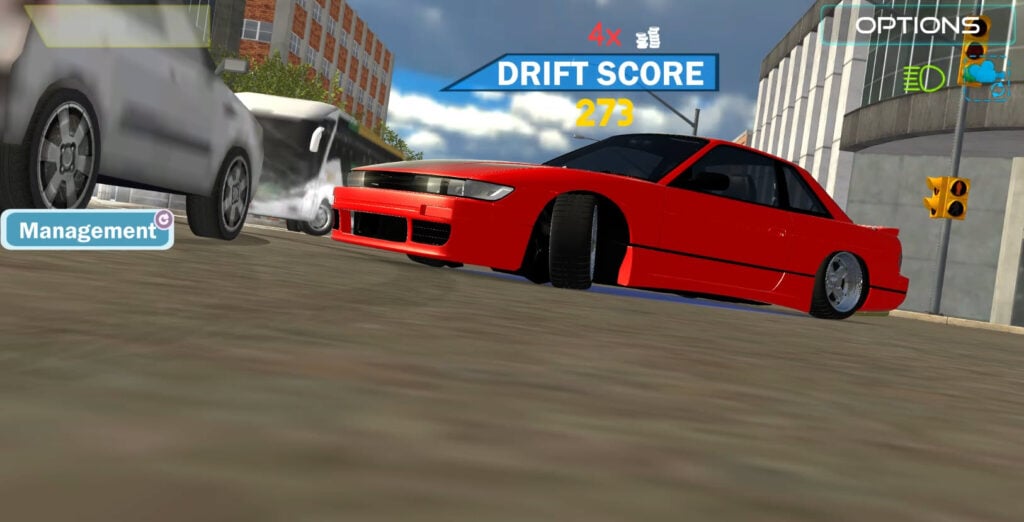
Table of Contents
Drift Race Simulator summary
Drift Race Simulator is one of the ultimate free browser games out there for fans of old-school 90s Japanese drifting.

If you’re looking to channel your inner Keiichi Tsuchiya – look no further! Take your pick from some of the ultimate JDM cars of the ’90s before heading to familiar tracks like Ebisu Minami (RIP), then experience the satisfyingly realistic traditional high-speed, low-angle, Japanese-style drifting physics in all their weight-shifting glory.

For those who are craving a realistic drift simulator while they’re at school, work, or anywhere else they can’t hop onto their sim rig, this one is undoubtedly worth a try. It’s all about the small touches, and (Drift Hunters MAX aside) it’s about as close as you’ll get to Assetto Corsa in a browser game where you don’t need to install a thing.
The car roster is packed with iconic JDM legends, featuring the likes of the Skyline R32 GT-R, Toyota Chaser JZX100, and even a modern Piotr Wiecek-style widebody Toyota GR Supra (complete with the massive aero.) There’s also a selection of German options, including the HGK Eurofighter BMW E92 for those who fancy mixing things up a bit.

Once you’ve got behind the wheel of the free Nissan Silvia 180SX S13 starter car, you’ll need to manually start your ignition, and you’ve got no choice but to use the manual gearbox before heading to some of Japan’s most iconic drifting locations.
While the realistic sim vibes won’t be for everyone, hardcore drifters looking for a free-roam JDM drifter with sim-esque physics, this is well worth your time.
Features
- Release date – February 2022
- Difficulty – Advanced
- Levels/environments – 4
- Number of vehicles – 12
- Vehicle customization/upgrades – Yes
- Multiplayer – No
- Mobile – No
Controls
PC/laptop/Chromebook
Driving
- W/Up arrow – Accelerate
- S/Down arrow – Brake/reverse
- A/Left arrow – Steer left
- D/Right arrow – Steer right
- Space – Handbrake/eBrake
- I – Start engine
Manual gearbox (non-optional)
- Ctrl – Shift down
- Shift – Shift up
- N – Neutral gear
Camera
- Mouse – Look around/spin camera (360-degree adjustment)
- C – Cycle camera modes
- B – Look behind
Lights
- L – Headlights (high-beam)
- K – Headlights (dipped-beam)
- Q – Left turn signal
- E – Right turn signal
- Z – Hazard lights
Recording/effects
- G – Enable slow motion
- R – Record video clip
- P – Playback video clip
The ability to record is a unique touch rarely seen in browser drifting games. Although it’s quite basic, it’s well worth checking out.
Unfortunately, Drift Race Simulator is currently unavailable for mobile/portable (iOS and Android) devices, but don’t panic – we’ve got a huge selection of mobile-specific games in our collection.
How to play Drift Race Simulator
Initial setup

When you start the game, the main menu displays your cash balance in the top-left and the price of the currently selected car in the top-right.
Before you jump in, head to Settings to adjust the graphics. Ultra is best, but you can drop it to Very High, Medium, or Low if your computer is struggling. You can also adjust the sound (on/off toggle).
The bottom right has a button labeled “Manual” – it sounds like a gearbox mode, but this is the game manual and help page. This explains the features, but will likely be your first encounter with the rough English throughout the game – it’s all part of its charm!

Since the game is focused on the free-roam mode, you’ll earn money to purchase new cars and upgrades as you refine and show off your drifting skills. Each car has unique aspects based on its real-world counterparts. For example, the JZX100 isn’t as snappy or nimble as the 180SX, as you’d expect.
It’s worth noting that the manual states there are five maps available: City, Track Ebisu Minami, Track Playground, Track Ebisu Kita, and Track Sugo. However, only four are actually available. Sugo isn’t available yet, but we hope it’ll be added eventually.
Alongside the lack of content, it’s worth noting there’s also no real damage in this game. If you want realistic damage physics, crashes, and stunts, we recommend checking out Car Crash Test Abandoned City. Or, you can head over to our full stunts and crash games category, where we have plenty more alternatives on offer that’ll give you your BeamNG-style carnage fix.
Getting started

Head to the Garage, where you’ll see your current free starter Nissan Silvia S13, in all its glory (the cars look awesome in this game!) Use the left and right arrows to toggle through the other options in the showroom to see what you’ll soon be able to buy, along with the price in the top right (be warned – some are crazy expensive).
Once you’ve selected your car, press Start to open the track/map selection, which includes four options.

Each of these offers full, free-roam drifting, letting you explore and drift to your heart’s content with no limitations. We recommend starting in Playground, as it offers an open space along with cones, where you can learn the basics, get a feel for the physics and handling, and use the barriers for wall runs with forgiving bounce-offs.

You’ll need to start the engine with the I key, then use the manual gears (Ctrl to shift down, Shift to shift up), making things more involved than your typical arcade-style drifting game.
If you’re here to actually learn the sim drifting basics properly, check out our guide on how to drift for core techniques and concepts, or head to our recommended free YouTube drifting tutorials if you’d rather be shown by your favorite real-world drifters.
If you’re feeling a bit overwhelmed by the gearbox and want a simpler start before diving into Drift Race Simulator’s realistic sim-based physics, RealDrive offers a similar vibe, but it’s a bit easier to get the hang of, and also provides challenges and training.
Alternatively, Drift Hunters is the most popular choice for beginners, offering a huge car selection (over 25 options) and a track list (10 to choose from), along with arcade-style physics that are easy to get the hang of, even for those who have never drifted before.
If you’re sticking around and not put off by the challenge, it’s worth noting that the drift score vs money aspect of the game. Your drift score has a money symbol next to it, which gives false hope, as it doesn’t equal your actual earnings. To view your true earnings, go to Options, then Exit. Then, when you’re back on the main menu, your top-left cash balance will update with what you’ve earned.
Game modes

There are no real game modes other than flexing your drifting skills. The game is purely focused on the open-world, free-roam drifting simulator aspect.
If you want a game that offers more to do, make sure you check out Drift Hunters MAX, which is the only free browser game that offers a ‘Drift Attack’ mode, where you’ll get scored for your drifting skills as you go through drift zones, before proving your worth on the real-time online leaderboard. That’s not all – it’s arguably one of the few drifting browser games that truly surpasses Drift Race Simulator in the realistic physics department, while offering 39 vehicles and 13 tracks to choose from.
There’s also no multiplayer, so if you want to tandem with your friends or join public drift trains, there’s plenty on offer in our multiplayer games section. The top picks are Drift King, which delivers awesome physics and plenty to do, and Unbounded, which offers stunning graphics with a unique streetlight, night-time drifting experience.
If they sound too tame, you can always go crazy and fly off huge jumps in Madalin Stunt Cars 3, where you can head to the public lobbies with an impressive 34-car selection, all of which are already unlocked, so there’s no money grinding to worry about!
Track list
Playground

This is the best starting point. It offers open space for learning the basics and guardrails for practicing wall runs that you can bounce off if it doesn’t go to plan.
City

Head to the traffic-filled streets where you’ll need to avoid the aggressive AI traffic if you want to try and build combos. Admittedly, the traffic car graphics are rubbish, but it’s massively fun weaving around them.
Ebisu Minami

Yes – THAT legendary track (RIP.) Old-school drifting fans will immediately recognize the pits, grandstands, and that wall. There’s also freshly-laid grippy black tarmac surrounding the circuit. You also get to experience the infamous jump, but it’s subtle, and you’ll need to hit it at the right angle. It’s certainly not peak-era Daigo Saito crazy!
Ebisu Kita

Another track from the Ebisu complex, and this one brings elevation changes, fast sections, and tight hairpins. It’s great for testing your limits once you can drift faster, with a touge-ish feel to the layout.
The ‘Manual’ states there are five maps. However, only four maps are currently available, as Sugo isn’t there.
Car list
You’ll be surprised how stunning the cars are for a browser game, even if the tracks and graphics aren’t quite so amazing. The roster is packed with JDM icons and a few BMWs for good measure:
- Nissan PS13 / S13 (free starter car)
- Nissan Laurel
- BMW 3 Series
- BMW E46 M3
- BMW E92 M3
- Nissan GTR
- BMW M5

- Nissan Skyline R32 GT-R (along with a missile-style front light bar)
- Toyota Chaser JZX100 (another missile, but with the front mount intercooler exposed)

- Custom widebody Toyota GR Supra
- Custom Nissan 350Z widebody

- Custom high-spec BMW E92 HGK Eurofighter
Tuning and upgrades
Given the level of detail in the cars, you might be hoping for comprehensive tuning, but unfortunately, it’s quite limited. However, there are a few worthwhile options.
You can fit wheels and spoilers to preview the look, and only buy if you like it. You get a preview look before committing, then hit Save to lock in your changes.
Neon

Underglow, with various colors. Free to install.
Color

Change the body color from a limited set of options. Free to apply.
Spoiler
Each car has five spoiler (wing) options, ranging from OEM-ish to huge BGW-style picks, priced from $1,000 to $5,000.
Wheels

These are named “Ring” in the UI (weird wording, but you’ll get used to it). There are five wheel options priced between $2,000 and $6,000. It’s worth noting that most of the stock wheels already look good, so there’s no urgent need to buy new ones.
Setting up wheels (suspension setup)
Another section with a quirky name, which lets you adjust the suspension settings with the following choices:

- Camber (Front and Rear)
- Suspension spring force (Front and Rear)
- Suspension height (Front and Rear)
- Suspension stiffness (Front and Rear)
Note: Be sure to press Save before you hit Exit the tuning menu, or you’ll lose all your changes.
When adjusting these, you can run extreme camber (oni-kyan-style full negative camber looks aggressive), and it won’t significantly affect how the car handles. However, the stiffness adjustments will be much more noticeable.
Although the camber value is displayed, it’s not in degrees as you’d expect. You’ll have to eyeball the angle on the car itself. For example, 5.7 appears almost straight, but in the real world, it would be closer to zero, so trust your eyes!
Suspension height is also worth considering. You’ll mostly notice this when you’re drifting in the City and hitting kerbs if you’re going for a full stanced-out look. While cars like the JZX100 lack a front bumper, there’s less risk of scraping. However, the PS13 sits super low when slammed, so you’ll need to watch out, or you’ll slam into the kerbs!
Drift Race Simulator FAQ
What is the main objective?
Earn money across a selection of legendary tracks and a free-roam city while using advanced drifting techniques, then spend it on unlocking new cars and upgrades. There are no structured objectives or missions – it’s all about open-world exploration while chasing high scores and combos, and unlocking your dream drift cars.
What’s the quickest way to earn money?
Pull off the sickest drifts you can, and be sure to keep the rear wheels spinning as you build up huge combos. Be warned that the in-game drift score doesn’t directly equal your earnings. To see your actual cash update, go to Options, then Exit, and check the top-left balance on the main menu.
Why did my combo reset?
If your wheels stop spinning for even a couple of seconds, your combo ends. Thankfully, crashes don’t kill your combo, so keep feathering the throttle to maintain your chain.
Can I use automatic transmission?
No. A unique aspect of this game is that it uses manual gears only. You’ll need to press Ctrl to shift down, Shift to shift up. If you find this too challenging, try alternatives such as Drift Hunters or RealDrive for an easier entry point into drifting games.
How many maps are there?
The in-game manual states there are 5, but there are only 4 available: Playground, City, Ebisu Minami, and Ebisu Kita. Sugo isn’t in the game (yet) despite being listed.
What’s the best starting car?
You’ll start with the Nissan PS13 (S13) for free. It’s a solid drift car and perfect for learning the physics before you spend money on upgrades and new rides, each of which offers its own unique and realistic experience.
Is there a multiplayer mode?
No, this game is only available in single player. If you want multiplayer drift action, check out other games such as Drift King, Unbounded, or Madalin Stunt Cars 3.
Can I play on mobile?
Unfortunately not. You’ll need to use the keyboard on a PC, laptop, or Chromebook to play Drift Race Simulator.
What gears should I use?
We mostly recommend using 2nd gear when you’re starting out. Once you’re comfortable, try 3rd gear for faster entries and longer drifts, but be warned that you’ll carry much more speed and momentum into the corner, which will likely lead to a huge crash!
Written by:
Published on:

Bill is a writer and photographer who has been part of the Drifted team since 2015. His work extends to various print and online publications, including Wangan Warriors.
As part of the King of Nations team, he traveled extensively for several years, capturing top-tier international drift events worldwide. His hands-on experience, including rebuilding his own Nissan Silvia S15 drift car, gives him unique insights into drift car building and global drift culture.
When not behind the lens or keyboard, Bill can be found browsing classifieds for his next JDM project or shredding virtual tires on popular simulators like Assetto Corsa, CarX, and Forza.
You can learn more about Bill’s story here or follow his socials on X (formerly Twitter), Flickr, Facebook, and Instagram.


