
Racing Pop
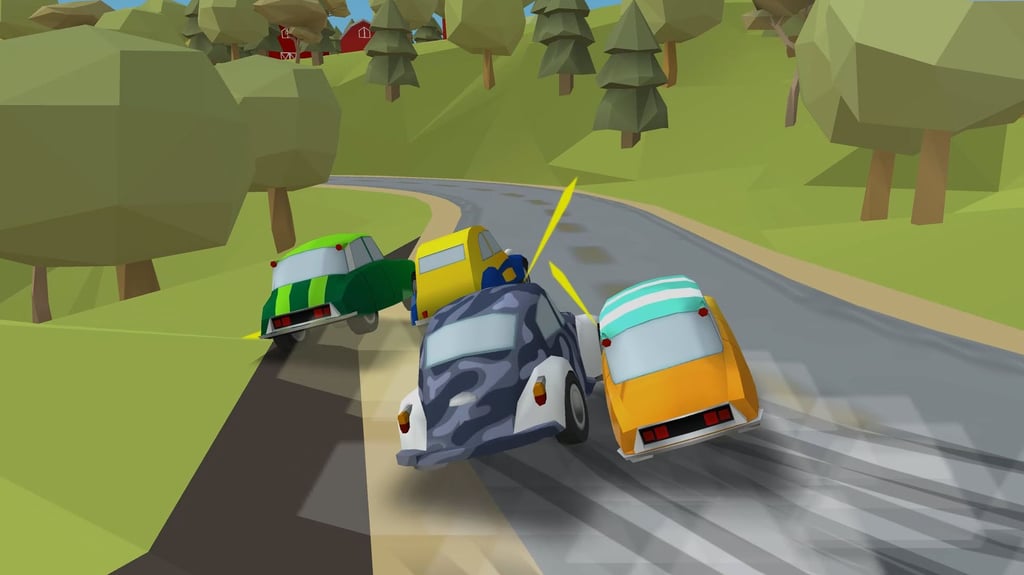
Table of Contents
Summary
It’s fully justified if you feel Racing Pop looks like a kids’ game. For the first few levels, it pretty much is. You just need to press one button, the car steers itself, and you’re shown exactly when to lift. Then the rivals start getting quicker, the tracks get trickier, and before you know it, you’ll find yourself fighting to finish third so you can progress to the next level.

By then, you’ve barely started. There are five huge locations to unlock (each with loads of races) and 19 cars to purchase, ending with a Formula Racer, which you’ll only get to unlock once you’ve mastered it. Unlocking a car doesn’t hand you the keys, either. You still have to buy it, while repairs, paint, and temporary Vigogreen (yeah, it was initially a mystery to us, too!) boosts compete for your money.
As with classic browser games like Drift Boss, the one-button controls couldn’t be much simpler, but the same can’t be said for the opponent and tracks you’ll face along the way. One bad corner can take you from first to last in the blink of an eye, especially once the faster cars arrive.
Needless to say, it’s a much better racer than it first appears, and I bet it’ll push your limits no matter your age or driving ability!
Features
- Release date – July 24, 2026
- Difficulty – Beginner/Intermediate
- Levels/environments – 5 locations (multiple races in each)
- Number of vehicles – 19
- Vehicle customization/upgrades – Yes
- Multiplayer – No
- Mobile – Yes
- Developer – AZ Games
Physics

The game handles the steering for you, and all you need to think about is mashing the throttle and braking. Hold the button and the car charges forward (much faster than you’ll expect). Release it, and you’ll be slammin’ on the brakes almost instantly, so a (very) quick lift is all you need, and overbraking will throw away all your speed.
Every car slides automatically through the corners, and they’re so grippy they often end up two-wheelin’ through the corner.

You can’t steer or trigger a drift yourself (it’s done automatically when you enter a corner fast enough), but close battles still produce fun tandem moments as all four cars tip and shuffle through the same bend.
Get greedy with the throttle, and you’ll smash into the tires, bounce into the scenery (watch out for the animals!), or get dragged through the dirt while the whole pack sails past. It’s crazy fast from the get-go, even in the basic starter car.
The automatic skids are a good (but basic) introduction to understanding entry speed, racing lines, and throttle timing rather than a full-blown drift system. If you’d rather have full control in a similar game, Arcade Car Drift is all about the drifting, with close-proximity tandems that you’ll get to enjoy from the same default bird’s-eye view in this one.
Graphics

The cars are clean, colorful, quirky, unique, and surprisingly well-refined (especially compared to the deliberately blocky grass, trees, buildings, and scenery). The tiny vehicles and circuits give us heaps of nostalgia for the glory days of Scalextric kits as kids (yeah, we’re old, we know!), with the whole thing landing somewhere between a toy set and frantic arcade racing.

Later tracks introduce many more obstacles, including inconvenient lampposts, poles, massive jumps (with sparks as you land), and unsuspecting animals chomping away at the grass beside the road. You’ll soon arrive at a hairpin with some blocky cows waiting at the end of it, and we feel racing games could benefit from more animals, as it helps tame your skills when you want to avoid them. (You do want to, right?)
Controls
PC/laptop/Chromebook
- Space/left mouse button – Accelerate
- Release Space/left mouse button – Brake
Mobile (iOS/Android)
- Press/hold screen – Accelerate
- Release screen – Brake
The simple controls make it perfect for touchscreens, and we’ve got plenty more mobile games optimized for tablets and phones.
How to Play Racing Pop
Initial Setup
Your first job when you start the game is to earn a driving license by completing three laps in less than 40 seconds, which eases you in nicely. Red guides tell you when to lift, green guides show when to accelerate again, and the automatic steering handles the rest (although you’ll probably end up slamming into the tires at least once).

Once the assessment ends, the guides disappear, and you’re left to judge the corners yourself from here on, so make the most of it!
Before each race, use the spanner button to check the car’s condition and assign any Vigogreen units you want to spend (explained in the Repairs, Boosts & Customization section below).
In the pre-game menu, you can also choose between follow and bird’s-eye cameras (bottom left). The overhead Micro Machines-style view reveals the (many) corners and hazards much earlier, while the follow camera is more of a typical racing game cam, which feels much quicker and more dramatic. Pick excitement or extra warning time. You can’t go far wrong with either.
Getting Started

The goal isn’t to brake as hard as possible at the last second. You’re looking for the shortest lift-off time that keeps the car gripping on the tarmac, followed by smashing the throttle as soon as the exit opens up.
The cars react super quickly and will cling to the road much better than you’ll expect, so play around with finding their limits. Since the early levels are super easy, it’s the perfect time to play around and find out how much you can push your luck.
Make sure you watch the track and keep your eyes peeled for what’s coming up (especially in the follow cam). You’ll immediately encounter tire barriers, then dirt (which slows you down), buildings, and other obstacles that’ll wipe out way more time than playing it sensibly with a tiny lift-off.
Faster vehicles don’t solve the crashing issues, either – they just deliver you to the crash sooner! Thankfully, their handling and braking abilities will help in the corners, though.
You’ll soon learn the hard way that the slightest split-second errors can drop you from first to last place before you know it, so don’t focus on aggressive door-bashing with every slide.
Staying behind another car (or two) for the opening laps can be super handy for figuring out the ideal braking zones, and then you can use the last lap to plan your attack. There’s no shame in being patient and playing it sensibly, and it’ll definitely pay off when it gets harder (quickly!).
Game Modes

There’s just one career-style mode in Racing Pop. Each event puts you against three AI-controlled rivals as you work through a huge selection of tracks across Circuit, Countryside, Coast, Desert, and Mountain locations. Within the journey, there are two event formats:
Lap races
These let you learn the same corners repeatedly, which is ideal for learning where you can shorten your lifts, tidy your line, and work out where you can go flat-out. Aim to have it all mastered by the final lap so you can blast your way to the finish and clinch pole position.
Point-to-point events
Point-to-point events start and finish at unique locations without laps, and there’s no minimap to guide you. It’s trickier since you won’t know how far remains, or what’s waiting beyond the next bend, so memorizing these often takes more than one attempt (if you end up finishing last).
You need to finish third or better to progress. First place awards three medals, second gives two, and third gives one. Those medals go towards unlocking the later locations, while the numbers beside each location show its medal requirement rather than the number of races.
There’s no difficulty selector. You’ll face stronger rivals, tougher layouts, and quicker cars until scraping by in third place feels good enough (at least you get to move on!).
If you’ve enjoyed the career here and fancy trying another similar game, Retro Rush offers a similar blocky, lift-and-go rhythm along with a career mode featuring more old-school cars and increasingly demanding high-speed races.
Car list
The 19-car garage starts unexpectedly, moves through some more familiar classics, and eventually reaches the usual performance machinery you expect from a browser racer.

- Starter and early cars – The free Zipper 600 is a super fun three-wheeled pickup that skids comically through corners. Compact 750, Runaway 800, and Journey 950 are all old, compact city cars that follow early on.
- Classic inspirations – Runaway gives a clear nod to the Citroen 2CV, with VW Beetle, Mini, and Fiat 500 influences elsewhere in the middle of the garage. Awkwardly, I’m old enough to recognize most of them!

- Later performance cars – Eventually, the usual modern cars arrive, which are clearly “inspired” by the Mustang, BMW, Corvette, Audi R8, and Lamborghini, with a Ferrari-inspired Formula Racer as the final boss (once you reach level 61, which sure won’t be anytime soon!)
Each car has ratings for tires, suspension, brakes, acceleration, and engine. Reaching the required XP level only unlocks the chance to buy it, so saving enough cash for your favorite rides needs to be considered early on.
If reaching level 61 feels like it’s gonna be way too far off (we get it), Super Star Car lets you get behind the wheel of a selection of Formula-style racers, where you’ll need to master a whole career, with plenty on offer from the start.
Repairs, Boosts & Customization
Unusually for a simple browser game, your car actually wears down through racing. Paying coins for repairs restores the lost performance, while Vigogreen units temporarily strengthen selected stats and are gradually consumed in events.
The costs soon turn the garage into a spending problem. Coins can fund repairs, temporary boosts, paint colors, or extra shop spins. Cash buys cars and can open tracks or locations early.
Sometimes the smartest move is keeping the amusing Zipper 600 competitive with the cheaper upgrades, and saving for the car you actually want. Maybe it’s just your driving that needs to improve to advance. (I mean, I’m not saying it is, but it’s worth considering!)
If you like the look of the garage but want more tuning and another long career opportunity (with 80 levels), Traffic Rally throws you onto a highway where you’ll need to weave through traffic without crashing in a selection of modern-day JDM legends like the Subaru BRZ, Honda S2000, and the Mitsubishi Evo.
Advanced Tips & Tricks
Test the throttle-lifting limits to see what you can get away with

Start with a safe braking point, then gradually release the throttle a little later or for a shorter time on the next attempt. The quickest line usually comes from losing only the speed you need, not turning every corner into an emergency stop.
You’ll be surprised how quickly your car will slam on the anchors, and you’ll struggle with lack of acceleration after, especially on the earlier cars.
Let your opponent’s brake lights guide you initially
Follow a rival closely enough to watch their brake lights and learn where they slow going into the corners.
Sitting behind for the first lap or two can be worthwhile, then you can use the final lap to put what you’ve learned to good use and make your move. Remember, once you take the lead, you’re on your own! (Trying to avoid the blocky animals will often be your best guide at this point!)
Use the aerial camera to get a clearer view

While the follow cam is the most intense and fun, don’t hesitate to switch to bird’s-eye view when you’re struggling to even get third. Seeing farther ahead gives you way more time to prepare for what’s up ahead. You can then return to the follow camera once you know the ropes a little better.
Sometimes, it’s better to just settle for third
You need a podium, not perfection. Protecting third can be smarter than a failed ram into your opponent, which ends up dropping you to the back of the pack, especially when one more medal is enough to open the next location.
You’ll be better at some levels than others, so just get yourself through the ones where you’re struggling, and you can revisit them later if you’re keen for a perfect three-medal completion.
Resist feeding every coin to the slot machine

The daily spin can award cash, coins, more spins, and other bonuses, but paid attempts soon get super expensive, and the reward won’t always pay off. I wanted Cash, and the only way to get it quickly was with a 1,000-coin spin. I got lucky by landing on cash, and then it gave me… Three. That’s not much of a retirement plan.
Racing Pop FAQ
Can I play Racing Pop on mobile?
Yes, it plays perfectly on mobiles. Press and hold your screen to accelerate, release it to brake, then get back on the throttle when it’s safe to do so.
Do I steer or control the drifts?
The game handles steering and drifting automatically. Your job is simply controlling the speed by managing the throttle and braking.
How do I unlock new cars?
Racing raises your XP level and makes more cars available, but you’ll still need to buy each unlocked vehicle with cash, so make sure you’ve got enough stashed away.
What’s the difference between repairs and Vigogreen?
Repairs restore performance lost through wear in races. Vigogreen units temporarily boost selected car stats and are gradually consumed as you race.
Written by:
Published on:

Bill is a writer and photographer who has been part of the Drifted team since 2015. His work extends to various print and online publications, including Wangan Warriors.
As part of the King of Nations team, he traveled extensively for several years, capturing top-tier international drift events worldwide. His hands-on experience, including rebuilding his own Nissan Silvia S15 drift car, gives him unique insights into drift car building and global drift culture.
When not behind the lens or keyboard, Bill can be found browsing classifieds for his next JDM project or shredding virtual tires on popular simulators like Assetto Corsa, CarX, and Forza.
You can learn more about Bill’s story here or follow his socials on X (formerly Twitter), Flickr, Facebook, and Instagram.
 Racing Master 3D
 City Drift Racing
 Slippery Drift Racing
 Traffic Racing
 Drift.io
 Hill Racing – Egg Drop