
3D Formula Racing
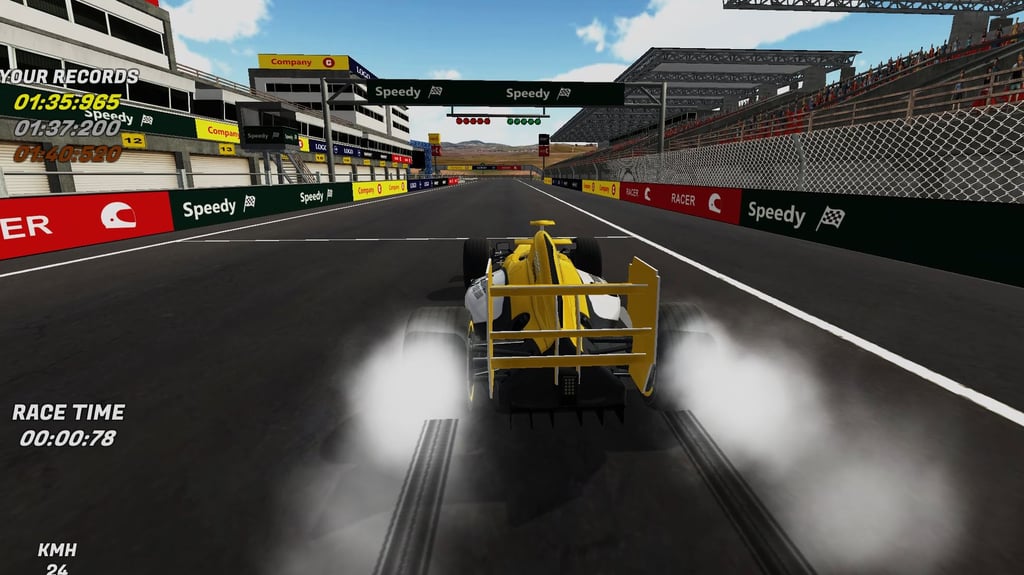
Table of Contents
Summary
This fast-paced browser-based time attack/trial game with stunning graphics gives you as many laps as you please across a selection of formula cars with a simple goal – set the quickest time you possibly can.

You’re out there on your own, with no opponents, assists, braking markers, or a minimap to help you out, so you’ll need to learn each circuit through trial and (lots of) error while fighting with the smoky understeer at 350 km/h.

Each run typically takes just a couple of minutes (assuming you don’t crash too often!), making it great for squeezing in a few attempts during lunch break or between classes.
As your lap times (hopefully) improve, you’ll earn more XP points. Then, as you level up, you’ll unlock seven (very similar) formula racers and six tracks, including trickier night races.
Features
- Release date – February 6, 2018
- Difficulty – Intermediate/Advanced
- Levels/environments – 6
- Number of vehicles – 7
- Vehicle customization/upgrades – No
- Multiplayer – No
- Mobile – No
- Developer – Ado Games
Physics

As you probably guessed, these cars are built for grip rather than sideways action. However, carry too much speed into a corner (probably your very first one) and you’ll get your first taste of the unforgiving understeer. You’ll go kinda sideways, but not in a good way. Then, before you know it, you’ll be confronted by a solid barrier.

Once you get confident with throwing them around a little more, you’ll be able to kick the rear out briefly as the weight shifts under heavy cornering, but it’s (unfortunately) short lived.
Even the starter car is capable of going over 350 km/h, so you’ll need to think about your approach. Practice lifting off the throttle before tighter bends, brake early (with shorter/longer taps), aim for the apex, and feed the power back in once the car settles. Since there’s no hints of when to brake, you’ll often need to learn the hard (or sensibly slow) way.
It isn’t a full-blown sim racer, but it’s challenging enough to deserve a spot among our simulator games which are worth exploring. If you want a slightly different take on the action, Formula Online is the closest follow-up. You’ll get to sit in the cockpit for a first-person view of the action (which is lacking here) to experience real-world tracks in all their glory.
Interestingly, the same team who made this may also be familiar to drifting fans. Ado Cars Drifter 2 swaps out the grip racing and F1-style cars for familiar rides and sideways action.
Graphics

You’ll quickly see that the visuals are genuinely impressive for a browser game. The grandstands, surroundings, and almost photo-realistic backdrops give off Google Maps-style vibes. Later tracks add night racing, which changes the atmosphere and makes the bends even harder to read.
Settings offers six graphics presets, ranging from Fastest (best for lower-spec devices) to Fantastic (for decent devices). The live preview lets you compare them before committing. Fastest is blurry and basic, and Fantastic certainly looks fantastic (the name actually earns its keep for once!). If you find the game could be running smoother, try dropping down a setting or two.
The fixed view is your only camera, and there’s no minimap or radar to help you predict when the corners are coming up. Track selection shows a useful preview, so give it a proper look before starting, but good luck remembering each turn! The (oddly tiny) speedometer in the bottom-left is less helpful when you’re piling on speed and trying not to miss the next corner, but it’s better than nothing.
Controls
PC/laptop/Chromebook
- W/Up arrow – Accelerate
- S/Down arrow – Brake/reverse
- A/Left arrow – Steer left
- D/Right arrow – Steer right
- Space – Rear-wheel brake/handbrake
Mobile (iOS/Android)
3D Formula Racing isn’t available on touchscreen devices. However, our mobile games section has plenty of awesome alternatives that are optimized for phones and tablets.
How to Play 3D Formula Racing
Initial Setup

The main menu shows your level in the top-right and lets you edit your player name, open Settings, or select Play. I’d visit Settings first and choose the best graphics preset your computer can run smoothly. Fantastic looks superb, but a steady frame rate is super important here. You can also toggle the sound on or off.
When you’re ready, select Play, choose the (familiarly-colored) red, black, and white free formula racer, then press Continue to open the track selection screen.
Only the first circuit is available at level one. Study the preview briefly, since this will be your last opportunity to look out for any tricky corners or things to be aware of, and you won’t get any additional help once your lap starts.
Getting Started

Use your first runs to learn where the circuit tightens, where you can go flat-out, and where you’ll need to lift, or brake. With no assists, racing line, braking markers, or minimap, you’re thrown in at the deep end right away.
Take it easy to begin with, and practice arriving at the corners at a sensible speed so you don’t have to deal with the excessive oversteer right away. Then, gradually tighten your braking distances, get more confident with the throttle, and try to improve on your previous lap without crashing too much!
Your current lap time and the small speedometer sit in the bottom-left, previous records appear in the top-left, and the level/XP bar is in the top-right. Even a slow completed lap earns XP, while a better time helps shift the bar further, getting you to the next unlock sooner.
Game Modes

Solo, single-lap time attack is the only real game mode. There aren’t any opponents to worry about. You’re simply trying to beat your previous record, and possibly earning a spot on the leaderboards (which unfortunately weren’t working at the time of testing).
The best way to enjoy the game to its full potential is to get a friend to load it up on their computer, agree on the same unlocked car and track, and see who can throw down the best lap time.
Most laps take less than two minutes, which makes another quick attempt easy to squeeze in. Returning to the menus after every lap is a little frustrating, but thankfully only takes a couple of seconds
Fancy a similar game but with cars instead of formula racers? Your Nurburgring Record lets you fight it out against the clock on the Green Hell, with a whopping 61 real-world cars to choose from.
Die-hard racing fans looking to push their limits need to try Polytrack. Despite the basic low-poly visuals, you’ll soon realize it’s one of the trickiest racing games out there, complete with leaderboards, track building, and community-made courses.
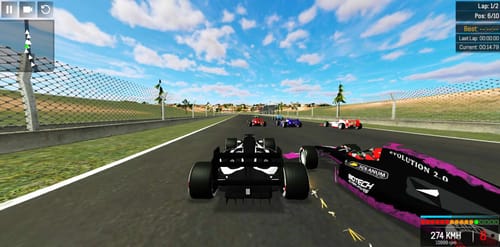
Missing other cars on the circuit? Grand Extreme Racing expands the formula theme with AI races, timed challenges, a championship, upgrades, and local two-player competition.
Super Star Car is another popular pick with recognizable real-world formula cars, along with a career mode where you’ll go up against familiar opponents across 14 (replica, of course) circuits.
Car List
All seven cars look near-identical, with just the color and tire-tread changing with each unlock:
- Level 1 – Red, black, and white starter car
- Level 2 – Blue car
- Level 4 – Yellow car

- Level 7 – Multicolored car with a pattern that looks a like a bar/QR code
- Level 10 – Purple car
- Level 13 – White car
- Level 16 – Stealthy black car
There are no stat bars, so don’t assume the later cars are faster. However, the unlocked felt twitchier and more willing to step out, while the starter seemed slightly grippier after returning to it with a little more experience. Admittedly, the difference could be familiarity or placebo (wanting to justify the time spent unlocking it), and the free starter car certainly isn’t slow.
If you want a little more fun in an F1-style game, F1 Drift Racer offers the same seven-car formula, but makes the cars deliberately tail-happy (which is lacking here). You’ll slide around on two-lap races with opponents, 20 tracks, online multiplayer, and you can even play it on your mobile.
Unlocks & Progression
Every completed lap earns XP and boosts your LVL bar, with quicker times providing quicker progress. The bar resets each time you gain a level (where you’ll often be rewarded with a new car or track), so another reward is usually close enough to tempt you back.
Tracks unlock at levels 1, 3, 5, 8, 12, and 15, while the car rewards arrive at 1, 2, 4, 7, 10, 13, and 16. After the initial generosity, the progress slows later on, which can become a bit of a grind.
If that’s not enough content to keep you tempted, you can head over to our racing games collection, where you’ll find plenty of alternatives with way more content.
Advanced Tips & Tricks
Lift off before braking on the tighter corners

Practice coming off the throttle earlier than feels necessary, let the car settle, then tap the front/rear brakes before turning (if necessary). A slightly slower entry gives the tires much more grip through the corner instead of just sliding towards the barrier.
Tap Space when the fronts start smoking
A quick press of the rear-wheel brake (Space) is a good way to scrub off speed and help rotate the car a little when ordinary braking isn’t cutting it. Use it sparingly on corner entry or when things aren’t going to plan. Try not to hold it too long, or you’ll scrub off speed.
Ease back onto the track after venturing onto the grass

Don’t worry, it’s inevitable! When it happens, the grass is super slippery, so pinning the throttle usually keeps the tires spinning (and not in a good way!). Instead, ease off, correct the steering if required, then wait until the rear tires are back on asphalt before accelerating hard again.
Learn the lines before chasing max speed

Use the early attempts to find each corner’s ideal entry, apex, and exit. Once you can go through the racing line cleanly, try moving the braking point a little later or carrying a bit more speed.
Unsurprisingly, this approach will earn you better times, and reward more XP than repeatedly smashing into the barriers. (Even if it’s not quite as fun as watching the sparks fly!)
3D Formula Racing FAQ
Is there more than one game mode?
Nope. Every run is a solo, single-lap time attack/time trial lap around a variety of circuits.
Can I race against other cars?
No, but the closest you can get is to compare lap times with your friends using the same car and circuit on separate computers.
Do the unlockable cars perform differently?
The game doesn’t show any stats to confirm, but some of the unlockable cars felt a little quicker and more tail-happy during testing, but it might just be our imagination! Treat them as visual unlocks rather than definitive performance upgrades.
Can I tune or customize the cars?
No. Progress only unlocks cars and tracks, and there’s no in-game currency.
Why isn’t my worldwide ranking displaying?
Online rankings weren’t working during testing, either. Given the age of the game, it’s likely they’re no longer hosting the leaderboards.
How do I unlock every car and track?
Finish laps in the quickest time possible to level (LVL) up and unlock them quicker. The final track unlocks at level 15, and the last car follows at level 16.
Can I play on mobile?
Unfortunately not. You’ll need a PC, laptop, or Chromebook to enjoy what 3D Formula Racing has to offer.
Written by:
Published on:

Joe is an avid writer and car enthusiast. When he’s not cruising the streets alongside his friends in his Nissan Silvia S15, he’s drifting on his VR racing simulator.
Joe’s passion for cars is always on display. With a keen eye for detail and a deep understanding of the automotive industry, he hopes his writing conveys his excitement and knowledge of cars and games.
Joe’s work has been featured on many platforms including drivetribe.com, 180sx.club, carthrottle.com, smartdrivinggames.com, smartbikegames.com, databox.com and ceoblognation.com.
When he’s not behind the wheel or at his keyboard, he’s likely daydreaming of his ultimate ride – the legendary Lexus LFA.
Follow Joe on X.
 GT Formula Championship
 Touge Drift & Racing
 NSR Street Car Racing
 Grand Extreme Racing
 ACR: City Drift Racing
 Racing Horizon