
Force Drift Racing: Aussie Burnout
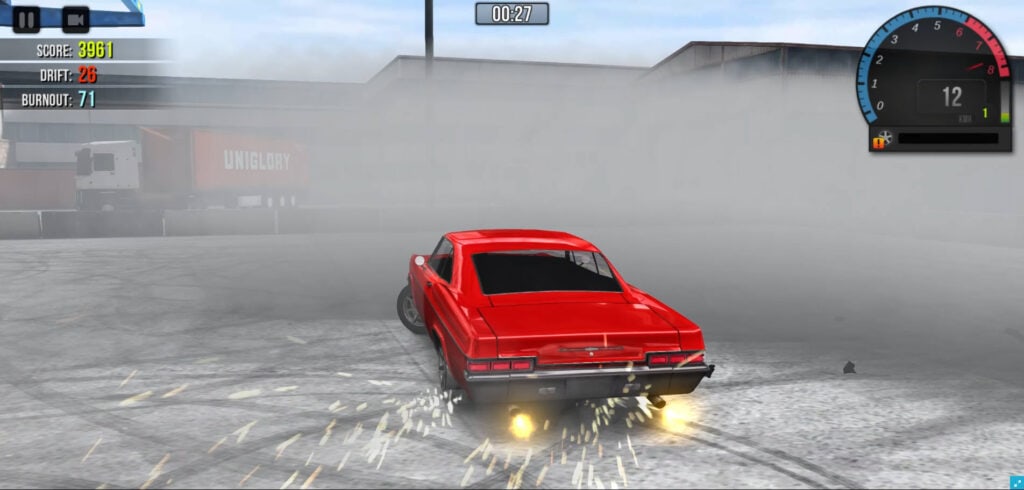
Table of Contents
Summary
Force Drift Racing: Aussie Burnout is undoubtedly the best burnout simulator you can play in your web browser. Take a trip down under and experience the Summernats-style burnout carnage, where you’ll shred your rear tires with massive smoke clouds, decimate the rubber in front of roaring crowds, and tune and push big block engines to their absolute limits.

Not only is Aussie Burnout heaps of fun, but it also combines stunning visuals with incredibly realistic physics, whether you’re tearing up the asphalt in the dedicated burnout mode or pulling off big-angle drifts with sim-level weight transfer that’s capable of holding its own against the ultimate drifting browser games.

On top of that, it also has an insane amount of depth and tuning on offer. You get three modes (Burnout, Drift, and Showcase), along with 23 vehicles to unlock, ranging from Japanese classics to American muscle, supercars, and the ultimate real-world Aussie burnout cars.
Once you’ve unlocked your burnout weapon, you get to upgrade it with what is quite possibly the most comprehensive tuning system of any browser game out there. From fine-tweaking the suspension geometry to upgrading every aspect of the engine, drivetrain, handling, weight, and tire specifications, this game has it all.

Not only does it feel great when you’re playing, but the graphics are also stunning on the higher settings, with smoke so thick you’ll genuinely struggle to see your car in the burnout pit.
If you’re at work or school and can’t jump on your drifting (or burnout) sim rig right now, this is about as close as you’ll get to the real thing. The drifting physics are capable of competing with the likes of Drift Hunters MAX and Drift Race Simulator for realism, while the totally unique burnout mode is completely exclusive. There’s simply no other free browser game that provides anything like what Aussie Burnout has to offer.
Force Drift Racing: Aussie Burnout features
- Release date – August 2024
- Difficulty – Intermediate
- Levels/environments – 6
- Number of vehicles – 23
- Vehicle tuning/upgrades – Yes (Comprehensive)
- Multiplayer – No
- Mobile – No
- Developer – YUCCI
Controls
PC/laptop/Chromebook
- W/Up arrow – Accelerate
- S/Down arrow – Brake/reverse
- A/Left arrow – Steer left
- D/Right arrow – Steer right
- Space – Handbrake/eBrake
- C – Toggle camera
There are four camera angles to choose from. Three are quite similar, while one offers a further-back view that makes it easier to see the action when you struggle to see through the thick smoke.
Unfortunately, Force Drift Racing: Aussie Burnout isn’t available to play in your browser on mobile devices. However, the team offers a similar game on Google Play for Android devices. If you’re currently on your phone or tablet, you can also browse our mobile games collection for recommended alternatives.
How to play Force Drift Racing: Aussie Burnout
Initial setup

When you start the game, you’ll see the main menu. Head to Settings (top left) to adjust your graphics quality. Start on High, and if it’s not running smoothly, you can drop to Medium, Low, or Very Low. You can also toggle anti-aliasing and adjust sound effects, music, and UI volume.
Once you’ve dialed in your settings, you’ll land in the Garage with your free starter car. You’ll immediately notice that the cars look insanely good, especially on higher graphics settings. You can left-click and drag to spin the camera and fully appreciate the details.
Main menu overview
Top right: Current cash balance
Below that: Car performance stats (don’t worry – you’ll be upgrading these soon!)
Bottom center: Cars and Tuning tabs
Bottom right: Drive – where you head to the track (or the burnout yard!)
Getting started
Since you’re broke at the start, your only option is to hit the track and start earning right away, unless you want to tease yourself by checking out the cars in the showroom.
Click Drive (bottom right), then choose from three modes: Burnout, Drift, or Showcase.

- Burnout – Shred your tires in the burnout pit while pushing your engine to the limit. You’ll get to pop your tires, blow up your engine, and create absolute carnage Aussie-style.
- Drift – Head to the track where you’ll earn points for showing off your drifting skills, alongside reaching the finish line as quickly as possible.
- Showcase – Combine your burnout and drifting skills in this free-ride/freeroam mode, where you get to explore Irwindale Speedway in all its glory.
We recommend starting with Burnout mode at Port (the only location available for this mode). You’ll then be thrown into a dockyard burnout area in front of a cheering crowd, where you’ve got one minute to collect as many points as possible.
As you progress, your point requirements and earnings will both increase, and before you know it, you’ll be raking in the cash.

The physics are super realistic, with huge, satisfying smoke clouds that’ll completely block your vision. Shred your tires as much as possible without touching the walls, but be warned, if you hit them, you’ll forfeit your earnings. If you’re looking for realistic, BeamNG-style damage physics, we recommend Car Crash Test: Abandoned City or exploring our stunts and crash games category.
On the flipside, you’re given bonus points for getting as close to walls as possible and pulling off various stunts, so you’ll need to combine flexing your driving skills and pleasing the crowds while ensuring you don’t clip the barriers.
Although it starts off easy enough, the difficulty soon increases with each successful run, where you can also watch a short ad to double your earnings.
You’ll need to mix up your technique with donuts, massive burnouts, and close wall-proximity driving, and the bonuses will begin stacking quickly. Soon, you’ll want to consider performance and tuning upgrades (or even a new ride) to keep up with the ever-increasing requirements.
Game modes

Be warned that in each of these, wall taps will kill your combo and points instantly, and even a light scrape resets everything. Consistency is key throughout. You’ll need to avoid crashing and use the e-brake (Space key) to your advantage while pushing the cars to their threshold for additional burnout bonuses (extra points when rear tires are at their absolute limit).
For each mode, your potential earnings are capped at the three-star requirement. Even if you earn way more points, the payout won’t exceed the listed amount. To ensure you progress, once you’ve banked enough for three stars, bring the car to a stop to lock in the score, then have fun pushing it to the limits for the remaining time.
Burnout

Available location: Port (dockyard)
This is one minute of pure chaos where you’ll shred your tires, create massive smoke clouds, and earn points through close-proximity driving and stunt bonuses in the burnout pit.
Drift

Available locations: Mobara Twin, Mobara Twin Reverse, Irwindale, Irwindale Reverse
It’s awesome that you get to drift at the now-closed ‘House of Drift’, Irwindale Speedway, the former Formula DRIFT track features a custom layout packed with walls in Drift mode. Some of you may also be familiar with the Mobara Twin, a Japanese drift circuit. Both offer forward and reverse configurations.
You might be wondering why you’d bother to play a drift mode in a game that’s focused on burnouts, but the truth is that the graphics and physics are up there with the best, along with proper (fully adjustable) weight transfer and super grippy and predictable handling.
Both the graphics and physics give the most popular game at Drifted, Drift Hunters MAX, a run for its money. While there’s not as much overall selection on offer, with MAX featuring 13 tracks, 39 cars, and a dedicated AI traffic and Drift Attack mode, you’ll still need to master advanced techniques like counter-steering and weight shifting to maximize your earnings. Our comprehensive how-to drift guide will help if you’re struggling here. Or, if you prefer, you can also learn from your favorite YouTubers and drifting pros.
Showcase

Available location: Irwindale Speedway
Unlike Drift mode, which features a custom layout rammed with walls on the inner section of the track, Showcase lets you free-roam around Irwindale’s banked outer oval as well as the infield section.
You’ll have the chance to (nearly) run the walls (don’t touch them, damnit!), and combine it with your burnout skills in the middle section for maximum earnings.
Unfortunately, there are no online or multiplayer modes available (which would be the cherry on the cake). If that’s what you’re after, we recommend heading to our multiplayer games collection.
If you’re looking to head to online lobbies and tandem with your friends, Drift King is the most popular pick. For stunning, unique, night-time visuals and realistic physics, you’ll want to check out UNBOUNDED. For pure stunt-based chaos, look no further than Madalin Stunt Cars 3.
Track list

Port – Dockyard location for Burnout mode. A single burnout area, which is perfect for tire shredding and close-proximity driving.

Mobara Twin / Mobara Twin Reverse – A Japanese drift circuit with proper track layout and permanent walls offering runoff sections which are far more forgiving than Irwindale’s tight and twisty corners.

Irwindale / Irwindale Reverse – The legendary American Formula Drift track, Irwindale Speedway, which features a challenging layout in drift mode with walls everywhere you can think of, which will truly test your limits if you want to venture there in a big-power, full-sized muscle car. In Showcase, you get free roam of the whole track, letting you utilize the banked oval and the infield section.
Car list
There are 23 cars available, ranging from $7,000 to $55,000. You’ll find the likes of JDM legends (Datsun 280Z, Nissan GTR), German and European options (Mercedes, BMW), American muscle (Corvette, Camaro, Ford Mustang), supercars (Audi R8, Ferrari, Lamborghini), and dedicated Aussie burnout rigs.

The Lamborghini is the most expensive at $55,000, followed by the Ferrari at $53,000 and the Audi R8 at $48,000.
Each car features its own unique characteristics, and you’ll need to think about which car is going to be most useful for the events you’re looking to participate in.
The big, heavier cars offer massive engines with crazy power potential, which are perfect for burnouts, but they’ll also need more upgrades to light up the rear tires. They’re also going to be much more challenging if you plan to drift Irwindale’s tight layout.
It’s worth noting that the nimble, responsive, high-revving starter car is surprisingly capable in all three modes and is great for learning the game before committing to more expensive purchases further down the line.
Tuning and upgrades
Force Drift Racing: Aussie Burnout offers quite possibly the most advanced tuning system in any browser game. Period. Each option has an adjustable slider (with a small cost) or five upgrade tiers: Stock, Street, Race, Drift, and Ultimate.
Before we dive in, note that some new-car purchases come with traction control enabled by default (hidden in the ‘Drivetrain > Components’ tuning menu). You need to pay a small amount to turn this off, or you’ll struggle to drift/burnout. If you’re failing to spin up the rear wheels, this is likely why.
Once you’re confidently mastering the game, you can disable steering and drift assists under ‘Conversion > Assistance’.
Don’t waste your money on small-tier upgrades if you’re keeping the car long-term; opt for the Ultimate parts instead, or you’ll end up upgrading through multiple tiers.
We recommend that your first upgrade be the turbo installation, as it quickly provides much more power and dramatically increases earning potential.

Engine
- Fuel system
- Ignition
- Camshaft
- Valves
- Displacement
- Pistons
- Cooling
RPM
Adjust max torque RPM and rev limiter
Intake
- Air filter
- Exhaust
- Turbo
- Blower
- Intercooler
Drivetrain
- Transmission
- Driveline
- Clutch
- Components (Adjust diff lock ratio, final gear ratio, and toggle traction control)
- Flywheel
- Gear ratios (coming soon)
Handling
Brakes
- Torque adjustment
- Front axle distribution
- ABS toggle
Suspension
- Spring length (front/rear)
- Spring stiffness (front/rear)
- Damper bump (fast/slow, front/rear)
- Damper rebound (fast/slow, front/rear)
- Anti-roll bars (front/rear)
- Camber (front/rear)
- Toe (front/rear)
- Front extensions (big-angle arms) – Caster, maximum steering angle, Ackermann angle
Weight reduction
Center of mass
- Mass height adjustment
- Front/rear weight distribution
Wheels
Tire compound
- Super soft
- Soft
- Medium
- Hard
- Super hard
Front/rear tire type
- Stock
- Street
- Sport
- Racing
- Drift
Tire profile
Front/rear adjustment sliders
Tire width
Front/rear sliders
Rim diameter
Front/rear sliders
Air pressure
Front/rear sliders
Conversion
Assistance
Steering helper and drift helper sliders (useful for beginners, but turn them off once you’ve mastered the basics)
Aspiration (forced induction upgrades)
N/A (naturally aspirated)
Blower (supercharger) install
Turbo install
Check out our turbocharger vs supercharger guide if you’re not sure which forced-induction method will suit you best.
We’d need about 50,000 words to cover the crazy amount of upgrades here, so you’ll be far better off watching your favorite YouTubers or heading to our drift car building and essential drift upgrade guides if you want to learn more about each aspect. We also have specific guides for topics such as camber settings, so be sure to use the search function for more info.
Customization
Given the depth of the tuning aspect of the game, there’s surprisingly no visual customization available. You can’t even change the paint color, wheels, or body kits.
If you’re after comprehensive visual customization alongside deep tuning, you’ll want to check out the options Drift Hunters and Drift Hunters MAX have to offer.
Advanced tips & tricks
Upgrade the free starter car before forking out for new rides
The starter car is nimble, light, and responds well to upgrades. It’s also surprisingly capable in all three game modes. Heavier cars with bigger engines will require more investment to perform at the same level. Learn the game with the starter, opt for the turbo upgrade, start earning money consistently, then save for your dream car.
Choose the right car for each mode
While the big Aussie burnout rigs and American muscle cars excel in Burnout mode, they’ll be much more challenging if you plan to hit up Irwindale’s tricky drift layout. For this reason, smaller, agile cars are better suited to technical drift tracks, so you’ll want to consider having different cars in your garage for different purposes. However, it’s worth noting that the heavy muscle cars earn bigger additional ‘Burnout’ bonuses even in Drift mode thanks to sheer power, so they’re worth trying once you’ve mastered the handling.
Turn off traction control on new car purchases
When you buy new cars, some have traction control enabled by default (hidden in the ‘Drivetrain > Components’ tuning menu). You need to pay a few bucks to disable this, or you’ll fail to spin up the rear wheels.
Avoid the walls at all costs
Even the tiniest perfect wall clip resets your current earnings. While there are high-risk, high-reward bonus points for close calls, be careful to avoid contact.
Bank your score, then go full YOLO

Once you’ve earned enough points to bag the three stars, bring your car to a complete stop to lock it in. Then, you can use the remaining time to go freestyle, pushing your limits, and not worry about smashing into the walls.
Don’t waste money on single-tier upgrades
It takes time to build up your cash, so if you plan to use a car long-term, save your money and jump straight to Ultimate parts rather than buying the Street, Race, and Drift tiers separately along the way, or you’ll just be paying multiple times over (unless you don’t want max-spec, of course).
Turn off assists once comfortable
While tteering and drift helpers are useful for learning, they’ll soon limit your potential behind the wheel, so turn them off in the ‘Conversion > Assistance’ tuning menu when you’re ready.
Consistency beats aggression
Stay consistent, avoid crashes, and three-star earnings will begin to compound your earnings quickly.
Force Drift Racing: Aussie Burnout FAQ
What are the main objectives of Aussie Drift?
Earn money across three modes (Burnout, Drift, Showcase) by shredding your tires, pulling off big-angle drifts, and collecting as many points as you can. Spend your earnings on 23 cars and comprehensive upgrades to build the ultimate drift and burnout machines.
What’s the best mode for earning money?
Burnout mode is easiest to three-star consistently once you’ve got sufficient power. The Drift mode also pays well, but requires more skill and technique, so it’s best to start with Burnout first to build your bank balance.
Why isn’t my new car drifting or doing burnouts?
New cars have traction control enabled by default. Head to ‘Tuning > Drivetrain’ and pay to disable it. Also, check ‘Conversion > Assistance’ and turn off the drift and steering helpers for full control.
How does the scoring system work?
Each run has three-star, two-star, and one-star earning levels with set payouts. Earning more points than the three-star requirement doesn’t increase your money, so you can bank your score by stopping completely once you’ve hit the target.
What should I upgrade first?
Your first upgrade should be the Turbo, even on the starter car. It’s essential for decimating the rear tires and earning maximum points so you can begin to earn more cash for new cars and upgrades.
Do I need to buy every upgrade tier?
No. If you’re keeping a car long-term, save money and skip straight to the best parts for your needs. Buying each tier separately (Stock > Street > Race > Drift > Ultimate) wastes cash.
Which car should I buy first?
Stick with the starter car and upgrade it before a little buying anything else. It’s surprisingly capable in all three game modes. When you do upgrade, consider what you’ll be doing. Smaller, lightweight cars are ideal for Irwindale’s tight layout, where you’re more likely to want something more like the big-power V8 Holden Ute for Burnout mode.
Is there a multiplayer mode?
While Force Drift Racing: Aussie Burnout doesn’t offer multiplayer, there are plenty of browser-based options out there, with the most popular being Drift King, UNBOUNDED, and Madalin Stunt Cars 3.
Written by:
Published on:

Bill is a writer and photographer who has been part of the Drifted team since 2015. His work extends to various print and online publications, including Wangan Warriors.
As part of the King of Nations team, he traveled extensively for several years, capturing top-tier international drift events worldwide. His hands-on experience, including rebuilding his own Nissan Silvia S15 drift car, gives him unique insights into drift car building and global drift culture.
When not behind the lens or keyboard, Bill can be found browsing classifieds for his next JDM project or shredding virtual tires on popular simulators like Assetto Corsa, CarX, and Forza.
You can learn more about Bill’s story here or follow his socials on X (formerly Twitter), Flickr, Facebook, and Instagram.


