
Street Wheelie
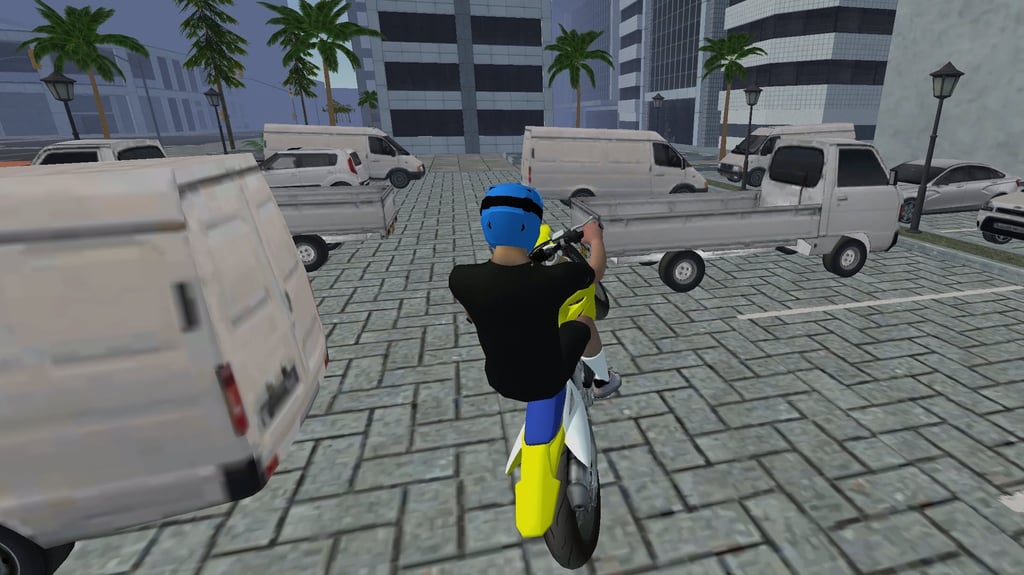
Table of Contents
Summary
Got the urge to head out onto the streets and pull some wheelies, but currently stuck in class? You’ve come to the right place! Street Wheelie puts you behind the handlebars of a selection of Supermoto-style bikes in an open city in a sim-style challenge where you can practice the balance and timing you use on your bike.

For those of you used to pulling wheelies on a pushbike, doing so on a motorbike is much twitchier and less forgiving. Instead of pedals, you’re controlling a super-revvy engine with your keyboard keys, so holding the throttle for a fraction too long will likely send you flying off the back (or over the handlebars).

You’ll soon realize that smooth wheelies come from short, precise taps, small corrections, and knowing when to tap the brakes to bring the front down.
Unlike most games, where you’ve got challenges and fixed game modes, you’re left to create your own fun around the city. Start on the long straights, then see if you can navigate the corners, curbs, and gaps between parked cars once you’ve got the hang of it. You’ll find yourself pressing ‘R’ a lot at first, but (thankfully) the instant restart makes it super quick and easy to give it another try.
Features
- Release date – May 23, 2025
- Difficulty – Intermediate
- Levels/environments – 1 (large open-world city)
- Number of vehicles – 6
- Vehicle customization/upgrades – Customization only
- Multiplayer – No
- Mobile – No
- Developer – AZGames
Physics

Street Wheelie’s handling focuses on balance rather than speed (although there’s plenty of that, too). The rev-happy engine responds rapidly to the tiniest throttle taps, so a wheelie can go from chilled to instant regret in the blink of an eye. Small taps, short pauses, and gentle corrections, while maintaining forward momentum, help keep the front in the air.
The controls are easy to understand, but the sheer challenge of keeping the front end propped up makes the Intermediate difficulty feel fair (either that, or I’m just terrible at these games, which is possible!). Since keyboard keys can’t give you the gradual throttle of an analog trigger, learning to tap the power and feel the weight shift can also help improve your skills in our drifting games, too. Maybe drift wheelie-ing is a new idea we’ve just invented?
Graphics

Visually, the city looks good for a lightweight browser game. You’ve got a selection of long, straight roads and tight side streets. Parking areas have cars, vans, kei trucks, and much more (which are lower quality).
There are also traffic lights, trash cans, and lampposts that give you plenty to use as tricky (and unforgiving) “clipping” points. You don’t get any traffic out on the roads, though. Apparently the whole city is sleeping (despite it being daytime). Either that, or they shut the streets for you to showcase your skills – no pressure!
If you’d rather head to a busy highway with speed being the main focus, Traffic Road lets you pop wheelies on insanely busy roads while rewarding risky riding with money, upgrades, and a much larger garage than what you get here.
The first-person view in Street Wheelie is immersive, but pulling bigger wheelies reveals some quirky bugs. Your rider’s arms (and sometimes most of the upper body) disappear. It’s a bit of a shame they didn’t notice this, as it’s pretty obvious. Thankfully, pressing C to toggle to follow cam makes it much easier to judge the angle, anyway.
Controls
PC/laptop/Chromebook
- W/Up arrow – Accelerate/tilt backward/start a wheelie
- S/Down arrow – Brake/tilt forward/reverse
- A/Left arrow – Steer left
- D/Right arrow – Steer right
- C – Change camera
- R – Retry from current spot (after falling off)
- T – Respawn at the level start (after falling off)
- Escape – Pause/back
Mobile (iOS/Android)
Although Street Wheelie can load on mobiles, there’s no on-screen controls, so it isn’t playable. Thankfully, we’ve got plenty of other mobile games if you wanna ride (or slide) from your phone or tablet.
How to Play Street Wheelie
Initial Setup
The main menu keeps things simple. Settings lets you adjust the volume or review the controls, while Customize is where you choose your ride and change your rider’s helmet, goggles, and gloves (more on all of these below).
When you’re ready, press Play and you’ll find yourself in first-person behind the bars at a city intersection. Press C if you’d rather try the follow view. It gives you a much clearer look at the bike’s angle, which is handy when you’re still figuring out why your rider keeps falling off. (Although it’ll likely still take plenty of failures before you get the hang of it. Ask me how I know!)
Getting Started

First of all, find a long, straight road and practice using the handlebars while stationary, then build a little speed before trying to keep the front wheel elevated slightly (no need for hero angles or playing with the steering mid-air just yet).
Tap W (or the Up arrow), tap until it starts to lift slightly, release, then tap again. Going full send immediately tends to end badly, so you might wanna keep a finger hovering over R because you’re gonna reset more than you’d like at first.

You can also practice tapping the brakes to lower the front a little, and you might find it slamming into the ground until you get the hang of it. This (along with the steering) is the challenging balance aspect you’ll constantly need to juggle throughout the game.

R puts you straight back on the bike where you fell, while T returns you to the level start. Occasionally, the bike can get stuck in the ground after a crash (yep, another “quirk!”). If neither button rescues it, you’ll need to open the pause menu and use Restart to return to the beginning.
If you get a little bored of the difficulty of the sim-style gameplay here, or the lack of scoring and things to do, Wheelie Master is an ideal alternative. While it’s not as realistic, it keeps the same throttle-and-brake balancing act, then adds tricks, combos, different bikes, and global leaderboards to keep things interesting.
Game Modes
Street Wheelie has just one mode, an endless free roam around a deserted city. There are no objectives or scoring. You simply attempt your best wheelies, probably crash (repeatedly), retry, then decide what success looks like before heading over to our other motorcycle games for something new. (Hint, hint.)

The long straights are great for initial practice, then the parking areas give you room to learn around vehicles.

After that, alleys, curbs, bins, lamp posts, and anything else you decide can become obstacles to wheelie around. Word of warning: given the realistic physics, if you clip a curb at the wrong angle, or scrape a vehicle a little too hard, your rider is likely to go flying.
While some other sites claim that there are more locations, I wasn’t able to find them after playing for some time. Unfortunately, no magic desert gateway appeared, but if you happen to find it, let us know!
If you’ve enjoyed the chilled free-roam aspect, Moto Rider 3D provides a huge environment where you’ll get to go off-roading before flying off huge ramps on a selection of varied motorbikes.
Bike List
All six Supermoto-style bikes are unlocked from the start in Street Wheelie. You get to choose from the following:
- MT
- CX
- ZY
- FRC
- XK
- MR
They might look familiar to Supermoto fans, but you’ll need to be imaginative and switch the letters around to reveal the answer if you don’t recognize them already.
Each bike has different styling, but they share identical wheels and don’t reveal any unique performance stats. A couple may feel a little more forgiving, but they’re not massively different. I’d treat them as mostly cosmetic choices and pick whichever one looks best to you.
Bike & Rider Customization

Every bike is available immediately, which is convenient. However, there’s no tuning or performance upgrades, and the bikes keep their stock colors.
Customization is limited to the rider. Custom Helmets come in red, blue, green, yellow, white, black, orange, pink, and purple. Goggles are orange, blue, or black, and the gloves can be black, white, or removed.
Admittedly, it’s a small selection. Thankfully, there’s plenty of other options if you want more on the customization side of things. Stunt Bike Extreme, for instance, lets you transfer your skills into a crazy 270-level trials career with gigantic ramps and tougher (often exploding) stages, making things far more intense and varied. You’ll then get to put your earnings towards fully customizing your rider and bike performance upgrades.
Advanced Tips & Tricks
Use tiny taps instead of holding the throttle

Raise the front with a brief throttle tap, pause for a split millisecond, then add another only when the bike starts settling. Then, keep repeating this with varied tap/hold lengths. Simply holding W (or the up arrow) will probably make you regret your decisions before you know it. Releasing the throttle lowers the front again.
Found Street Wheelie frustratingly (rather than enjoyably) difficult? Wheelie Bike follows the same concept, but it’s even simpler, where just one mouse button controls the wheelies on a pushbike.
Get yourself out of the unforgiving slow zone
It might seem counterintuitive, but getting some speed before committing to a long wheelie can make learning less chaotic. Attempting to pop big wheelies from a standstill feels jerky and unpredictable, and will often leave you flying off.
It’s better to settle your bike into more of a flow above roughly 40 km/h while you get the hang of it, where small maintenance taps are much easier to judge.
Learn what the bike’s doing with the follow cam
First-person feels more realistic (bugs aside), but often makes it more difficult to figure out how close you are to tipping backward.
Use chase cam while learning the balance point and when you first add steering. Once you’re more confident, consider switching back for the more immersive view and see whether you can keep the wheelie poppin’ going without the visual aid.
Add corners after you get the hang of the straight-line balance

Only once you’re ready (it’ll be a disaster otherwise), find a wide space or parking area and gradually add more steering, but only after you can hold a straight wheelie.
A corner asks you to manage throttle, angle, and direction all at once, so don’t expect to be squeezing through parked cars immediately. If the front climbs too far, release the throttle or tap S/Down arrow for a small forward correction before gravity decides for you (in the most painful way possible!).
Once corners feel manageable, you can begin creating your own routes through the back alleys, or maybe even set yourself a high-speed cornering target. The game won’t record either achievement, but you can show off your skills to your friends and see if they’ve got what it takes to compete.
Street Wheelie FAQ
Is Street Wheelie a racing game?
No. It’s a free-roam motorbike wheelie simulator where you’ll get to practice your wheelie-popping skills in an open city and set your own challenges.
How many different locations are there in Street Wheelie?
It’s just one big, shut-off open-world city with parked traffic and plenty of items dotted around to test your wheelie skills.
What’s the fastest bike in Street Wheelie?
There’s no stats or conclusive performance differences. They might feel slightly different, but they’re mostly cosmetic choices.
Can I play Street Wheelie on my mobile?
The game loads on mobiles, but there’s no buttons, so you can’t even move from the starting spot.
How do you recover after falling?
Press R to retry from where you fell off, or T to return to the start of the level. If the bike gets stuck in the ground (it happens), you’ll need to use Restart from the pause menu.
Is Street Wheelie the best browser wheelie game?
It’s certainly one of the hardest and will often be a true test of your patience. However, given the lack of game modes and the clear in-game bugs, it won’t be for everyone.
Written by:
Published on:

Bill is a writer and photographer who has been part of the Drifted team since 2015. His work extends to various print and online publications, including Wangan Warriors.
As part of the King of Nations team, he traveled extensively for several years, capturing top-tier international drift events worldwide. His hands-on experience, including rebuilding his own Nissan Silvia S15 drift car, gives him unique insights into drift car building and global drift culture.
When not behind the lens or keyboard, Bill can be found browsing classifieds for his next JDM project or shredding virtual tires on popular simulators like Assetto Corsa, CarX, and Forza.
You can learn more about Bill’s story here or follow his socials on X (formerly Twitter), Flickr, Facebook, and Instagram.
 Wheelie Master
 NSR Street Car Racing
 Street Escape
 Wheelie-Poppin’ Mini Nearly Has A Disastrous Crash At LZ World Tour
 Downhill Car Ride: Crash Test
 Vex X3M 2