
GTR Drift Fever
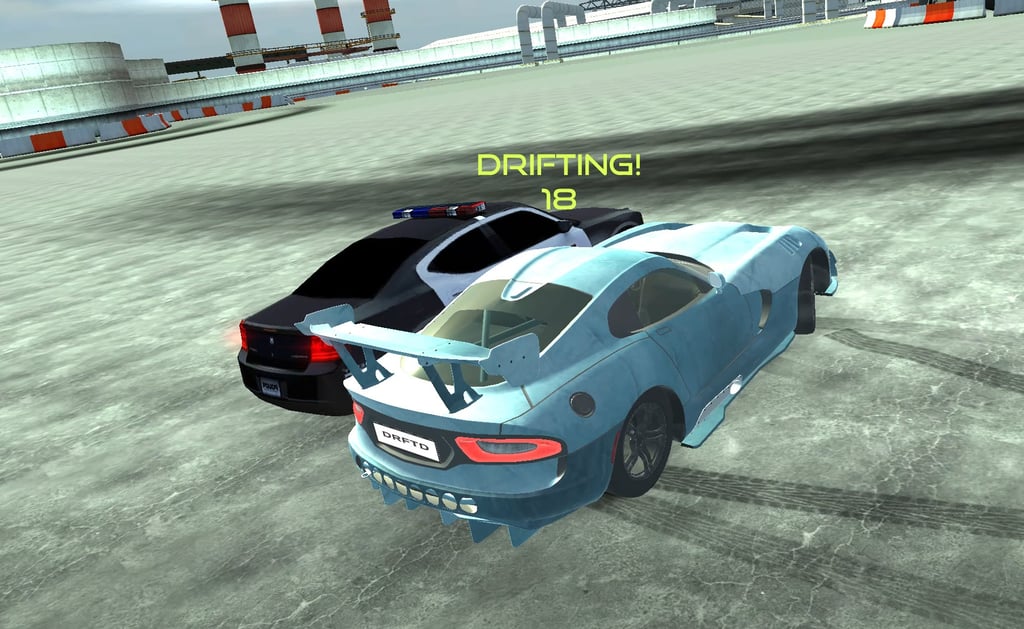
Table of Contents
Summary
If you’re after a browser drifting game where you’re handed a selection of already-unlocked crazy widebodied drift machines along with great graphics and super realistic physics, look no further than GTR Drift Fever.

While the game mostly offers a super chill vibe where you’ll slide across a variety of fun drift arenas, there’s a rogue police officer who’s clearly having a bad day, who’ll spend the entire session trying to T-bone you mid-drift like he’s got a personal vendetta against drifting.

The physics and unique camera angles are some of the best you’ll find in a browser game, with weight transfer that’s realistic enough to genuinely sharpen your drifting technique when you can’t get on your sim rig.

There’s several fun environments to explore, from an industrial factory parking lot filled with obstacles (and a homemade drift layout) to a stunt arena with ridiculously huge ramps and loop-the-loops. Everything is unlocked from the start, too, so you can steal the keys for your favorite ride and get hooning right away!
GTR Drift Fever features
- Release date – April 2021
- Difficulty – Beginner/Intermediate
- Levels/environments – 4
- Number of vehicles – 15
- Vehicle customization/upgrades – Yes (visual only, no performance upgrades)
- Multiplayer – No
- Mobile – No
- Developer – afewanima
Physics
If you’re working on improving your drifting skills, GTR Drift Fever offers a solid training ground. The physics are super impressive, and the weight transfer feels natural and predictable. You can really feel the tires loading up and the suspension doing its thing through every corner and transition.

It’s not quite as grippy as Drift Hunters MAX, which remains the pinnacle of browser games for realism (and game modes). But the trade-off is a more fun, forgiving, relaxing style that suits the game’s large open spaces perfectly. Well… Besides the angry cop!
If you build up too much momentum going into a corner, you’ll need to lift off the throttle, dab the brakes, or use the handbrake to scrub off speed rather than throwing down massive angles. The cars will bog down if so, but you can use the clutch kick trick (tap N for neutral while keeping the throttle pinned) or hit F for a nitrous boost to help snap the power back and keep the wheels spinning.
Graphics

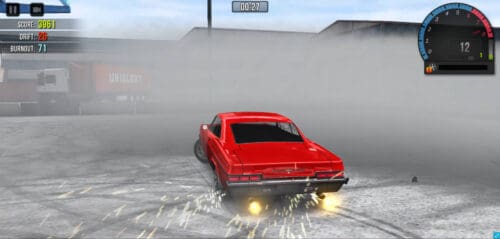
For a browser game, the visuals are awesome and different from anything else out there. You get sunburst effects and lighting touches you rarely see at this level, and the car models look great with their aggressive aero and widebody kits.
It sits just below the top tier occupied by games like UNBOUNDED, where streetlit reflections set the benchmark, and you struggle to believe it’s running in your browser.
While GTR Drift Fever doesn’t quite reach that level, the camera options more than make up for it. You get multiple angles that are arguably the best of any browser drifting game, with smooth tracking and low angles that make it look cinematic. You also get a slow-mo mode (G) to appreciate the visuals in all their glory!
GTR Drift Fever controls
PC/laptop/Chromebook
- W/Up arrow – Accelerate
- S/Down arrow – Brake
- A/Left arrow – Steer left
- D/Right arrow – Steer right
- Space – Handbrake/eBrake
- F – Nitrous boost
- N – Neutral gear (clutch kick)
- C – Change camera
- G – Slow motion (hold to engage, then ‘Esc’ to turn off)
- B – Look behind
- Esc – Pause/return to menu
- Mouse – Rotate camera
You can also move the mouse to look around while driving in the default external and in-car views, which is extra fun during police chases, as you can do rapid transitions and trick the cop.
Mobile/tablet (iOS/Android)
GTR Drift Fever isn’t available on mobile devices. However, our mobile games collection has loads of tested alternatives if you’re on your phone or tablet.
How to play GTR Drift Fever
Initial setup
The main menu lets you scroll left or right through the full car roster, and they’re all completely free – no grinding here!
You can also head into ‘Body Colour’ to customize your look (we’ll dive into these features in Customization below) or press ‘Go Level’ to jump straight in.
Quick tip: If the Drifted frame doesn’t go full screen properly on its own, click the full-screen button on the outer frame first, then the one on the inner frame.
Getting started

Once you’ve picked your track, you’re ready to get sliding right away. However, be warned, the angry cop will immediately be ready to ram you at the most inconvenient moments, but there’s no damage system. Although he can’t damage your car, he’ll happily ruin a perfectly executed drift. I had an instance where he rammed into my car so hard that he launched into the air and got stuck outside the barriers. Winning.

The only goal here is to rack up the highest drift score within the time limit, and you’re rated out of five stars at the end of each run. Use the various obstacles scattered around as makeshift clipping points and build the biggest scores you can. There’s no combos, so if you want a new high score to show off to your friends, you’ll want to go for big, fast entries and hold it for as long as possible.
If you feel your car getting bogged down, the nitrous (F key) gives you a quick burst of speed with flames out the exhaust. It refills super quickly and often helps with escaping the cop or clearing the loop-de-loop in the Stunt Arena. You can also press N (neutral gear) for a quick clutch-kick.
Game modes

There are no competitive modes on offer, but you’ve got four open-world sandbox environments to explore.
If you’re after more to do, RealDrive provides dedicated drift zones and highway racing with traffic alongside similar physics. Or, if you’re looking to drift with your friends online, Drift King features six tracks, including a huge mountain touge, along with real-time multiplayer lobbies.
GTR Drift Fever car list
Despite the name, there’s MUCH more on offer here than just GTRs (although there’s one of those, too!)
All 15 cars are unlocked from the start, and nearly every one comes with plenty of cool drift styling mods (widebodies, front-mount intercoolers, roll cages, and massive BGW’s).
They look sick, even if the wheel fitment is, uhh… Somewhat questionable. They could also do with some coilovers to sort the stance out! Still, those minor niggles aside, they’re awesome.

Audi R8 – Featuring aggressive Time Attack styling with a massive splitter and canards

BMW M4 (F82) – Comes with riveted widebody overfenders, a carbon hood, and side-exit exhausts
BMW M3 (E46) – Similar treatment here, with an air filter poking through the hood
Chevrolet Camaro (6th Gen) – The tamest option, offering much more of an OEM street look

Honda Civic (8th Gen Sedan) – The randomest addition that’ll make you double-take when you’re scrolling through!

Dodge Viper – A throwback to Dean Kearney’s Formula Drift beast (we sure miss that thing!)
Mazda MX-5 Miata (ND) – Perfect for top-down sideways action, with fitment that’s the complete opposite of what Kyle Mohan would go for!
Mitsubishi Lancer Evo IX – Chunky vibes that are reminiscent of the old Team Orange builds (probably showing my age there)
Mercedes-Benz C-Class Coupe (C63) – A surprisingly subtle, stock-ish addition

Ford Mustang (S550) – This one will remind FD fans of Chelsea DeNofa’s RTR weapon
Nissan 350Z – Another opportunity for roof-down drifting, along with a roll cage and another thicc widebody
Nissan GT-R (R35) – A Liberty Walk-style build begging for some massive deep-dish wheels

Subaru Impreza WRX STI (Hawkeye) – Another Team Orange nod, which sits super low (so much so that it’ll often hit the floor on ramps in the Stunt Arena)
Dodge Charger (Old school) – The obligatory classic American muscle car
Toyota Supra (MKIV) – No drifting browser game would be completed without the legendary 2JZ-powered Supra (in pleasantly stock form!)
There’s a solid mix of JDM legends, European exotics, and American muscle on offer here. But, if you’re after an even bigger garage and online multiplayer, Drift Hunters Pro offers iconic 90s machines like the Honda S2000 and Nissan Silvia with real-time lobbies.
Track list

Factory – An industrial parking lot packed with challenging gradients, barriers, machinery, and back sections to discover. The elevation changes and tight corners make it easy to create your own drift layouts using the obstacles and walls as clipping points. Arguably the standout track, and my personal favorite.

Drift Zone – This is a large circular loop around the entire area where you need to drift through the massive gates. It’s good for beginners learning the game’s physics, but more experienced drifters will probably find it a little limiting compared to other options.

Airport – Keep your eyes peeled for the tarmac areas, which are perfect for creating a makeshift drift track, with a couple of tight corners, making linking the whole track a fun challenge. Around the outside, you also get parked up luggage vehicles, which make great proximity targets

Stunt Arena – Of course, there’s a stunt arena! You get massive ramps, hoops, a barrel area for 360 spins, and a loop-de-loop. It’s more of a Gymkhana-style playground, and while it’s not quite as wild as dedicated stunt games like Madalin Stunt Cars 3 (where you can play with friends in online lobbies), there’s still plenty to keep you busy.
Tuning and upgrades
You unfortunately don’t get any performance upgrades or tuning options in GTR Drift Fever, which is a shame. Along with much-needed suspension options and fitment tuning, the cars could also do with some extra grunt (and a turbo or supercharger wouldn’t hurt), which would’ve been the icing on the cake.
Thankfully, there are plenty of alternatives that focus much more on this aspect. The most popular right now is Force Drift Racing: Aussie Burnout, which covers everything from detailed suspension geometry tweaks and a selection of tire compounds to diff lock ratios and weight distribution adjustments.
Customization
Thankfully, there are a few visual options. From the main menu, tap ‘Body Colour’ (which offers much more) to access the full customization screen.

‘Write Name’ is the first option you’ll see. This offers a custom text field where you type whatever you want, and it displays as a licence plate on your car.

The body colour options run along the top, and you get much more than simple solid colours, as there are also unique livery designs, which is rare for a browser car game. You can scroll past the wackier patterns to find the standard colours.

When you click ‘Rim Color’, the options appear on the left, and the same livery designs can be applied to the wheels (the carbon fibre pattern looks cool on rims).
If you need to, you can hit ‘Reset’ on each of these to revert everything to default.
Advanced tips & tricks
Tap neutral to clutch kick, or hit the nitrous, when the power drops off
If your car bogs down mid-drift, tap N while keeping the throttle pinned, which snaps the revs back up and sends the wheels spinning up. If you’ve not already emptied the tank, combine it with a nitrous boost (F) for the ultimate sudden power hit.
Pick the right car for the in-car camera

While the in-car view is arguably the coolest option, visibility varies between cars because of the camera angle. While you can turn left to right using your mouse, you can’t adjust the position. The Impreza works perfectly, but the Mustang’s high dash makes it harder to see out. So, if cockpit driving is your thing, test a few options.
Use the (many) obstacles as makeshift clipping points
From the bins and cones in the Factory parking lot to the Airport luggage vehicles, there’s plenty of great proximity targets scattered around each area. Test your drifting skills by getting as close as possible while holding impressive angles. You can also learn from the pros and your favourite drifting YouTubers if you’re looking to take your technique even further.
Save the nitrous for when it counts

Don’t just keep the NOS button held down the whole time. Nitrous works best when you need a burst to maintain a big entry, or when the engine bogs down, and you need that extra push to keep the rear wheels spinning. If you do find yourself emptying the tank (there’s no gauge display), you’ll need to wait a few seconds for it to refill.
GTR Drift Fever FAQ
What is there to do in GTR Drift Fever?
It’s a simple, drift practice sandbox where you’re chasing the highest score possible across four varied locations while trying to avoid the angry cop. At the end of each run, you’re given a score and handed a rating (out of five stars).
Can I play it on my phone?
No, GTR Drift Fever is only playable on PC, laptop, or Chromebook. You’ll need a keyboard to utilize the full range of controls.
Is there multiplayer?
No. It’s single-player only.
How do I turn off the police car?
You can’t disable the cop, but he can’t cause any damage. Use it as an extra challenge, or use the nitrous to put some distance between you.
What do I do if the car loses power mid-drift?
Tap N (quickly) to put the car in neutral while holding the accelerator, and hit F (nitrous). This acts as a clutch kick and provides sudden power.
How do I get full-screen working?
Click full screen on the outer Drifted frame first, then click the same (slightly smaller) button on the inner game frame.
Are all the cars free?
Yes, every car and customization option is unlocked from the start with no credits or coins required. Rewards are purely a way to show off your score.
Written by:
Published on:

Joe is an avid writer and car enthusiast. When he’s not cruising the streets alongside his friends in his Nissan Silvia S15, he’s drifting on his VR racing simulator.
Joe’s passion for cars is always on display. With a keen eye for detail and a deep understanding of the automotive industry, he hopes his writing conveys his excitement and knowledge of cars and games.
Joe’s work has been featured on many platforms including drivetribe.com, 180sx.club, carthrottle.com, smartdrivinggames.com, smartbikegames.com, databox.com and ceoblognation.com.
When he’s not behind the wheel or at his keyboard, he’s likely daydreaming of his ultimate ride – the legendary Lexus LFA.
Follow Joe on X.
 Drift Police Simulator
 Madalin Stunt Cars 2
 Touge Drift & Racing
 Force Drift Racing: Aussie Burnout