
Rally Point 2
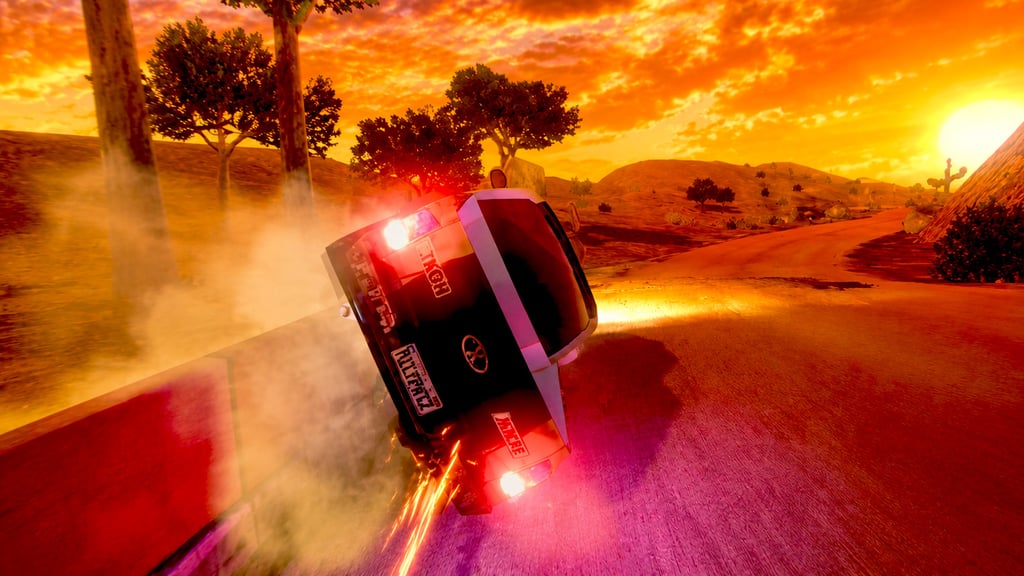
Table of Contents
Summary
Rally Point 2 is a short, arcade-style rally time-attack game where you’ll be racing a variety of dirt tracks against the (increasingly challenging) clock, smashing through inflatable checkpoints, and constantly deciding how long to hold the never-ending nitro.

The unlimited NOS sounds super generous until you see the screen flashing red and an exclamation mark on the engine temp gauge. Keeping it blasting just a second too long and your car literally turns into a fireball – you’ve been warned!

There are six vehicles (all loosely based on real-world recognizable cars), six tracks that get darker and much harder as you progress, and a ‘try car’ system that lets you attempt challenge runs to unlock new cars early. The whole thing is designed to potentially be finished in one sitting, but the later levels might take a few more goes than you’ll initially hope.
It’s a quick-blast browser racer with a simple (and short) formula, but the drift button and nitro gamble keep even the easy tracks entertaining.
Features
- Release date – July 20, 2021
- Difficulty – Beginner
- Levels – 6
- Number of vehicles – 6
- Vehicle customization/upgrades – No
- Multiplayer – No
- Mobile – No
- Developer – XformGames
Physics
The drift button works more like an e-brake than the usual drifting physics you’re used to in dedicated games. Your car grips up and inspires plenty of confidence on the faster sections, but the moment you yank the drift button, the back end snaps and things get tail-happy immediately.
It takes some getting used to. In games like Drift Hunters MAX, the car naturally drifts, and you can maintain the slide through entire levels. Here, you’re forcing rotation and hoping to catch it on the other side. It reminds me of driving an FWD car with your favorite fast-food chain’s trays under your rear wheels! (I’m likely showing my age there…)
Once you get the feel for it, lifting off the throttle through corners often works better than the drift button if you’re looking to maintain speed. Although the button feels like an e-brake in other games, it allows you to maintain your speed much better, to the extent that you can even throw manjis on the straights if you want (which isn’t the fastest approach but definitely the most fun!).
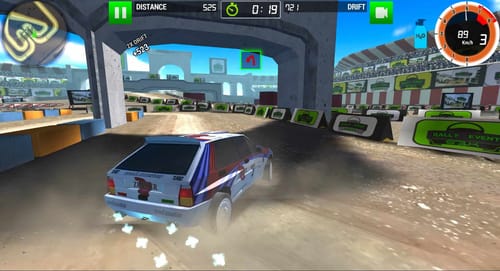
If you want a game with a little more content, the closest rally-specific alternative at Drifted is Rally Racer Dirt, offering AWD and RWD physics, drift-combo scoring that rewards going sideways, and online multiplayer with friend invite codes if you want to race with your mates.
Graphics

The styling has an old-school console feel that doesn’t keep up with modern top-tier browser alternatives like Drift Hunters MAX or UNBOUNDED, but works well with the arcade rally theme and gives an awesome sense of speed, especially on boost.
You can cycle graphics quality between SD, MD, and HD using the button in the top-right corner of the main menu. HD looks noticeably better if your machine can keep up.
The tracks shift from bright countryside to deep orange desert sunsets to dark snowy mountain stages, and the lighting makes each one feel totally different (and often more challenging, too).
Controls
PC/laptop/Chromebook
- W/Up arrow – Accelerate
- S/Down arrow – Brake/reverse
- A/Left arrow – Steer left
- D/Right arrow – Steer right
- Shift/X – Drift
- Space/Z – Nitro
- R – Reset car
- Esc/P – Pause
Mobile/tablet (iOS/Android)
- Not supported
Despite the on-screen steering wheel and various icons looking like they were designed for touchscreens, Rally Point 2 doesn’t actually work on mobiles, unfortunately. If you’re after a drifting game or rally racer that does, our mobile games section has loads of alternative options.
How to Play Rally Point 2
Initial Setup

The main menu is about as straightforward as it gets. A trophy icon in the top-right lets you track your 10 in-game achievements, a question mark explains the basics, and you’ve got buttons for graphics quality and sound.

Click ‘Play’ and six tracks appear as polaroid-style previews. The first three are unlocked, and the rest show a red exclamation mark until you earn them. I’d recommend starting from track 1 and working through in order since there’s not a huge amount to get through.
The car selection works the same way, with locked cars showing a yellow padlock and a ‘try car’ button (more on that in the Car List section).
Getting Started
Once you pick a car and track, you’re fired straight onto the start line.
Your current time sits front and center on the HUD with the target time above it. A rally-style time split below tells you how far ahead or behind pace you are as you reach each checkpoint.

The nitro gauge at the bottom of the screen quickly transforms from orange to red as the engine heats up. An exclamation mark flashes, and the screen goes red when you’re close to overheating. Let go, and it drops back down immediately, but hold it too long and… well, you already know…

Checkpoints are tall, glowing red inflatable markers (kinda like the wobbly advertising air dancers outside a car dealership). Drive through them to keep the run valid, but you don’t need to stay on the road between them. Cutting across dirt and grass is fair game (and you’ll likely find yourself here more than planned!).

Watch out for the overhead banners with metal legs, though. They look harmless, but clip at too much of an angle, and it’ll stop you dead. The same goes for boulders and any solid trackside object.

There’s no damage model (check out our stunt and crash games for that), but a solid collision will bring you to an instant stop. You’ll usually need to reverse out, and by the time you’re back up to speed, the target time is long gone. Hitting ‘R’ to restart or reset the level from the menu is likely to be the smarter move.

The closest browser-based rally alternative with the checkpoint/clock along with more depth is Dirt Rally Driver HD, which adds a bigger car roster, upgrades, and a free-roam mode if you want more to work through.
Game Modes
Rally Point 2 has one mode – beat the target time!

Admittedly, there’s not too much to work through, but it works well as a quick-blast browser racer. The tracks are short enough that runs take under a minute, and the drifting and nitro risk-reward keep even the early runs interesting.
If it’s the time-attack obsession that hooks you, Polytrack is the perfect follow-up (if you have the patience for it). You’ll compete in ghost races against your own best times across 100+ tracks, global leaderboards, and the ever-familiar feeling of five minutes turning into an hour. Fair warning, though – it’s about as challenging as browser racers get.
Car List

All six cars are based on real-world vehicles (unlicensed, and some lesser-known), though the front ends, sides, and rears often look like they came from different cars entirely (in a Madalin Stunt Cars kinda way). You’ll recognize what they’re going for, though, especially if you’re a hardcore car fan (some might still test you, though).
- Car 1 – Old-school Mini Cooper style. Free starter car
- Car 2 – Mitsubishi Eclipse-style front end with a mashup rear. Free starter car

- Car 3 – Nissan Skyline GT-R R34 style, and probably the most recognizable of the lot. Free starter car
- Car 4 – BMW M6-inspired front end, though the rear is doing its own thing entirely. Unlock after completing track 4 (desert)
- Car 5 – Dodge Ram-style pickup. Unlock after completing track 5 (snow). Fairly slow compared to the nippier options, but cool to see a drifting pickup in a browser game
- Car 6 – SEAT Bocanegra style. Unlock after completing track 6 (forest)
The ‘try car’ system lets you test locked cars early, and the two unlockable cars (not the Ram) are faster, but you’ll soon realize speed isn’t always the answer here. The later tracks have tight corners and awkward obstacles where precision matters more than straight-line pace.
Track List
The tracks are numbered (rather than named), and each environment shifts as you progress. All six are short, usually under a minute for a clean run, with the time targets getting tighter as you go.
- Track 1 (countryside) – Green hills, wide dirt roads, gentle corners. You’d have to drive pretty badly not to clear this one
- Track 2 (countryside) – The corners tighten up, and obstacles appear more often
- Track 3 (autumn fields) – Rolling farmland with more boulders and narrower sections
- Track 4 (desert) – Deep orange sunset sky with acacia trees lining the road. Noticeably harder

- Track 5 (snow) – Dark, slippery snowy roads with pine forests and limited visibility. The first track where you’ll often be reacting to obstacles as they suddenly appear in the headlights
- Track 6 (forest) – The final boss. Near pitch-black in places, with dense trees and barely any warning before corners
There’s no radar or minimap (or co-driver, for that matter), and tracks 5 and 6 are where you’ll start wishing there was. You’re relying on the glow of checkpoint markers in the distance to figure out where to aim, and sometimes you won’t be able to see them at all.
If just six tracks feels too minimal, Top Speed Racing 3D might not have rally driving, but it has just about everything else with its generous game mode selection. You also get to a free-roam map spanning city streets, airport runways, desert dunes, and mountains, plus 19 cars with drift and grip mode switching.
Tuning & Customization
The whole unlock path is built around beating time targets. You pick a car, race the clock, and that’s it.
For tuning, two of the most popular games among Drifted fans are Drift Hunters MAX and Touge Drift & Racing (another Drifted exclusive). TD&R is a solid option if you want to stay in the mountain-road theme with even tougher time attack sections. You get to choose from 14 JDM cars with LSD setups, suspension tuning, widebody kits, and three-stage performance tiers.
If it’s online lobbies along with customization you’re after, Drift Hunters Pro and Drift King (from the same team) both offer online tandem drifting lobbies, full paint and rim options, and tuning setups to dial in. DHP goes JDM with cars like the S15 and DC5, while Drift King has the supercars and hypercars.
We’ve got loads more in our multiplayer games lineup if you want to see what else is on offer.
Advanced Tips & Tricks
When the engine heats up, tap the nitro button instead of holding it
Holding the button down fills the temp gauge fast. Tapping it in short bursts near the “DANGER TO MANIFOLD”-style warning lets you keep flying ahead at warp speed without tipping into the danger zone.
Use the drift button to suddenly flick into a corner when you’ve left it too late

At times, it’s more like a Scandinavian flick button, suddenly snapping the rear out rather than sliding it in like you might be used to. Use it when you need a quick direction change, then let go and get back on the throttle. Lifting off through corners often works better for maintaining speed, but this can save you when it’s too late.
Try to follow the checkpoints on the dark tracks

Checkpoint markers often glow in the distance even when you can barely see the road. Aim for the glow, and cut straight toward the next marker if you’re running low on time. There are likely to be a couple of sections where you’ll need to memorize where it went wrong and retry, though.
Save a full-send YOLO nitro for the last stretch
When you can see the finish line, and you’re a few seconds from the finish, try holding the nitro and don’t let go even when the screen starts flashing. The run is about to end anyway. Better to cross the line on fire than miss the target by half a second playing it safe, right?!
If you enjoy the “one bad input ruins everything” feel, Drive Mad throws 100+ levels at you with a completely different vehicle on every level, with some weird and wacky choices thrown into the mix.
Rally Point 2 FAQ
Can I play Rally Point 2 on my phone?
Unfortunately not. The on-screen controls look like they’re built for touchscreens, but it only works on PC, laptops, or Chromebooks.
How do I unlock new cars?
Complete tracks within the target time. Each car unlocks after beating a specific track. You can also use the ‘try car’ option to attempt a harder challenge level and unlock a car early.
What happens when the engine overheats?
Your car explodes. The temp gauge fills up as you hold nitro, and if you ignore the pretty obvious red warning flashes, the engine detonates, and you’ll need to restart the run.
How many tracks are there?
Six. The first three are unlocked from the start, and the rest unlock as you beat time targets. The later ones get significantly darker and harder.
What’s the best car?
It depends on the track. The unlockable rides are quicker in a straight line, but keeping control through tight corners matters just as much. You can clear every track with the free starters. For fun, you’ve gotta give the Ram a try!
Does Rally Point 2 have multiplayer?
No. It’s a solo time-attack-style game. Rally Racer Dirt is the closest browser rally alternative with online multiplayer if you want to race against your friends.
Written by:
Published on:

Bill is a writer and photographer who has been part of the Drifted team since 2015. His work extends to various print and online publications, including Wangan Warriors.
As part of the King of Nations team, he traveled extensively for several years, capturing top-tier international drift events worldwide. His hands-on experience, including rebuilding his own Nissan Silvia S15 drift car, gives him unique insights into drift car building and global drift culture.
When not behind the lens or keyboard, Bill can be found browsing classifieds for his next JDM project or shredding virtual tires on popular simulators like Assetto Corsa, CarX, and Forza.
You can learn more about Bill’s story here or follow his socials on X (formerly Twitter), Flickr, Facebook, and Instagram.
 Rally Racer Dirt
 Traffic Rally
 Drift Rally Champion
 Assetto Corsa Rally Early Access – Everything You Need To Know
 How To Play Assetto Corsa Rally VR, Even During Early Access
 5 Assetto Corsa Rally Alternatives You Forgot Were This Good