
Crazy Grand Prix
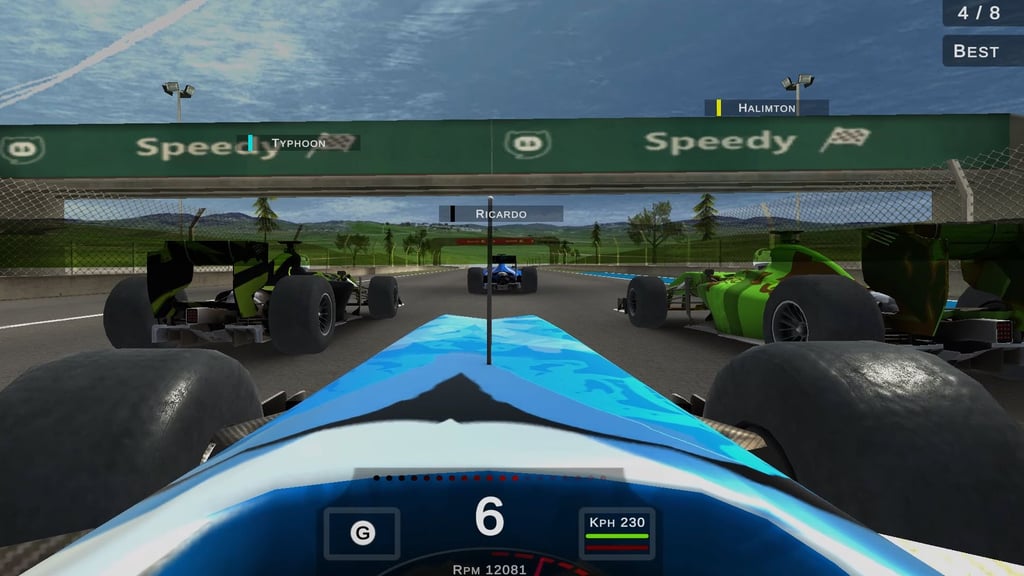
Table of Contents
Summary
In Crazy Grand Prix, you’ll blast through the grid in a realistically fast and grippy Formula racer while executing late-brake passes, slipstream battles, and trying not to get shoved into the walls (or worse) by one of your excessively-aggressive rivals.

You’ll get to choose from a 20-event Career, Practice sessions, or online multiplayer lobbies, while upgrading your car with a selection of upgrades to ensure it’s capable of keeping up with the best on the grid.
If you’re thinking the quickest route to the podium will be keeping the throttle pinned, you’ll soon be proven wrong. You’ll need to discover the perfect braking points, clip the apexes, and carry as much speed as you can through clean exits in an effort to secure the top spots. You’ll then put your race earnings towards performance upgrades and stronger teammates in the quest for world dominance.
Features
- Release date – November 2022
- Difficulty – Beginner/Intermediate
- Levels/environments – 20 tracks
- Number of vehicles – 1
- Vehicle customization/upgrades – Yes
- Multiplayer – Yes
- Mobile – No
Physics

While they’re not gonna compete with a AAA F1 title, the physics are great for a browser game. While it’s more simcade than a full-blown simulator, it’s still realistic enough while providing enough fun along with it. Your car has plenty of grip… until it doesn’t, just like you’d expect (and that rarely ends well!).

You’ll get to push it to the 13,000 RPM redline and reach speeds of 380 km/h before you’ve even begun installing upgrades. So, as you can imagine, if you arrive at a corner a lil’ too hot, you’ll be greeted with a trip into the wall.
Just like the real thing, you haven’t got a handbrake to bail you out, and there’s no drifting (or oversteer, for that matter) if you were hoping for some tail-happy action. If the backend starts stepping out here, you know you’re in trouble! You need to find the perfect braking point, clip the apex, and carry enough speed through to the corner exit.
Drafting works as intended, making it a great way to close on a rival, and the ability to optionally shift through the gears (think semi-auto) lets you utilize engine braking without worrying about every gear change.
Contact with the other cars throws out sparks and crashes create smoke, but there’s no actual vehicle damage, you’ll wanna check out our stunts & crash games section for that.

Hitting the concrete barriers lining each track will kill your speed (somewhat), but since they often curve in the same direction as the track, they usually point you back toward the asphalt. Sometimes it goes… a little more sketchy, though!
Graphics

At full speed, the car starts vibrating and the scenery rushes past quickly enough to give the racing a convincing sense of pace. The circuits change layout and time of day, with bright races, sunset lighting, tunnels, and narrow wall-lined sections that feel like street circuits.
You can switch between follow and cockpit views. I found the cockpit view more natural and useful, while the minimap helps with corners hidden beyond tunnels or barriers. If your device can handle it, the Higher graphics setting is worth using.

You might notice a couple of visual bugs, where the scenery seemingly comes on the track, but thankfully it’s fairly transparent.
Controls
PC/laptop/Chromebook
- W/Up arrow – Accelerate
- S/Down arrow – Brake/reverse
- A/Left arrow – Steer left
- D/Right arrow – Steer right
- C – Change camera
- B – Look behind
- Left Ctrl – Shift down gear
- Left Shift – Shift up gear
- Mouse – Menu interaction and photo-mode camera rotation
Mobile (iOS/Android)
Although Crazy Grand Prix loads in mobile browsers, there aren’t any usable on-screen controls. If you’re on a portable device (phone or tablet), give one of our tried-and-tested mobile games a go instead.
How to Play Crazy Grand Prix
Initial Setup
Enter your custom player name, then create your team name (opt for something different) and team colors.
You’re then handed $100,000 in the bank from the start, which sounds generous until you see the upgrade prices. Occasionally (not all the time) an optional “Free Cash” button option at the top pays out an additional $50,000 for watching a five-second ad, which can be a worthwhile tradeoff when the upgrades start draining your balance.
Before heading to the track, open Settings quickly to adjust graphics and audio. Go with the best setting you think your device can handle. If it’s not right, you can change it on the in-game Settings menu.
The image button in the top right of the main menu opens a proper little photo mode. You can rotate the camera around your garage with the mouse, and taking a screenshot downloads and saves it automatically. It’s a pretty neat feature you rarely see in browser games.
Getting Started
Career is the obvious place to begin (you’ll wanna learn the ropes before heading on right). Practice is there if a specific circuit keeps catching you out, but most players will be fine jumping straight into the Career.
The upper-screen HUD shows your position and lap information (current and best times). In the bottom left you’ll find a (super helpful) minimap. In the center, gear, speed/throttle and braking dials, and steering G-force data. At 300+ km/h, I don’t recommend studying the G-force meter too much, though!
If your skills are decent, you’ll be fine landing pole position against the early rivals (even with the stock car), so don’t rush into engine upgrades.

You’ll want to learn the correct braking zones, aim for the apex, and get back on the throttle without running onto the grass (or hitting the other cars). Cleaner exits are perfect for setting up slipstream passes, and leaving a little room around the erratic rivals reduces the chance of being knocked off your line (or worse).
If you’ve enjoyed this one, and want to try more of the most popular browser-based Formula racing games, there’s plenty on offer. Super Star Car offers similar grippy physics and wheel-to-wheel racing with nine cars and 14 circuits, while Grand Extreme Racing provides five cars, a selection of tire choices, and local split-screen. Crazy Grand Prix is the only one that combines upgrades with online lobbies, which is one of the main reasons why it’s so popular.
Game Modes
Career
The rewarding Career provides 20 tracks inspired by real-world locations, with a top-three finish required to unlock the next one.

Races start at two laps, four soon becomes normal, and the longer later events give you more time to recover from contact or a mistake (assuming it’s not gone horribly wrong, in which case, restart!).
There’s no set difficulty levels. Your rivals (and their cars) get quicker as the circuits become harder, but the difficulty isn’t completely linear. If you’re anything like me, you might struggle to bag the win on one track and then smash the next.
First place awards $250,000 and 25 points, second gets $150,000 and 18 points, third gets $50,000 and 15 points, and fourth gets $40,000 and 12 points. Lower positions earn progressively less, and anything below third means you’ll need to up your game before you’re able to unlock the next event.
Completed events remain available for earning more cash, and the early (easier, two-lap) levels can be great for quickly earning cash for upgrades. After you’ve completed the 20-race calendar (and proven yourself online), Polytrack is a must-try. It turns clean laps into an endless online leaderboard challenge with shared community courses, a detailed custom track editor, and super unforgiving physics.
Practice
Practice removes the pressure if you want to get to grips with braking distances, apexes, and the awkward tunnel sections. If you find you prefer racing without other drivers ramming into you, 3D Formula Racing offers a solo time attack mode, along with seven cars, and six circuits. Formula Online is another great option if you fancy some Monza lap chasing and more detailed setup adjustments.
Multiplayer
Choose Host and choose any track you’ve already unlocked in Career, name the room, choose up to seven players, set as many as eight laps, and pick Race or Free. Free is essentially an open run. Bots (AI rivals) are turned off by default, but you can add them and start without waiting for another person, if you wish.
Join shows the available open lobbies, which are often busy at popular times of day. If they’re quiet, our other multiplayer games provide plenty of alternatives.
Tuning, Customization & Team Management
You’ll use the same team-owned Formula car throughout, with the upgrades unlocking its true potential rather than having more cars to buy.

The parts seem expensive, but once you start earning decent positions the cash will soon start flowing. Engine upgrades cost $300,000, brakes and tires cost $250,000 each, and aerodynamics (aero) costs $200,000. Each purchase fills only a small part of the upgrade meters, so reaching its peak will take a fair bit of winning.
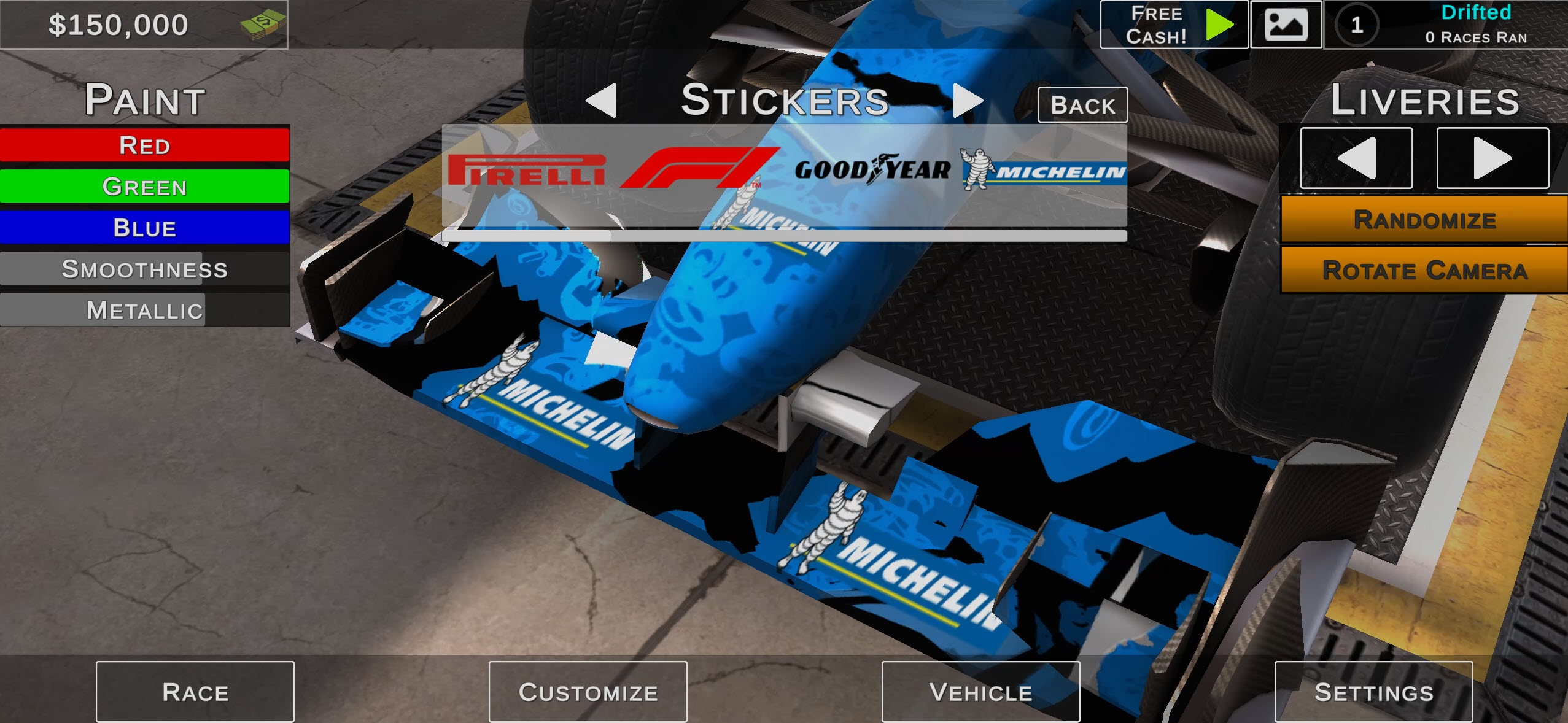
You get to choose several Liveries, all of which are free, with basic and funky options. You’ll also get to choose a custom paint color, along with custom Smoothness, and Metallic controls and sponsor stickers.

You can recolor your helmet and suit too. Changing the team name or color after setting initially will cost $100,000 each time, so I don’t recommend doing it too often!
Teammates are paid per race, ranging from $20,000 for a basic driver with 65 Experience, 65 Taking Corners, and 70 Speed to $200,000 for someone rated 95 in all three. Better drivers are much more likely to win and improve the team bonus.
If you’re after a racer with a huge car selection, Your Nurburgring Record replaces open-wheel racing with a full Nordschleife (Green Hell) time attack experience and a huge 61-car garage (including modern options like the GR Supra). Or, for something different, GP Moto Racing 3 offers a selection of bikes, with Race and Time Attack modes, and a familiar top-three unlock rule.
Advanced Tips & Tricks
Move your braking point later without sacrificing the exit
Find the safe braking area, then shift the point slightly later on each clean lap. Late braking only helps when you can still reach the apex cleanly and accelerate out without needing to correct.

Enter the corners too fast, and you’ll see how quickly the grip vanishes, forcing you with no option but to slam on the brakes (and hope for the best).
Keep your eyes on the minimap before fast (or tight) corners
Use the minimap to prepare for the tight tunnels, hairpins, and wall-lined corners coming up. A sensible early lift costs less time and speed than smashing into the barrier, especially when a rival is close enough to take the position.
Downshift to help with extra braking when necessary
The automatic gearbox is great for normal driving. But, when things start going wrong, or if you want to experiment with pushing the limits, tap the Left Ctrl key to shift down a gear, then (assuming you saved yourself from binning it) you can concentrate on steering and the exit.
Save your money for the right improvements
Don’t panic with upgrading the engine right away. Even in stock form, the car has enough power. If you find yourself frequently slamming into the walls, consider upgrading the brakes and tires first, then upgrading the engine once you’ve got it all under control.
Crazy Grand Prix FAQ
Can I play Crazy Grand Prix on my mobile?
Unfortunately not. It loaded in our mobile browser, but has no usable touchscreen controls.
How many cars are there?
You get just one Formula-style open-wheeler, which you’ll customize and upgrade throughout the game.
Does Crazy Grand Prix have damage?
Crashes produce sparks and smoke, but there’s no actual damage.
Can you drift in Crazy Grand Prix?
Not intentionally, sadly! There’s no handbrake, and your car is optimized for gripping to the tarmac (until it’s not!).
How do I unlock the next Career race?
Finish on the podium (top three). Fourth place still pays money and points, but you’ll need to retry before advancing.
How many people can play online?
A host can choose up to seven players (and add bots if preferred).
Do I need to shift gears manually?
No. The gearbox is automatic, but Left Ctrl and Left Shift provides a semi-auto option that lets you override it when a downshift or upshift would help.
Written by:
Published on:
Bill is a writer and photographer who has been part of the Drifted team since 2015. His work extends to various print and online publications, including Wangan Warriors.
As part of the King of Nations team, he traveled extensively for several years, capturing top-tier international drift events worldwide. His hands-on experience, including rebuilding his own Nissan Silvia S15 drift car, gives him unique insights into drift car building and global drift culture.
When not behind the lens or keyboard, Bill can be found browsing classifieds for his next JDM project or shredding virtual tires on popular simulators like Assetto Corsa, CarX, and Forza.
You can learn more about Bill’s story here or follow his socials on X (formerly Twitter), Flickr, Facebook, and Instagram.
 Grand Extreme Racing
 Crazy Drifter
 Crazy Traffic Racer
 Crazy Stunts 3D
 Burnout Crazy Drift
 Mighty Motors