
Loop Crash
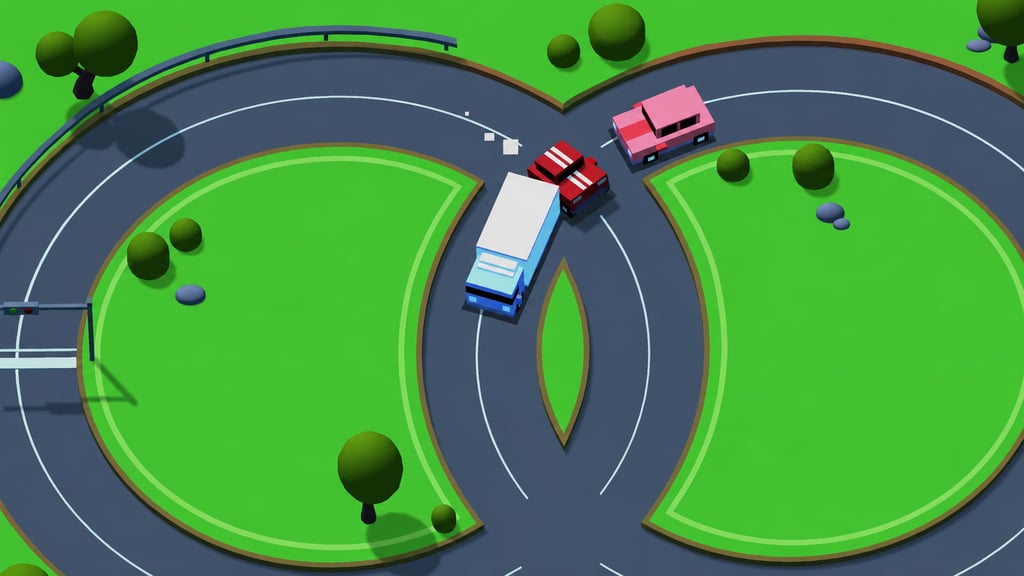
Table of Contents
Summary
Unlike most driving (and drifting) games, you don’t need to worry about finding the perfect line in Loop Crash (that’s already done for you). It’s about trying not to smash into the near-constant stream of oncoming traffic while only managing your speed.

You’ll relentlessly circle a fixed donut (with the traffic side overlapping in a “figure-eight”), constantly adjusting your speed as the ever-increasing traffic moves around its loop in both directions.
The opening laps leave plenty of room to accelerate, but soon, much more traffic joins the route. Even the slightest touch of a vehicle ends the run, even if it’s only a tiny tap after realizing the brakes aren’t going to save you.
Completed laps build your score and coin balance, which you’ll put towards unlocking 12 blocky vehicles and characters, including bikes, a school bus, a skateboarder, two Rebels, and… a llama. It’s uhh… not often you see them in a driving game (or any game, for that matter!).
It’s a great time-burner if you’ve got a few spare minutes, and perfect for challenging your friends to beat your score. However, if you feel the one-route format is a little limited, our other arcade games offer many more short-session score challenges to try.
Features
- Release date – February 25, 2026
- Difficulty – Beginner
- Levels/environments – 1 (fixed route with various themes)
- Number of vehicles and characters – 12
- Vehicle customization/upgrades – No
- Multiplayer – No
- Mobile – Yes
- Developer – AZ Games
Physics
The only real connection to drifting is the need for reflexes and concentration. Staying alert and making quick decisions helps here (ideal practice for when you head back to close-proximity battles later). But it’s admittedly not gonna be the best pick if you’re looking to learn advanced drifting techniques.

Your ride (whether that’s a car, character, llama, etc.) constantly follows the same route, and the closest you’ll get to tire smoke is when you push the vehicles hard, producing little pixelated smoke clouds. Heavy braking leaves tire marks and lifts the rear end slightly, and that’s about the closest you’ll get to weight transfer. The handling feels like it’s on rails throughout.
If you fancy something where your tap skills have a bigger impact, Drive Mad includes a huge selection of vehicles to work through, including rocket-strapped trucks. Its 100+ levels let you control a different vehicle each time, and failed attempts let you restart almost instantly.
Graphics

Loop Crash provides simple low-poly-style visuals, from the chunky traffic to the almost Minecraft-like playable choices. Daylight, snow, nighttime, and greener scenery change the vibes without altering the road.

Night looks awesome, with headlights lighting up the loops (with no street lights), although the darkness makes things harder to judge, especially the length of longer vehicles.
The simplicity makes it ideal for lower-spec devices, and Polytrack offers a similarly simple look, but is actually one of the most difficult browser racing games out there. You’ll race against the clock across 100+ tracks (and a track editor), along with global leaderboards for the ultimate challenge.
At the opposite extreme when it comes to visuals, UNBOUNDED throws you into a wet nighttime city with stunning reflections and detailed, real-world cars. You’ll struggle to believe it’s playable in your browser, but the heavier graphics are PC-only and definitely need a much stronger GPU than this one.
Controls
PC/laptop/Chromebook
- D – Accelerate
- A – Brake/slow down
Mobile/tablet
- Bottom-right pedal – Accelerate
- Bottom-left pedal – Brake/slow down
There’s no steering, and neither control lets you come to a complete stop (even if you hold the brakes). Releasing both keys/buttons maintains a neutral cruising speed.
If you’ve enjoyed the automatic movement aspect, Arcade Glide turns it into another timing test. You need to hold and release a single button, which attaches the car to corner anchors and swings it through each turn. You’ll get to work your way through 100 challenges, with online leaderboards.
How to Play Loop Crash
Initial Setup

In the main menu, you’ll find a settings cog in the bottom-left corner, which controls volume and shadows, so there isn’t much to configure. Your total coins sit in the top-right, while your current highest score appears above the ‘Play’ button in the bottom-right.

Press ‘Play’ to open the selection screen. Since you start with zero coins, it makes the Red Car the only option for now.
Locked choices that you’ll soon be able to unlock are shown as black silhouettes, but the names and shapes should give you a decent enough idea of what you’re looking at.
Getting Started
The first thing you’ll see are the two loops, which meet at shared junctions. Traffic circles at different speeds, with some moving in the same direction and some in opposing directions before crossing your path.

Traffic vehicles can overlap each other as though they’re on separate visual layers (they won’t reduce by smashing into each other, unfortunately). You don’t get the same privilege here, and the slightest contact with any one of them immediately ends your attempt.
Your first laps are nice and calm, and holding ‘D’ lets you bank quick progress while you’ve only got one vehicle to worry about.

Each completed lap adds to the score and instantly pays coins when you pass the line. You start at 2 per lap, and soon, the payouts (slowly) increase as you reach higher scores.
Coins and score are separate, so your earnings can go well beyond the score shown for that attempt, but it’s still a bit of a grind.
Once more traffic arrives (it won’t take long), try to keep your eyes on the center of the track as the pace picks up, so you can try to predict what’s going to happen.
Leaving your braking too late can leave you creeping helplessly toward the traffic (before an unavoidable dink), while accelerating into a gap commits you much faster. Bigger vehicles also take more time to clear the road, which can make a slow truck way more inconvenient than a quick car that blasts past.
If you fancy something even simpler where you don’t need to think about other vehicles, Drift Boss is another popular beginner browser game which requires just one button to drift along a floating track, where you’ll try not to fall off, with 31 vehicles to unlock.
Game Mode, Coins, and Garage
Every run takes place on the same layout. The visual theme changes, but there’s no additional tracks or levels to unlock.

The difficulty comes from the extra traffic travelling at mixed speeds and opposing directions. It’s perfect for seeing who can bag the highest score among your friends for bragging rights (especially if you quietly give yourself a head start first), but there’s no multiplayer mode.
You’ll get to unlock the following vehicles (and much more) with your earnings:
- Red Car – Free
- Green Car – 250 coins
- Black Car – 250 coins
- Taxi – 500 coins
- Truck – 1,000 coins
- School Bus – 1,000 coins
- Red Bike – 2,500 coins
- Green Bike – 2,500 coins
- Police Car – 5,000 coins

- Llama – 5,000 coins
- Skater – 10,000 coins and double coin earnings

- Rebels – 10,000 coins and double coin earnings
The early choices are mostly visual changes rather than making a noticeable difference in-game.
When you’ve got enough to unlock the larger, quirkier rides, you might want to consider whether it’ll be a wise decision, since it’ll leave much less room to fit through tiny gaps in the traffic.
The much smaller and versatile bikes are 2,500 coins each, but they’ll take a while to earn given the payouts are so small.
While the double coin earnings for the skater and rebels characters are welcomed, you won’t have much more to earn after that point other than bragging rights among your friends.
If you’re looking for a motorcycle game you can play right now (instead of grinding away for the bikes in this game), Traffic Road offers 30 to choose from, along with two-island Career, Endless, and Free Ride modes where you’ll need to blast your way down a highway. You also get performance upgrades and wheelies that trade bonus points for badly restricted visibility. It’s a much more realistic experience than you’ll get here, too.
There’s no tuning or customization, and despite the small puffs of smoke, Loop Crash certainly isn’t a drifting game (or trying to be one). Two great choices there are Drift Arena, which offers similar top-down pressure, but lets you drift auto-accelerating cars while managing tire life and obstacles in wager-based ghost battles.
Or, for a much bigger step-up, Drift Hunters MAX adds open-world AI traffic, some of the most impressive tuning you’ll find in a browser-based drifting game, and login-backed progress that carries over between your phone and PC.
Advanced Tips & Tricks
Make the most of the opening laps before the chaos begins

At first, you can get away with just holding the accelerator (most of the time) while only one traffic vehicle is going around. You’ll soon realize that bagging the initial easy coins matters when even the first unlock costs 250.
Don’t get too carried away, though, and ease off as soon as more vehicles appear. The confident rhythm from the opening can disappear on the next crossing, so don’t treat early speed as the correct pace for the entire run.
Read both junctions before you arrive

Keep watching the center of the figure-eight to glance over the speed and traffic that’s approaching each side of the shared crossing.
You need to plan, since the brakes will help out, but won’t save you if you need to come to a total stop.
Judge the vehicle length as well as the speed

A slow truck can hog the crossing much longer than a speeding car. You’ll need to wait until the back end has cleared rather than accelerating as soon as the front passes your route.
This is especially true at nighttime, when you’ll struggle to see its full size until your headlights shine on it. By that point, it’s often too late.
Truck speeds also vary. Some move almost twice as quickly as others, so reassess each one instead of relying on the last lap.
Use matching traffic speeds as breathing room
Several vehicles sometimes move in the same direction at similar speeds, forming a (much welcome) predictable cluster.
Once they clear together, use the larger opening to quickly bank another lap (or two) rather than waiting for them all to come back around.
Save for double coins if you can handle the grind
Skater and Rebels are the only choices with an earning advantage, but each one costs 10,000 coins.
Saving gives you a better long-term payout, but reaching either one will take a LOT of patience when the initial payouts are so small. It’s ideal if you want to unlock the full roster, though.
Loop Crash FAQ
Is Loop Crash playable on mobile?
Yes, it runs perfectly on portable devices. Use the large pedal buttons in the bottom corners for braking and acceleration.
Can you stop in Loop Crash?
No, braking only reduces the speed of your vehicle (or llama!) rather than bringing you to a standstill.
Is Loop Crash a drifting game?
No, you’re on a fixed route. There’s light tire smoke and braking marks, but no steering or sideways angles.
Does Loop Crash have multiplayer?
No. It is a single-player high-score game, but you can share your best score with your friends to see if they can beat it.
How can I earn double coins in Loop Crash?
The most expensive unlockables, Skater and Rebels, both offer double coin earnings. However, each one costs 10,000 coins, which will (unfortunately) take quite a while to unlock.
Written by:
Published on:
Philippe Daix is a seasoned automotive writer and entrepreneur who founded TopSpeed.com in 2005. After nearly two decades shaping online car journalism, he brought his passion for drifting and performance culture to Drifted.com in 2024. His work blends technical insight, storytelling, and a lifelong love for high-performance machines.
 Downhill Car Ride: Crash Test
 Beam Drive Car Crash Test Simulator
 Car Crash Test: Abandoned City
 Car Crash Multiplayer
 Crash Game: Physics Machines