
Online Car Destruction Simulator 3D
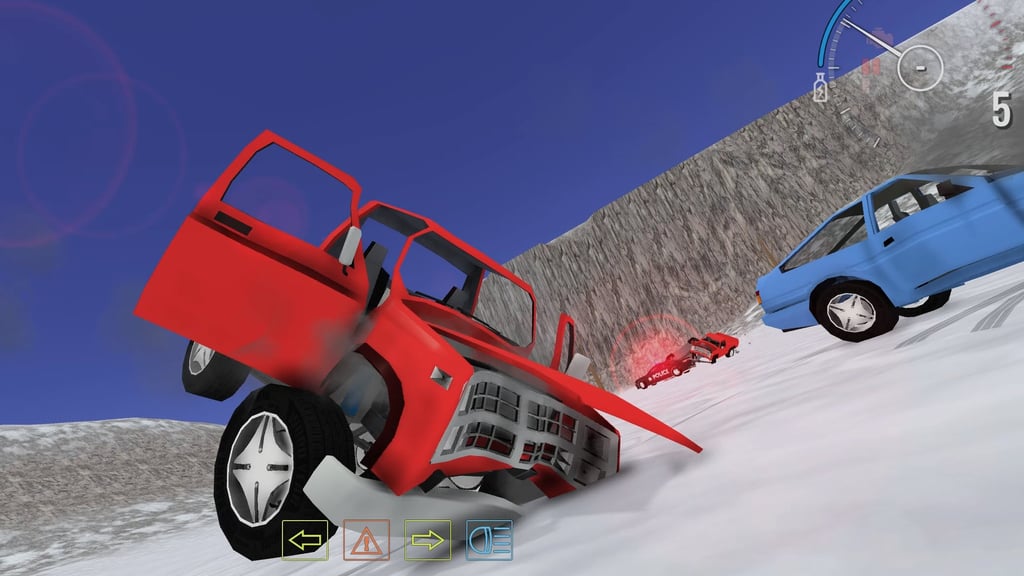
Table of Contents
Summary
Some browser crash simulators give you a couple of cars, a few mediocre ramps, and call it a day. This one throws in giant hammers, industrial crushers, spinning rollers that flatten your car like a tube of toothpaste, loop-the-loops, mountains you can barrel-roll down, and a motorcycle cruising mode.

Even then, you’ve barely scratched the surface, as you get to explore ten huge (and totally varied) locations, each with a unique approach to destroying your favorite rides.
As you probably guessed, there’s no shortage of drifting on offer, either, and it definitely doesn’t disappoint. The in-game AE86 (“style” car, of course!) delivers super impressive weight transfer and countersteering, to the point where you could happily ignore the destruction side and just use it as a free-roam browser drifter. We never expected to see a dedicated crash sim double as a legit drifting game, yet here we are.
All the in-game vehicles are unlocked from the start, there’s no progression to grind through, and you can reset or fully repair any car in a split second. Simply pick a location, pick a vehicle, and cause as much chaos as you please!
Features
- Release date – March 6, 2025
- Difficulty – Beginner
- Levels – 10
- Number of vehicles – 7
- Vehicle customization/upgrades – Paint customization only
- Multiplayer – Yes
- Mobile – Yes
- Developer – Playgama
Physics
The damage physics are insanely good for a browser game. Your body panels peel off individually as you clip objects, and the harder impacts will rip your doors, wheels, and bumpers clean off.
Drive long enough, and you’ll leave a trail of scattered panels across the whole area (which make for fun clipping points!).

On the AE86, the weight transfer feels awesome, but be warned that the rear end is unforgiving. You can’t fly into corners at full speed and expect to get away with it. You’ll need to catch the rotation as it comes around like you would in realistic drift sims.
It’s not as predictable and easy to get the hang of as games like Drift Hunters MAX, but once you get the hang of it, the drifting alone makes it worth a try. The only downside is that you’re only able to properly drift in the AE86. Even the R34 is more AWD-focused and too grippy to throw sideways.
If you want to check out another game where you do get to drift the full selection, Car Crash Test: Abandoned City is from the same team with a similar car roster. This one lets you switch between AWD, FWD, and RWD drivetrains, along with its own set of crushers and ramps across an empty city. There’s nowhere near as much variety in locations as this one, though.
Graphics
While they’re not incredible, they’re solid for a browser game. They won’t be competing with the real BeamNG.drive any time soon, but each one of the locations is surprisingly detailed for something running in a browser tab.

Make sure you check out the slow motion (B key). Watching a high-speed ramp launch in slo-mo while panels fly off mid-air is highly amusing, and the free camera (U key) lets you orbit and inspect the carnage from every angle.
Controls
PC/laptop/Chromebook
- W/Up arrow – Accelerate
- S/Down arrow – Brake/reverse
- A/Left arrow – Steer left
- D/Right arrow – Steer right
- Space – Handbrake
- Shift – Nitro
- C – Change camera
- U – Free camera
- R – Reset vehicle position
- K – Restore vehicle (removes all damage)
- B – Slow motion
- N – Switch vehicle
- Tab/Escape – Pause menu
Mobile/tablet (iOS/Android)
- On-screen touch controls
There are quite a few keys to remember here, but the important ones to remember are R (reset position when stuck), K (repair), and N (switch vehicle). A selector menu on the left side of the in-game screen covers most of them with icons, which is handy when you forget.
It works well on mobiles, but the keyboard gives you much quicker access to things like slow motion and free camera. If you’re after more mobile-friendly games that play better on a touchscreen, we’ve got plenty in our ever-growing collection.
How to Play Online Car Destruction Simulator 3D
Initial Setup

The main menu shows ‘Play’, ‘Settings’, and ‘Update’ in the center, with the controls listed in the top-right and your cup score in the bottom-right.
‘Settings’ is worth checking before you start. You can adjust sensitivity, graphics quality, and gravity (yes, gravity). Turning it down makes for some hilarious launches.
Click ‘Play’ and you’ll see all ten tracks. Most are unlocked from the start, but Mega Crash and Barrel Track require watching a short ad to access.
Getting Started

Once you’re in the game, you’ll see other vehicles already driving around, and you’re free to go wherever you want and cause as much carnage as you like.
A selector menu (the double-arrow icon on the left) mirrors most of the keyboard controls in a visual grid. If you’ve forgotten that K repairs your car, the wrench icon does the same thing.
You’ll occasionally stumble upon floating Cups that are scattered across the maps. You don’t get any rewards for these, and the tally on the bottom-left of the main menu is purely for bragging rights. Hunting them down and seeing who can find the most with your friends can make for a fun side game.

As your panels start flying into the air and your car starts looking like it’s just been to Ebisu Matsuri, you can press K to restore it or N to hop into something else. (If only it were that simple in the real world!) Over time, your totalled cars remain, and you’ll likely pass them on your next trip around the map!
If you wish you could place more ramps and obstacles around the map rather than just using what’s there, Beam Drive Car Crash Test Simulator offers a similar experience, but with a built-in map editor and terrain tools before choosing from a larger selection of 19 vehicles to throw at whatever you build.
Game Modes
There’s no set modes. You pick a location, pick a vehicle, and make your own fun.

Cop cars patrol several maps, and while they’re happy sitting back enjoying their donuts and letting you get on with it, smashing into one starts an immediate heavy-handed pursuit.
Changing vehicles mid-chase is an amusing getaway tactic (the cops keep chasing your abandoned car while you get to watch it unfold from a completely different ride). You can even ram them from your new vehicle to protect the old one!

For Multiplayer, you can get your friends to join the same location and then chat through the Message icon on the left.
If proper online sessions are what you’re after, Car Crash Multiplayer has private and public lobbies with 22 deformable cars, including the rarely-seen Nissan 400Z, alongside the likes of the Corvette C8, Bugatti Chiron, and… a Toyota Camry.
Or, if you want something even bigger, the open maps in Madalin Stunt Cars 3 give you over 60 unlocked cars (all free from the start), giant ramps, loop jumps, and online lobbies across three huge maps. The only downside is that you don’t get any damage or destruction like this one.
Track List

There’s a great mix. Some are open-world sandboxes, others are purpose-built crash arenas, and one is a motorbike motorcade through the desert.
- Winter – Snowy, icy terrain
- Nature – Steep mountains, rolling hills, with long winding roads running through. One of the best for general free-roaming and drifting
- Forest – Logs and obstacles scattered through vast woodland terrain
- Crash Test – Purpose-built sandbox with crushers, hammers, ramps, and obstacles designed for smashing into
- Mega Crash – Huge ramps and jumps for massive launches (unlocked by watching an ad)
- Mountain – A gigantic, steep mountain for testing traction on the off-roaders. You also get ledges where it flattens out that’ll launch you into barrel rolls at wild speed, and driving back up is a proper challenge
- Crazy Ride – Open desert with rocks and a flat area for head-on collisions
- Barrel Track – Loop-the-loop ramps and a huge Fast & Furious-style wall ride (unlocked by watching an ad)
- Motorcycles! – Puts you on a Honda CB-style motorbike in a desert motorcade. Kinda like Slow Roads on steroids (no damage in this mode though, and the bikes don’t actually fall over)

- Crash Test – Ramp – Gigantic ramps that let you launch into walls at maximum speed
If you’ve enjoyed the fast-paced downhill sections in this, Deadly Descent offers the same thing across a 20-level racing campaign, along with near-identical damage physics (wheels fly off mid-race, etc), and sometimes scraping your way across the finish line with just two wheels left is enough to win.
For more two-wheeled action, our motorcycle games section has a huge selection ranging from trials games to highway racers.
Car List
All six vehicles are available from the start, and they’re all based on real-world cars (unlicensed, of course). You can’t drive the Dodge Charger police cars, so we’ve not included those.
- AE86 (Toyota AE86 Sprinter Trueno) – The drift king of the roster. Super tail-happy, no nitrous, and not a lot of power, but it doesn’t need it for most tracks (although it’s a little lacking on the uphills). If you know anything about the real AE86’s legacy, you already know why it’s so loved in the drift scene
- R34 (Nissan Skyline R34) – Not the best for drifting (more AWD than RWD), but surprisingly capable off-road. The ground clearance is lower than the dedicated off-roaders, but it often bounces over things when pushed to its limits that you wouldn’t dare do in a real Skyline (especially at their current prices!)
- Pickup (Chevy offroader) – Most at home on the steep mountainous terrain
- Lada Niva (Euro-style utility vehicle) – The compulsory random Lada that always seems to sneak into browser games somewhere. Solid for off-roading
- Motorbike (Honda CB Series) – Only available on a couple of tracks

- Semi-truck (Peterbilt 379-style with trailer) – Available on several levels but not all. Too large to fit through the crushers in the sandbox, but watching something that big smash through obstacles is sick. It shrugs off the giant hammers better than the smaller cars, but the biggest one won’t have any issues launching it into the air!
Tuning & Customization

The ‘Tuning’ option in the pause menu is a bit misleading. It’s panel-by-panel color customization using HSV sliders, not actual performance tuning.
You select each body part individually (bonnet, doors, boot lid, bumpers, wheels, and brake discs) and pick your favorite color. However, paint matching across panels is a challenge in itself since the sliders have no values. Amusingly, you can actually paint the brake discs rather than the calipers, which… we don’t recommend trying on a real car (to say the least!).
Performance upgrades and suspension tuning aren’t part of the package, unfortunately. For the full experience, try Drift Hunters Pro, which hands you a free Honda Integra DC5 with a RWD conversion and 25,000 starting credits that’ll unlock most of the JDM roster almost immediately, with proper suspension, gearing, and forced induction upgrades.
Advanced Tips & Tricks
Get comfortable with the weight transfer before using the handbrake

The handbrake is harsher than most games. Even if you don’t hold it for long, the back end flings out (especially if you’re countersteering at the time), and it’s easy to create way too much angle.
You’re better off using the power-over method with minimal e-brake use, at least until you understand how the car reacts. If you want to better understand the techniques, our guide to drifting covers initiation methods, countersteering, and weight transfer in detail. Alternatively, you can also learn from your favorite pros and YouTubers.
Use the AE86 for drifting and the pickup or Lada for off-roading

The AE86 is by far the driftiest car, but it lacks power on the steeper ramps and uphills. The pickup and Lada handle the climbs perfectly, and the R34 sits somewhere in between. It’s not great at drifting or climbing, but it bounces over things in a way that makes off-roading in it super entertaining.
Switch vehicles mid-police chase
When the cops lock on, pressing N to jump into a different vehicle is an instant escape. They keep chasing the car that started it, so you can watch the carnage unfold from your new whip. We’ve got a whole section of police car games at Drifted if you enjoy this part.
Try slow motion on the big ramp launches

Hold B as you fly off a ramp and watch the impact unfold frame by frame. Combine it with the free camera (U) to span around the wreckage while it’s still happening. Our stunts and crash games section is full of similar games, and you’ll often be surprised how detailed and fun the physics are.
Online Car Destruction Simulator 3D FAQ
Can I play Online Car Destruction Simulator 3D on my mobile?
Yes. The on-screen touch controls work, although the keyboard gives you quicker access to things like slow motion and free camera.
How do I repair my car?
Press K to instantly restore all damage. Or, you can press R to reset the car’s position if you get stuck.
What’s the best car for drifting?
The AE86, by a long way. It’s tail-happy, has surprisingly realistic weight transfer, and enough power to get sideways in most situations.
How do I unlock Mega Crash and Barrel Track?
Watch a short ad. All other tracks are readily available if you’d rather not.
What are the cups for?
Bragging rights. They’re scattered very rarely across the maps, and the total shows on the main menu. There are no actual rewards, but they’re fun to hunt down and compare totals with your friends.
When do the police show up?
Cops patrol several maps automatically. Crash into one, and they’ll start chasing you. The chase keeps going until you outrun them, switch vehicles, or flip them on their roof!
Written by:
Published on:

Bill is a writer and photographer who has been part of the Drifted team since 2015. His work extends to various print and online publications, including Wangan Warriors.
As part of the King of Nations team, he traveled extensively for several years, capturing top-tier international drift events worldwide. His hands-on experience, including rebuilding his own Nissan Silvia S15 drift car, gives him unique insights into drift car building and global drift culture.
When not behind the lens or keyboard, Bill can be found browsing classifieds for his next JDM project or shredding virtual tires on popular simulators like Assetto Corsa, CarX, and Forza.
You can learn more about Bill’s story here or follow his socials on X (formerly Twitter), Flickr, Facebook, and Instagram.
 Beam Drive Car Crash Test Simulator
 Drift Police Simulator
 Mr. Drifter: Car Chase Simulator
 Car Crash Multiplayer
 Drift Race Simulator
 Real Drift Online