
Airborne BMX
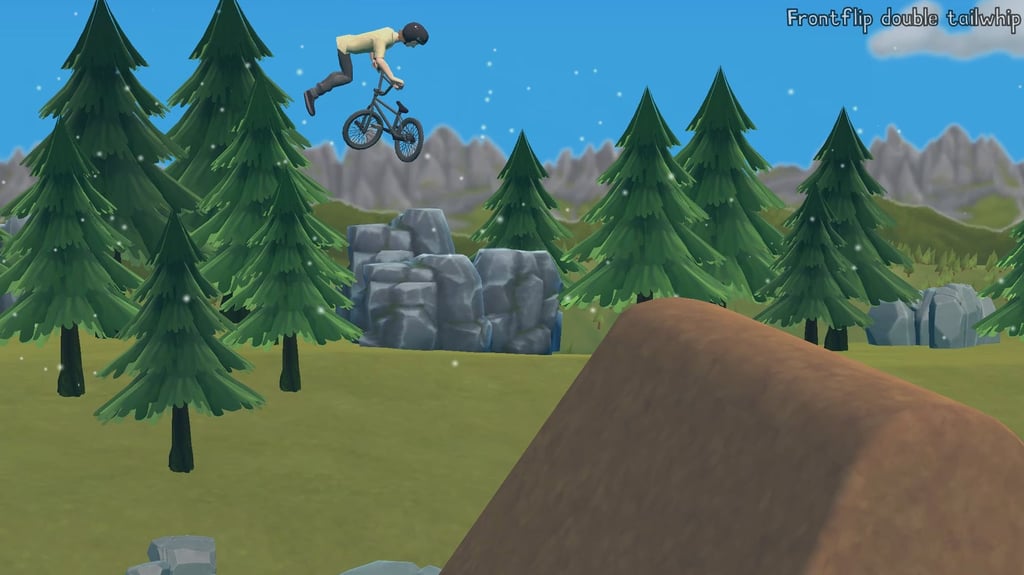
Table of Contents
Summary
Fans of Pumped BMX Pro will undoubtedly recognize this super addictive and challenging browser BMX game, which requires you to link increasingly-difficult tricks (based on individual skill challenges) without losing your speed required for the next jump.

You’ll pump into takeoff before performing flips, spins, and a variety of wild and complex BMX tricks in the air, then (hopefully) line the bike up for a clean landing (or not) before doing it all over again. As you progress, you’ll need to get to grips with, (and memorize), an ever-growing number of keyboard key combinations as you unlock harder stunts and new worlds.
The six worlds on offer contain a total 60 levels and 720 individual challenges, along with score targets, medals, unlockable bikes, and leaderboards giving you plenty to keep you busy.
It starts off fairly easy, but soon you’ll be introduced to grinds, manuals, and extra trick tiers that’ll keep pushing your memory limits (and likely your patience!), but it’s super satisfying once it (eventually) all comes together.
Features
- Release date – August 10, 2026
- Difficulty – Intermediate/Advanced
- Levels/environments – 60 levels (6 worlds)
- Number of vehicles – 15 BMX bikes
- Vehicle customization/upgrades – Visual customization only
- Multiplayer – No
- Mobile – No
- Developer – AZ Games
Physics
BMX fans are undoubtedly gonna love this game. The physics are realistic enough that they’re challenging and rewarding when you nail it, yet won’t require you going through a world of pain once it all goes wrong and you faceplant into the dirt.

You’ll build up speed by accelerating into the ramps, then pumping at the right moment. Big jumps and well-timed landings then keep the momentum flowing for the next one. Mistime either, and you’ll end up smashing into the next ramp, sliding backward down it, or send the variety of pro riders flying over the handlebars.
Takeoff and landing angle matter, but it’s not totally unforgiving since you can make plenty of adjustments to the bike in midair. You can often get away with a rough one-wheel landing (assuming you balance correctly after), but a clean two-wheel touchdown lets you carry way more speed into the next obstacle.
The game’s own explanation, “pump equals speed, and high landing equals high speed,” is worth remembering once things start ramping (excuse the pun) up.
Despite its cartoon-y styling, the realistic feel makes it one of the better browser simulator games out there, even if it’s not drift-focused. Bike Xtreme, another AZ Games bicycle title, offers a calmer MTB experience. It trades the giant trick book for an endless downhill run built around balance, bumps, ever-changing weather conditions, and clean landings.
Fancy dropping the two-wheel aspect entirely? Drive Mad takes the same hidden-precision into 100 savage vehicle levels where momentum and landing angle matter more than its blocky graphics suggest, and you’ll need to learn how to master a totally unique vehicle on each one.
Graphics

The clean cartoon style visuals makes the game look deceivingly easy. Foothills opens the campaign before Dark Woods, The Mountain, Dust Bowl, Wetlands, and The Park unlock later on, providing different visual variety (and obstacles) with each new location.
Amusing ragdoll-style crashes (which you’ll need to get used to) put the cherry on the top, and make the frustration of failing to land a jump nicely entertaining.
Controls
PC/laptop/Chromebook
- Space – Accelerate/pump
- Release Space at takeoff – Launch with maximum speed
- Hold Space while airborne – Dive into the landing
- Left arrow – Backflip or balance the rider backward
- Right arrow – Frontflip or balance the rider forward
- Down arrow – Spin
- WASD – Perform basic tricks
- Left Shift + WASD – Perform Tier 2 tricks
- Right Shift + WASD – Perform Tier 3 tricks
- T – Open the trick/help menu
- P – Pause or view current challenges
- X – Reset the rider
- Tab – Navigate the in-game menu
- Enter – Confirm a menu selection

The controls are pretty overwhelming at first, so don’t try to memorize everything before the tutorial explains what you’ve gotta do.
When you’re in-game, pressing ‘T’ opens the trick list, and you’ll get used to returning here. Also note that the two Shift keys control different trick tiers. Their icons can look like the Up Arrow key at a glance, so check which side of the keycap the symbol sits on.
Mobile (iOS/Android)
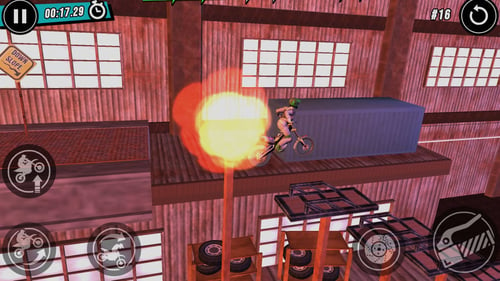
Airborne BMX isn’t playable on mobile, which isn’t surprising given the amount of controls. However, our mobile games collection has a huge selection of touch-friendly alternatives. Xtreme Moto Mayhem is a popular pick among bike fans, where you’ll control a trials bike instead, with similar suspension movement and faceplant potential across the 100-level campaign.
If you’ve enjoyed the ramps in this one, but not the finger gymnastics (and brain racking keys), give Moto X3M a try. Its 22 obstacle courses still demand careful speed, bike angle, and airtime, but the controls focus on beating the clock instead of recalling three tiers of BMX tricks.
How to Play Airborne BMX
Initial Setup

The main menu offers Play, Rider, Bike, Replay Tutorials, and Settings.
Unless you need to change the sound, head into Rider first. The 14 named choices (unlocked from the start) are real BMX pros, including Corey Bohan, Chris Doyle, Dennis Enarson, Chase Hawk, and Mike “Hucker” Clark, along with a mystery rider you’ll eventually get to unlock. (See if you can guess who!)
Alongside the unlocked riders, in the Completes menu, you’ll find a selection of 15 free bike designs (with no stat differences), but Custom isn’t unlocked until later.
So, pick the rider and bike you like, then choose Play. Foothills is the only available world at the beginning, and the opening tutorial introduces each basic control before (quickly) expecting you to combine them.
Getting Started

The tutorial asks you to finish the course, land one backflip, complete a 360, and perform a tailwhip. It’s worth noting that it wants you to do exactly what it says, and if you do a double backflip, for example, you’ll fail the mission (took me a while to figure this one out!).
Hold Space to pump for speed (accelerate), and then release it near the top of the ramp to launch off. Complete the required trick(s), align both wheels with the slope, and hold Space again to dive into the landing to maximize the momentum. The aim isn’t to simply survive each jump, you need to practice hitting the ground rolling and preparing for the next.
You can easily perform the required trick and still fail by reaching the next jump too slowly, in which case you’ll need to head back to the start and try again.
Clean two-wheel landings help, but you can often balance your way out of a single-wheeled landing, assuming you can get the speed up again as soon as possible. When things don’t go to plan, X offers an instant reset to have another go (you’ll become super familiar with it soon!).
If you find yourself repeatedly failing a specific aspect, head back to Replay Tutorials in the main menu for a quick refresher.
The usual WASD keys handle the basic tricks. Down spins the bike, while Left and Right control flips in the air and your balance later on. Tapping D performs a tailwhip, but holding it too long can add a second one. This is great for earning more points, but not so ideal when you’ve got a specific objective to meet.

Dark Woods introduces (bamboo?) poles for grinding, alongside more advanced techniques. You’ll need to practice Icepicks (scraping on the rear peg), 50-50s (front and rear), and toothpicks (front peg). You then use the Left and Right keys to keep your rider balanced on the rail.
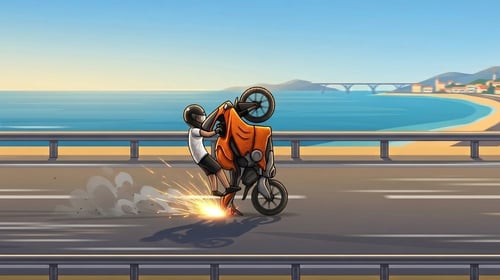
Manuals add another balancing job, with the rear wheel used for a normal manual and the front for a nose manual. If you want to practice this aspect, Wheelie Master takes the wheelie-based challenge into a much simpler score chase, making it great for building up your one-wheel balancing skills.

Tier 2 tricks require use of the left shift key along with the WASD keys, while Tier 3 uses Right Shift instead (which isn’t always super clear on the in-game button hints). You’ll need to press the modifier before pressing the trick key. A decade, for example, is Left Shift + D.
Make sure you repeatedly check the unfamiliar (or forgotten) key combinations with T rather than guessing. Thankfully, it resolves a lot of the in-game questions easily along the way.
Game Modes
There’s only one game mode, but don’t let that put you off, as there’s no shortage of things to do within it.

Each side-scrolling run combines reaching the finish with separate Level Score and Trick Score targets, along with the individual skill challenges. Rewards progress through Bronze, Silver, Gold, and blue-colored Platinum medals. If you get a good enough score, you’ll also get to earn a spot on the global leaderboards.
Each of the six worlds contains 10 levels and 120 challenges, providing an impressive 720 challenges altogether. Don’t worry, you don’t need to nail every objective before moving on. Earn enough to unlock the next world (which will be sooner than you think), then you can go back and revisit earlier levels for missed requirements, better medals, or a stronger leaderboard position if you wish.
Fancy strapping an engine to your bike? Stunt Bike Extreme is the closest you’ll get, offering 270 levels, touchscreen support for mobiles, bike upgrades, customization, and tournaments.
Traffic Road is perfect if you want to change the pace completely, offering first-person highway riding where you’ll thread your way through cars with 30 motorcycles, upgrades, and four game modes.
Bike & Rider Selection

Fans will be pleased to see plenty of familiar pro rider names in the lineup, all of which are unlocked from the start. You can head to the main menu at any point to swap riders or bikes. There’s one mystery guest rider, displayed as “????” that you’ll unlock further down the line.
The 15 bikes (found under Completes), all of which are again available for you to choose from the start, provide different looks, but the same performance. So, go with whichever one you like the look of.
Bike Customization
At the start, the Custom option is locked. Once available, the bike designer lets you recolor individual parts such as the frame, wheels, handlebars, and pedals. Again, the tweaks are purely cosmetic, so you won’t get to create a super-BMX with a 2JZ engine and turbo upgrades, unfortunately!
Advanced Tips & Tricks
Don’t overperform when you’re asked to perform a trick

More isn’t always better. When an objective requests just one backflip, don’t get clever and throw in a double. Tap the D once for things like the tailwhip, too, as holding it too long can add an unwanted second rotation and fail an otherwise clean attempt.
Assign each trick to a jump before you start (after failing initially)
Press P to review the current challenges, then decide where each requirement fits if you don’t nail it first time. For example, you could use the smaller jump for a simple spin or barspin, and save the huge ramp at the end (hopefully) for a multi-trick combo.
Since you only get so many useful takeoffs on each level, it pays off to remember what you intend to do, and when.
Protect your momentum before chasing fancy tricks
When you’re trying to unlock the new levels, focus on completion rather than impressing. Consistently release Space near the top of the ramp, finish the required trick(s) early enough to straighten up, then hold Space to slam it into the downslope for maximum speed.
Unfortunately, a spectacular combination means very little if your landing kills the speed required to clear the next gap and you’re forced back to the start.
Use the menus instead of relying on memory
Unlike most browser games, there’s a lot to remember here. T shows the trick inputs, P checks your current objectives, and Replay Tutorials refreshes the basics. They’re not just there for show, they exist because there’s heaps to remember.
If you’re getting tired of meeting the specific objectives, and would rather swap out the scenery for collapsing platforms, explosions, and enormous gaps, give Ramp Xtreme a try.
Airborne BMX FAQ
Can I play Airborne BMX on my mobile?
Unfortunately not. Since there are so many keys, it requires a keyboard. It works perfectly on PC, laptop, and Chromebook browsers, though.
How many levels and challenges are there?
There are 60 levels across six worlds (unique locations), with 120 challenges per world and 720 altogether.
Does Airborne BMX have multiplayer?
No. Online leaderboards provide the only competitive element.
Do different bikes perform differently?
No. The unlockable bikes and custom designer are visual choices, not performance upgrades.
Do I have to complete every challenge to progress?
Nope. You can earn enough progress to open later worlds, then return to try and collect any missed objectives, medals, and earn higher scores for the leaderboards.
Written by:
Published on:

Bill is a writer and photographer who has been part of the Drifted team since 2015. His work extends to various print and online publications, including Wangan Warriors.
As part of the King of Nations team, he traveled extensively for several years, capturing top-tier international drift events worldwide. His hands-on experience, including rebuilding his own Nissan Silvia S15 drift car, gives him unique insights into drift car building and global drift culture.
When not behind the lens or keyboard, Bill can be found browsing classifieds for his next JDM project or shredding virtual tires on popular simulators like Assetto Corsa, CarX, and Forza.
You can learn more about Bill’s story here or follow his socials on X (formerly Twitter), Flickr, Facebook, and Instagram.
 Bike Xtreme
 CarBall.io
 Xtreme Moto Mayhem
 Stunt Bike Extreme
 Wheelie Master
 Stunt Multiplayer Arena