
Bridge Builder: Crash Test
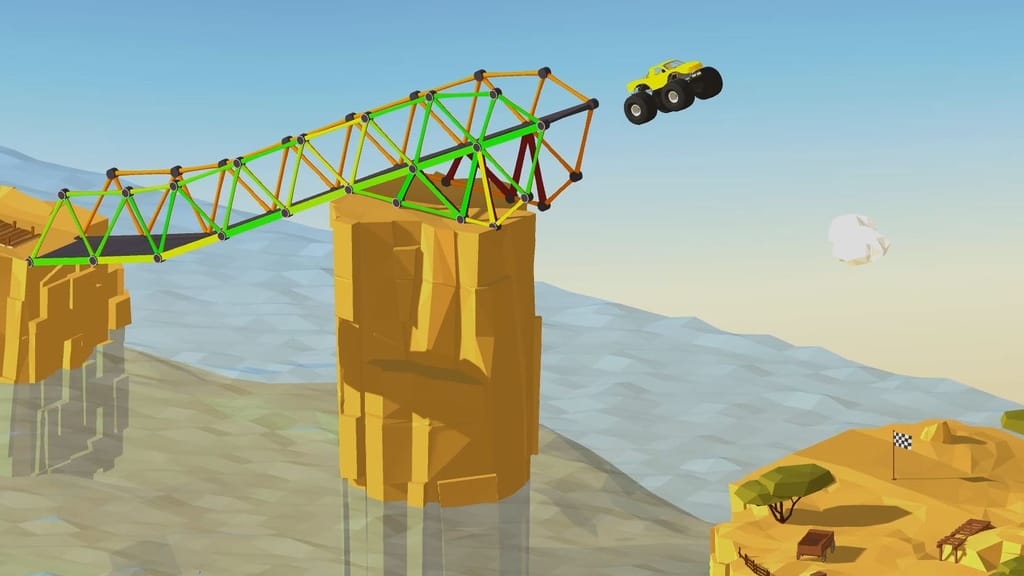
Table of Contents
Summary
Bridge Builder puts you in a variety of levels with a huge gap, a random vehicle, and a budget, and doesn’t care how you get across. You can play it like a careful architect and build the cheapest, sturdiest bridge you can. Or, go full YOLO by throwing together the pieces to form a massive ramp, launch a firetruck off it, and hope for the best.

Either way, the only requirement is that the vehicle has to reach the finish line. It doesn’t matter if your bridge completely falls apart once you’re over it. Thankfully, this makes way for plenty of hilariously creative (and often very sketchy) solutions.
It starts off nice and easy with a hand-holding tutorial, but it soon gets seriously tricky, and you’ll likely get to pick up plenty of real engineering know-how along the way. Who says gaming can’t be educational?!
It’s a great challenge if you like a puzzle to get your brain working, or if you need a break from the usual doomscrolling. Or, it’s often just as much fun if you just wanna send trucks into the sea (and our stunts and crash games have plenty more where that came from). Sure, it’s a little different from the usual drifting games, but it makes for a great break from the norm.
Features
- Release date – July 2026
- Difficulty – Intermediate/Advanced
- Levels/environments – 50+ levels (many environments)
- Number of vehicles – Many
- Vehicle customization/upgrades – No
- Multiplayer – No
- Mobile – Yes
- Developer – 8Games
Physics
It’s not the usual physics consideration, since you don’t get to drive the cars (although you can get behind the wheel.) So, forget the weight transfer you’d use to get a car sideways. The closest you’ll get is (anxiously) feeling the weight of whatever’s crossing based on the stress (or total collapse) of the bridge you’ve built.

At the start, the taxi rolls over your questionably-built wooden beams without a fuss, but once the firetruck comes to play, the bridge lights up yellow under the stress. Push it too far and the beams sag, snap, turn red, and eventually the whole lot gets dumped into the water.
For the ultimate varied-vehicle puzzle game, Drive Mad flips the idea around, putting you behind the wheel (where you actually get to drive) across 100 levels, with bridges and ramps in everything from monster trucks to rocket-powered dragsters.
Graphics

You’re treated to clean, cartoony cliffs (in various locations), a bright blue ocean, and a different vehicle waiting nervously at the edge. The scenery changes nearly every level, from shipping channels to icy landscapes with penguins and polar bears.
Make sure you take the time to check out the camera views when you send the vehicle across. 3D lets you rotate around freely with your mouse (or touchscreen), while the flat 2D is the clearest way to see where your bridge is struggling, and there’s a follow cam plus a CCTV-style view that cycles through angles.

You can slow the simulation down but can’t pause it, which is a bit frustrating. Thankfully, you can retest as often as you like by retrying (it keeps what you built). If slow-mo destruction is your thing, Crash Game: Physics Machines adds slow-motion replays of everything, from a BMW E30 getting smashed up to a full-size bus meeting giant crushers.
Controls
PC/laptop/Chromebook
- Left mouse button drag (on a build point) – Place and connect bridge materials
- Left mouse button drag (outside build point) – Pan around the construction area
- Double-click – Remove an existing bridge part
- Mouse wheel – Zoom in/out
- Material buttons – Select road, wood, steel, or cable
- Start Simulation (green button) – Test your bridge
- Undo – Reverse your most recent placement
- Clear All (red explosion icon) – Remove every part you’ve built
- Grid button – Toggle the construction grid
- Help (?) – Show what each button does
- Hint button – Build part of the bridge for you (100 coins or a five-second ad)
- Pause button – Open the Pause menu
- Camera buttons – Switch between 3D, 2D, cockpit, follow, and CCTV-style views
- Mouse drag (3D camera) – Adjust the viewing angle
- Simulation speed control – Slow the simulation down
Mobile (iOS/Android)
- Drag – Place and connect bridge materials or pan around when not clicking build points
- Pinch – Zoom in/out
- Tap on-screen buttons – Select materials, start the simulation, undo, clear, use hints, and switch cameras
It plays well on a phone, although placing parts is a little fiddlier, but we found it easier once we zoomed in. Our mobile games section is packed with plenty more optimized games to play on the go.
How to Play Bridge Builder: Crash Test
Initial Setup
Click “Collect Bonus” on the daily reward pop-up when you first open the game for your first 100 coins (which can be put towards a hint). The reward grows each day you come back, with bonus levels on offer for days three and seven.
You can also hit the plus button next to your balance to get another 100 coins (in exchange for a five-second ad), as many times as you like. Coins pay for hints, not materials (each level has its own building budget), so there’s no need to stockpile them before heading into Main mode. They’re more of a bonus than a necessity.
Getting Started

The tutorial starts you with a taxi and two cliff edges. Drag road pieces across the gap, then add wood underneath for support (I know, just wood, but it’ll hold out long enough if done right). Every part has to connect to an anchor point (the little dots) or it’ll collapse, and the cursor doesn’t always land exactly where you want, so stretch the pieces slightly past the point until it snaps in.

When you’re satisfied it’s good enough (or not) hit Start Simulation, and if the taxi makes it across, you’ll get a confetti cannon and a star rating based on cost. The cheaper your bridge, the more stars you earn.

Made a mess? Double-click a part to remove it, use Undo for your last placement, or hit Clear All to start over.
New materials unlock as you go:
- Road and wood (from the start)
- Steel cables (level 6, longer than steel but also pricier)
- Steel girders (level 9)
The initial hand-holding tutorial ends quickly, but thankfully, nobody’s stopping you from building a massive ramp just for the giggles at this point.

Enjoyed the building process, and want to drive what you build? Polytrack lets you do that on a much bigger (and more competitive) scale. There’s a drag-and-drop editor for entire racetracks full of absurd jumps and loops that you can then race, share, and get others to try and beat your time on global leaderboards.
Game Modes

Main mode is sure to keep you busy for a (very) long time, with 50+ levels that ramp up (excuse the pun) quickly. Beat a level once and its (often fun) missions unlock, which you’ll find in the top left after hitting Retry. They change from level to level and can ask you to:
- Cross within a time limit
- Make a jump of a set length
- Reach a certain height
- Build under a set cost
- Keep stress below a limit
- Land a backflip
… and more.
The ultimate goal is three stars and every mission on every level, which is easier said than done. Some later levels need a certain number of stars to unlock, and Space mode only opens up once you’ve beaten every level in Main.
If you fancy hitting the jumps and flips for real, Madalin Stunt Cars 3 offers three huge stunt maps packed with jumps, loops, and tunnels, 60+ cars unlocked from the start, along with online multiplayer lobbies to share the chaos.
Backflips are even better when you’re pulling them yourself, and Stunt Bike Extreme hands you a selection of trial bikes to take on 270 levels of crazy ramps and exploding hazards.
Vehicles & Scenarios

Nearly every level pairs a new vehicle with a new setting, though a few familiar faces come back after a while.
Taxis and firetrucks give way to heavy trucks, and even monster trucks. You’ll be given hot air balloons to assist you getting across, and some scenarios change the entire puzzle, like making way for a couple of ships that need enough clearance to pass under your bridge.
You can’t choose or upgrade your ride. The game hands you the keys, and it’s your job to keep it out of the ocean. Stick Annihilation II does things the other way around. You start with a bare chassis before upgrading the armor, suspension, and engine as you attempt to survive increasingly brutal attacks from the relentless stickmen.
Advanced Tips & Tricks
Give it your best effort before you give in to the Hint
It’s easy to be tempted by the Hint button (it’s constantly staring at you), but try not to cheat your way through until you’ve exhausted your brainpower. Play it as intended, and it’s one of the toughest puzzle games out there, with levels that’ll rack your brain for ages (which is half the fun).
If you do use a hint, study what it built, because sometimes the first section alone is enough to figure out the rest. When you fancy a different kind of head-scratcher, our puzzle games are full of them.
Build in triangles to maximize the bridge strength

The game suggests this early, and it’s the same reason real bridges and cranes are covered in them. Triangles hold their shape under load, while squares tend to fold. When a span keeps sagging, splitting it into triangles is often cheaper than piling on more material.
Your bridge only has to last until the finish line

If it collapses after the vehicle crosses, who cares? Think drift missile rather than show car!
Build it just strong enough to get across and you’ll bank the savings for extra stars. Deadly Descent has the same limp-over-the-line spirit, racing you against rivals down steep tracks full of crushers and craters, more often than not dragging a mangled car (well, chassis) over the finish.
When the vehicle has the power, just send it

Later levels bring some seriously powerful vehicles that can fly the gap with barely any bridge at all. A short, sturdy ramp is often way cheaper than a full crossing, which means more stars, and it doesn’t matter if it crumbles on takeoff.
If it all goes pear-shaped, just head back to the drawing board. Downhill Car Ride Crash Test is all about the launch, sending you off huge ramps with a crash-test dummy to cause as much destruction as possible, with earnings that unlock faster vehicles and upgrades.
Bridge Builder: Crash Test FAQ
How do you get three stars in Bridge Builder: Crash Test?
Spend less when building. Each level has three budget limits (one per star), so trim every beam you can while still getting the vehicle across, whatever it takes.
How do you unlock Space mode?
Beat every level in Main mode, which will take longer than you might think. Unless you give in and use the hints!
Can I play Bridge Builder on my phone?
Yes, it’s available on iOS and Android browsers, with drag-to-build and pinch-to-zoom touch controls. We recommend zooming for the more technical parts.
Written by:
Published on:
Philippe Daix is a seasoned automotive writer and entrepreneur who founded TopSpeed.com in 2005. After nearly two decades shaping online car journalism, he brought his passion for drifting and performance culture to Drifted.com in 2024. His work blends technical insight, storytelling, and a lifelong love for high-performance machines.
 Beam Drive Car Crash Test Simulator
 Car Crash Test: Abandoned City
 Downhill Car Ride: Crash Test
 Loop Crash 2
 Car Crash Multiplayer
 Loop Crash