
Loop Crash 2
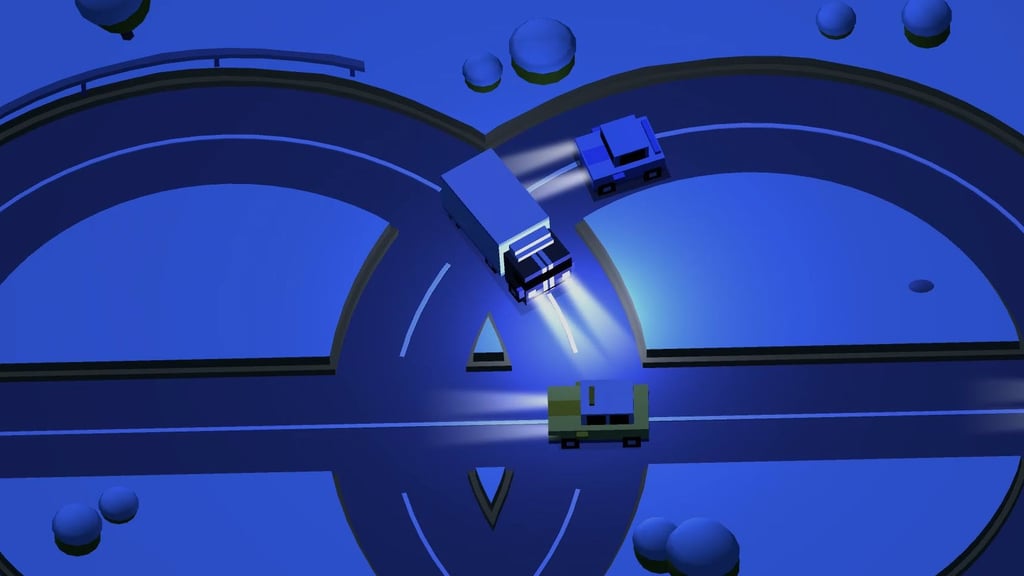
Table of Contents
Summary
Loop Crash 2 is a fast-paced arcade traffic game built around acceleration, braking, and timing. Your ride (or character) follows a fixed route, and you only need to think about controlling the speed to safely pass through the crossings without hitting anything.

While the concept sounds amusingly easy, you’ll soon realize it’s far more challenging than it looks at first glance.
After you crash (which you will, a lot) you’ll get to head back into the action almost immediately, which is handy given how addictive it is. You’ll constantly chase your next best score (and maybe even get on the leaderboards?) or another unlock.
Fans of the simpler browser games out there like Drift Boss will undoubtedly enjoy this one, and it’s a fantastic (yet subtle) improvement over the popular original.
What’s new in Loop Crash 2?
Compared with the OG Loop Crash game, the sequel adds:
- Two layouts – Choose between Easy and Hard (where a straight road gets thrown into the mix).
- More unlocks – You now get almost double the cars, bikes, trucks, and other oddballs.
- Bonus activities – Spend tickets on the Prize Wheel or Collect Coins, both brand new.
- Vehicle perks – More of the (later) unlocks now provide extra health or double coins.
- A cleaner look – There’s much more variety to the scenery, and the graphics have had a glow-up.
Features
- Release date – July 31, 2026
- Difficulty – Beginner
- Levels/environments – 2 endless tracks (Easy/Hard) with changing scenery
- Number of vehicles – 23
- Vehicle customization/upgrades – No
- Multiplayer – No
- Mobile – Yes
- Developer – AZ Games
Physics
As fans of the original will know, your vehicle follows a fixed loop, so the challenge is managing your speed carefully rather than worrying about steering and clipping points.

One of the most difficult aspects of the game is that your ride can’t stop completely at any point. Acceleration and braking determine when you’ll reach the crossings, quickly turning the road into a fast traffic puzzle where planning the (increasingly short) next gap is vital.

Cars and characters (you’ll see these in-game now) circulate at different speeds and in different directions. Their speeds stay steady and predictable until several of them overlap and wreck your perfect plan.
One of the most challenging aspects is that the traffic can pass through one another, but good luck trying that for yourself! Any contact with a vehicle will immediately end your run.
Hard braking leaves smoke and skid marks, but that’s the closest you’ll get to drifting in this one. If the sideways teaser leaves you wanting more, Drift Hunters MAX is the most popular drifting game in our catalog, with a huge selection of vehicles, game modes, tuning, and upgrades. It’s not quite as simple as this one, so you might want to read our getting started in DH:MAX guide to gain a decent understanding.
Graphics
The sequel is now smoother, cleaner, and more refined than the original. Each reset offers changing scenery and time of day.

Motorcycles, sign-waving rebels, a skater, and even an escaped llama with a cop car chasing it will keep you guessing what’ll turn up next. Yep, it certainly gets a lot quirkier than the typical browser game traffic!
Controls
They couldn’t be much simpler if they tried.
PC/laptop/Chromebook
- D/Up arrow/Right arrow – Accelerate
- A/Down arrow/Left arrow – Brake
Mobile (iOS/Android)
- Bottom-right on-screen control – Accelerate
- Bottom-left on-screen control – Brake
How to Play Loop Crash 2
Initial Setup

When you open the game, you’re gifted with a free ticket that you get to spend on the Prize Wheel or Collect Coins, both of which are new bonus games for this version.

Prize Wheel lets you have a spin for the chance to win coins, tickets, another spin, or a free vehicle.
Collect Coins puts you into the game for a bonus level where you’ve got the chance to earn far more coins than normal.
Since you only get one life, and you’ve not practiced yet, I’d initially put the ticket towards a Prize Wheel spin and hope for a winner! You can always try the Collect Coins round when you’ve built up your in-game experience. You can also save your ticket for later.
After that, choose Easy or Hard, enter the username you want shown on the global leaderboards (you’ll get on ’em!), and select any vehicle you’ve unlocked. Easy is the sensible place to learn and earn. The extra center road in Hard doesn’t look like much, but it adds way more traffic (and confusion) to track, so jumping straight in is unlikely to be too successful (although you’re welcome to prove me wrong!)
Getting Started
The top-left counters show your coin and ticket balances, while the center of the main menu displays your current record.
Open the stats panel on the left for your best score, total play (retries), average score, and today’s best. The leaderboard next to the (volume) setting icon separates the global rankings into day, week, month, and all time.
The lower menu also holds the Prize Wheel (also where you access Collect Coins), custom username field, and vehicle list. Over on the right, a full preview shows the next vehicle you can afford while its garage entry remains a black silhouette.
Once a run starts, complete as many laps as you can to earn increasingly valuable coin rewards. Watch the circulating traffic, then accelerate or brake so your vehicle reaches each intersection during a gap. You can’t simply park and wait for safety (the brakes could do with an upgrade!), so every adjustment needs to prepare you for what’s coming next.
Game Modes
The main mode is an endless overlapping intersection run that continues until you crash.

Easy uses a figure-of-eight, double-ring layout, where you’ll cross the traffic twice. Hard adds a straight road through the center, creating another traffic stream to cross twice (making four in total) and far more simultaneous movement. Hard certainly lives up to its name, and even Easy becomes tricky when several vehicles (or animals) turn up!

Collect Coins is a separate, ticket-gated bonus survival mode. Various sized coins float around the level, and you need to collect as many as possible without crashing, with far more generous payouts for the larger coins. The Prize Wheel also costs a ticket, but it’s a spin reward activity rather than another driving mode.
The day, week, month, and all-time leaderboards let you compete for scores under your custom username entered in the menu. They’re not live races or multiplayer sessions, but we’ve got a huge selection of multiplayer games to check out, if that’s what you’re after.
Vehicle List
“Vehicles and beyond” would be a more accurate description here. Most of the 23 unlockables begin as silhouettes in the menu, though fans of the original will spot familiar oddities that were fully revealed.

The roster includes:
- Sports cars and nimble hatchbacks
- Trucks, pickups, recovery trucks, and a costly forklift
- Motorbikes
- A skateboarder
- A llama
- Rebel (a group of protesters)
Large vehicles look cool, but squeezing them through the endless narrow gaps makes things even harder. They’re worth a try, but you’ll likely find yourself coming back to the more compact options.
When you get to the final two vehicles, you’ll get x2 coin earnings and x2 life bonuses, but you’ll need to fork out 35000 coins for both.
If the motorcycles catch your eye, but you don’t wanna grind for ’em, Traffic Road is among the most popular motorcycle games in our catalog. Its Career, Endless, and Free Ride modes, larger bike collection, and upgrades give you far more two-wheeled variety than what you’ll get here.
If threading through traffic at nearly 300 km/h isn’t crazy enough for you, you can up the intensity even further in the ultimate trials bike game, Stunt Bike Extreme.
Unlocks, Rewards & Perks

Coins buy vehicles, with affordable early choices and much costlier options as you progress, and successfully completed laps (gradually) pay more coins over time.
Alongside purchases, new rides can also come from the Prize Wheel or appear as occasional gifts in the main menu. They’re rare, though, so enjoy one when it appears, but don’t build a plan around it.
There’s no tuning or upgrading here, but Racing Pop is a great alternative that keeps the automatic-steering idea while turning it into lapped and point-to-point racing, with repairs, paint, temporary boosts, more cars, and more locations. It’s an ideal fit when you want a garage you can develop.
For more freedom and a huge selection of stuff to unlock, Escape Road 3 brings the quick-retry format into an open-world of police getaways. You get drifting, power-ups, mini games, collectible characters, and a huge 90-vehicle catalog to work through.
Advanced Tips & Tricks
Hit the brakes early to see what’s coming up ahead

Your vehicle never stops completely, so last-second braking rarely pays off. Ease off early, identify the next gap, then adjust your speed instead of reacting right at the crossing.
Memorize the speed of each vehicle
Monitor how quickly each vehicle (or character) goes about its full circle instead of just following one vehicle. A fast bike can catch a slow truck right after they both reach your crossing, turning the apparently safe gap into a quick trip to the main menu.
Learn (and earn) on Easy mode initially
Easy is still far from truly easy, but removing the center road gives you more room to learn the braking distances and build up your coins. Switch to the tougher layout when you’ve built up your confidence, but expect it to be knocked pretty quickly!
Stick with the smaller vehicles for high score attempts

The oversized trucks are a welcome addition, obviously, but the compact options make squeezing through tight gaps much easier. And, given that’s the entire target here, it’s silly not to utilize it.
Save the big stuff for having fun and mixing it up, then use something smaller when proving yourself on the leaderboards matters, then challenge your friends to beat it!
If you fancy an endless change of scenery from the constant loops, Drive Mad uses the same controls across 100 totally unique, vehicle-based physics puzzles, where you’ll get behind the wheel of 100 different (often very strange) vehicles.
Loop Crash 2 FAQ
Do I need to steer in Loop Crash 2?
No. The route is automatic. You only need to control the acceleration and braking, but it’s not as easy as it sounds.
Can you stop the vehicle completely?
Nope. Braking only slows the vehicles down, but never brings it to a total stop. There’s no handbrake (or e-brake) to save you, either!
Does Loop Crash 2 have drifting?
No. Hard braking creates smoke and skid marks, but that’s about as close as you’ll get to drifting. You don’t even get to steer.
Is Loop Crash 2 multiplayer?
The global leaderboards cover several time periods, but there’s no live multiplayer races.
Can you play on mobile?
Yes. It’s fully optimized for portable devices, and the brake and acceleration controls sit in the lower corners of the mobile screen.
What’s the most expensive vehicle in Loop Crash 2?
The final two vehicles are 35000 coins each, which will take a long time to save up for. However, they provide double earnings and a second life.
Written by:
Published on:

Bill is a writer and photographer who has been part of the Drifted team since 2015. His work extends to various print and online publications, including Wangan Warriors.
As part of the King of Nations team, he traveled extensively for several years, capturing top-tier international drift events worldwide. His hands-on experience, including rebuilding his own Nissan Silvia S15 drift car, gives him unique insights into drift car building and global drift culture.
When not behind the lens or keyboard, Bill can be found browsing classifieds for his next JDM project or shredding virtual tires on popular simulators like Assetto Corsa, CarX, and Forza.
You can learn more about Bill’s story here or follow his socials on X (formerly Twitter), Flickr, Facebook, and Instagram.
 Loop Crash
 Beam Drive Car Crash Test Simulator
 Car Crash Multiplayer
 Car Crash Test: Abandoned City
 Downhill Car Ride: Crash Test
 Crash Game: Physics Machines